If you're planning to get involved in website management, SEO is something you simply can't avoid—but how much do you actually know about it?
While it’s often said that SEO strategies change every day, there are still some methods you should definitely implement.
So, in this article, we’ll explain 10 essential SEO strategies—based on the latest information—for those who are just getting started with SEO.
Why SEO Is Essential
If you're running a website, unless you're only focused on attracting visitors through ads, you must"SEO Strategies"I think you'll come across that phrase.
Whether you’ve become the SEO manager at your company, started writing a personal blog, or are managing a website, everyone’s reasons may vary, but one thing remains consistent:"I want to attract more customers"That should be the main purpose.
So, to rank higher in search results,SEO is essentialThat’s how it turns out, and the reason isClick-through rateis located at.
This graph summarizes the click-through rates by ranking and their averages, as determined by three international SEO research firms.
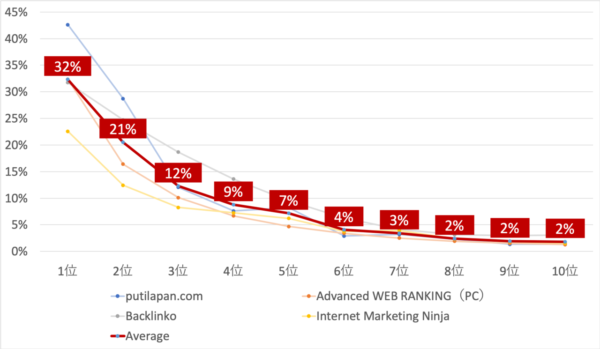
As you can see,Just the top 1–365%It's getting a lot of clicks.
In other words, simply by not ranking in the top 1–3 spots, you’re already missing out on more than half of the users who searched for that term.
That’s a huge missed opportunity, isn’t it?
There's a difference between appearing in 1st place and appearing in 10th place,A 16-fold differencethere isThat's why.
That’s why, if you’re writing an article with a specific goal in mind, ranking highly is essential.
SEO strategies are Google strategies
Also, “"SEO is all about Google"It is also said that...
What I refer to as “Google strategies” in this chapter are not so much specific tactics as they are ways of thinking that you should be aware of if you’re doing SEO.
I’ll explain this here in simple terms, but
If you'd like to learn more,
「Google's 10 Principles」
You might want to give it a read.
Google and Yahoo! hold a 90% market share
Please take a look at this graph.
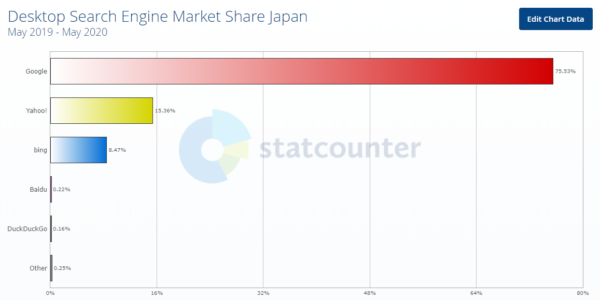
Quote: Desktop Search Engine Market Share in Japan | StatCounter Global Stats
This graph shows which search engines are used on PCs in Japan, and as you can see,Google at 75.53%、Yahoo! at 15.36%That's it.
In other wordsGoogle and Yahoo! combined90.92%。
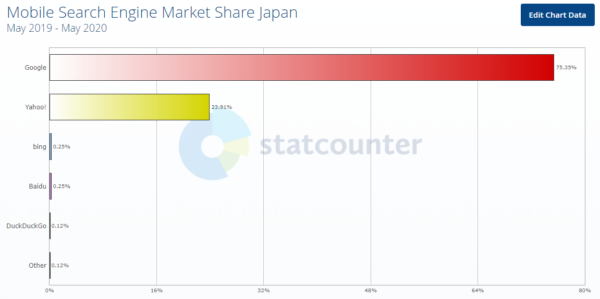
Quote:Mobile Search Engine Market Share in Japan | StatCounter Global Stats
This graph is about smartphones (in Japan), but here as well,Google at 75.35%、Yahoo! at 23.91%And that brings us to89.26%So, whether I look at my PC or my smartphone,90% on Google and Yahoo!accounts for.
Since Bing accounts for just under 10% of traffic on PCs, if you want to increase your traffic even slightly, you should implement Google SEO strategies while keeping Bing’s trends in mind.
Yahoo! uses Google's search system.
Yahoo! has also been using Google's search algorithm since 2011.
In other words90% of users use a search engine that utilizes Google's algorithmThat's the point.
Therefore, if you can master Google, you can master SEO.
The Three Pillars of SEO
There are three main methods of SEO:
・Internal Measures
・Off-page SEO
・Improve the quality of content
Internal Measures
What Are On-Page Optimization Measures?"Organize the site's information so that it is accurately conveyed to Google"That's what it means.
Google has “Googlebot” There is a search engine crawler that uses information such as a site’s XML sitemap and links to create an index, which is then used to generate a score. The ranking of search results is determined by taking this score into account along with the relevance to keywords.
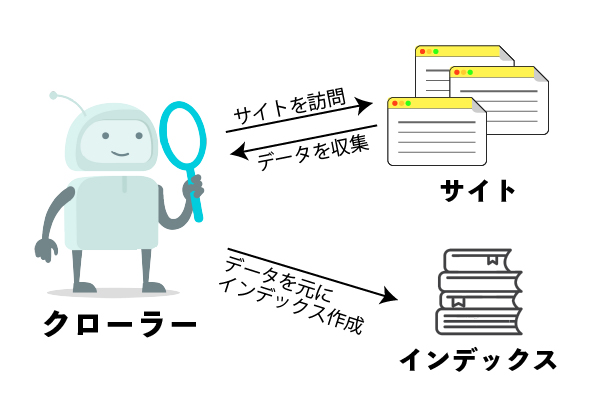
In other words, unless your site is designed to be easily crawled, it won’t rank highly no matter how good your content is.
External Measures
Next,"External Measures"That's right. Google also places importance on credibility and relevance as perceived by third parties.
So, how are they determined?"The number and quality of links to your site posted on external sites (backlinks)"That's it.
A large number of backlinks essentially means that “the information on that site is well-received,” right?
However, that doesn't mean you should just increase the number of backlinks indiscriminately.
Until a few years ago, the number of backlinks was the only factor that mattered, but this led to a proliferation of SEO tactics that focused solely on building backlinks.
As a result, the algorithm was updated so that if the site receiving the backlink is of high quality, the site to which the link points is also deemed to be of high quality.
Improving Content Quality
The last one is"Improving Content Quality"That is the point.
As I mentioned briefly a moment ago,Google puts user convenience first.
In other words, it is important that the content be easy for users to understand and provide firsthand information (i.e., information that is up-to-date and accurate).
ThisBased on primary sourcesThat is to say,「It has originality」You could say that, too.
For this reason, websites that simply copy information from various other sites are considered to be of low quality.
Even if you use it as a reference, be sure to rewrite it in your own words.
Essential On-Page Optimization Steps

As mentioned above, internal measures include..."Optimize your site's internal structure so that crawlers can properly access the site's information."That is the point.
There are two main types of on-page optimization: “settings you should configure on your site” and “elements you should include in your articles.” In this article, we’ll introduce seven essential practices from among these.
However, among those measures,Many of them require knowledge of the HTML that makes up the site.That's it.
When running a website, having even a little knowledge of HTML makes it easier to customize the site to implement the features needed for SEO.
So, even if you just go through the beginner-level courses, you should get a basic understanding of how to use HTML on programming sites like Progate and Dotinstall.
I recommend it because you can learn the basics even with the free version.
① Configuring the XML Sitemap
First, let's create an XML sitemap.
To begin withSite MapThis refers to a page that consolidates information into a single location to make the site's structure easier to understand.
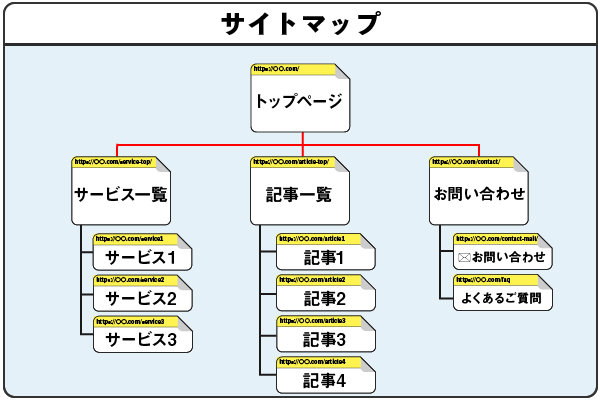
And features designed specifically to enhance user convenience include"HTML Sitemap"That's what they say.
In contrast,"XML Sitemap"It contains information such as the URL, category, and last updated date for each page, andDesigned to convey information more effectively to search engine crawlersThat's it.
While search engines will crawl your site based on the HTML sitemap alone, if you have an XML sitemap, they’ll use that as a reference when crawling your pages as well.
However, creating an XML sitemap yourself and submitting it every time you add a new page is quite a hassle.
If you're using WordPress, there are plugins that automatically generate XML sitemaps and submit them regularly—they're easy to set up, so I highly recommend them!
② Implement a breadcrumb trail (limit it to three levels)
Breadcrumb TrailThis is a clear indication of which level you are currently on.
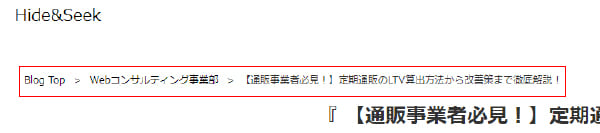
One benefit for users is that when they enter the site from a page other than the homepage (such as an article),You can visually see where you are right now.。
That’s why it’s really convenient—when you want to read another article in the same category, for example, you can just go to the page one level up.
SimilarlyFrom the crawler's perspective, it is possible to determine which pages a specific page is linked to and whether it is higher or lower in the hierarchy.So,Benefits for SEO as wellThat's it.
On free blogging sites like Hatena Blog, breadcrumb navigation is often enabled by default.
However, depending on the theme you're using in WordPress, the breadcrumb trail may not be enabled by default. In that case, please install a plugin to set up the breadcrumb trail.
③ Be sure to include keywords in your heading tags
Be sure to includeKeywords I want to rank highly forLet's add that.
Heading tags are
<h1></h1>,<h2></h2>,<h3></h3>
These are HTML tags, and you must include the keywords you want to rank highly for within the sections enclosed by these tags.
After all, from the perspective of users who are searching, if keywords aren't included in the title or headings,"Does this site really have the information I'm looking for?"You might be wondering, right?
Be sure to include keywords so that users don’t think, “This site doesn’t have what I’m looking for.”
Google's crawlers also evaluate pages based on their relevance to keywords, soKeywords are required in heading tagsThat's it.
④ Always use the “blockquote tag” for quotes.
When you're writing content, there are times when you want to quote something from another site, right?
At that time, be sure to include the quoted section
Quoted section
Let's enclose it in .
<blockquoteの書き方>

This is what it will look like when displayed on the site.

If I had quoted it without using this tag,Search engine crawlers will mistake it for duplicate content, which will lower your ranking.
"blockquote tag"Using this tells search engine crawlers, “This is a quote.”
When writing a post on WordPress or Hatena Blog, you’ll probably notice that the editor screen has a “Quote” button by default, as circled in red in the image below.
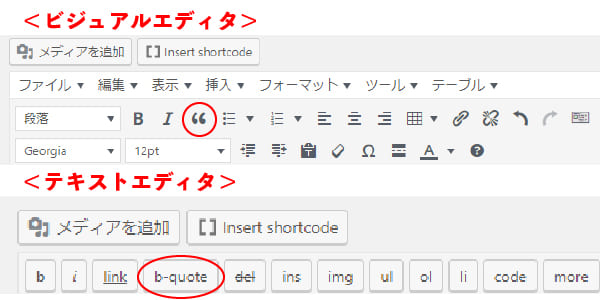
If you use this to create a citation, you can’t go wrong, but if you’re running your site using a tool other than WordPress, you’ll need to manually wrap the cited text in
tags using a text editor.
In addition,To avoid legal violations, clearly indicate that it is a quotation, for example, in the lower-right corner of the quoted textLet's do it.
There may be times when you want to quote an image, but in those cases, you generally don’t use the “blockquote tag.”
(The graph at the top of the page is used as an example of how to cite a source.)
It's enough to simply make it clear that the image is a reproduction.
However, you must not present it as original content.
⑤ Optimizing Internal and External Links
First, as a review...
Internal links are
"Links to other pages on the same site"で
External links are
"Links to External Sites"
refers to this. (Strictly speaking, “external links” are called “outbound links.”)
Specifically, here’s what you should do to optimize internal links:"Do not use phrases such as 'this article' or 'from this article' in anchor text."That is the point.
For example,
① If you want to know what anchor text means,Here
②The Meaning of Anchor TextCheck
If you wrote ①, please correct it to ②.
The reason is that crawlers evaluate the relevance of a page based on the links it contains.That's it.
Since there is no connection between the word “here” and the term “anchor text,” make sure the text you use for the link clearly describes the page it links to.
Here are two things to keep in mind when optimizing external links:
・Are there any broken links?
・Whether the linked site has been penalized
In other words, the quality of the linked sites is also being evaluated.
By the way, if you use a link checker, you can use a single URL to check whether any of the links on all the pages of that site are broken.
⑥ Don't give images arbitrary names
Instead of using simple names like “1.jpg” or “a.png” for your images,Choose a name that's relevant to the article.。
Since Google Image Search is said to use the names attached to images as a ranking factor, setting high-volume keywords for image search should increase traffic from that source.
Also, in the image, “alt attribute” Let's add that.
“The ”alt attribute” is a kind of descriptive text added to an image, andDisplayed instead of an image when a user has set their browser to not display imagesThat's how it is.
Additionally, if an image is an “image link” that takes you to a linked page when clicked, and the image does not display, the link will instead use the text specified in the “alt attribute” as the anchor text.
⑦ “robots.txt” and “noindex” for When You Don’t Want Your Site Crawled”
First of all, there is a limit to the number of pages that can be crawled for a single domain.
ThereforeLimit crawling of pages that aren't very importantTherefore, we need to improve the efficiency of the crawl.That's it.
For example"404 Error Page"や"Deleted Pages (410)"These are examples of pages you wouldn't want crawled.
That’s when you’ll need “robots.txt” and “noindex,” but there are differences between them, so you need to use them appropriately.
First, while “robots.txt” can be used to prevent certain pages from being crawled or to indicate the location of a sitemap.xml file to encourage crawling, “noindex” is used to prevent specific pages from being indexed.
In other wordsThe former simply communicates crawl priorities to measure crawl efficiency.So, while all pages appear in the search results,Since the latter is not indexed, it will no longer appear in search results.。
By the way, “noindex” should be added to the HTML header of pages you don’t want to be crawled or displayed in search results.
<meta name=”robots” content=”noindex”>
If you add this, it will no longer be indexed.
If you don't want "googlebot"—Google's web crawler—to index your site,
<meta name=”googelbot” content=”noindex”>
Let's write it like this.
“If you want to use ”robots.txt,” there’s a plugin available for WordPress, so please use that.
Essential Steps for Off-Page SEO
As mentioned above, external measures include..."The quality and quantity of backlinks" are importantThat's it.
In the past, the number of backlinks was the only thing that mattered, so it was easy to climb to the top of search results simply by mass-producing links on low-quality satellite sites or obtaining large numbers of backlinks from link-building services.
However, if you do that now, you’ll be penalized by Google and won’t rank as highly anymore, so be careful.
And if you're considering a satellite site, please make sure to develop it thoroughly and improve its quality.
So, what are the most important things you should definitely do when it comes to the latest off-page SEO strategies?
Here are the three points:
・Adding social media buttons
・Manage social media accounts and post links
・Check backlinks in Search Console
⑧ Adding Social Media Buttons
The first one is “adding social media buttons.”
Social buttons are the social media icons that you often see at the top or bottom of a website.

These days, there are so many social media platforms—like Twitter and Facebook—that make it easy to communicate with others online, aren’t there?
In addition, these social media platforms have made it easier to spread information.
If an article or the website itself looks like it might go viral, it’s important to set up the site so that users can share the page immediately.
By the way, since some people seem to misunderstand this, I’ll just say that social media buttons are meant for sharing, soThe link leads to a social media post pageis set to.
It doesn't link to your website or your own social media profiles.
However, it’s not necessarily the case that you have to link to your social media profile, so in a sense, you’re free to do as you please.
⑨Manage social media accounts and post links
AlsoIt's also effective to manage your own social media accounts and post links to your site.That's it.
The higher the quality of your content, the more likely it is that your post—complete with a link—will spark interest and get shared by a wide range of people.
What’s more, social media is free. There’s no reason not to take advantage of it, since it allows you to reach a large number of strangers—who could become potential customers—without spending a dime on advertising.
Be sure to put this into practice.
⑩Check backlinks in Search Console
Google Search Console This allows you to see which pages have backlinks.
If you can use that to figure out what genres and types of content tend to attract backlinks, you can use that information as a reference to predict and create content that’s likely to attract backlinks, right?
Since it can also help with content creation, be sure to take advantage of it.
In this article,BacklinksWe provide a detailed explanation of this topic.
Pursuing Content
So far, I’ve discussed the specifics of on-page and off-page SEO, but what’s even more important than that is"High-Quality Content"That's it.
So, what kind of website can be considered “high-quality”?
But first, let’s take a look at what kinds of sites are considered “low-quality.”
Low-quality websitesMeaning
・A aggregation site that simply pulls content from other sites
・Sites that have copied and pasted text from other sites
・Websites with outdated information
・Websites that lack accuracy
applies.
If this doesn't apply to you, the likelihood of receiving a penalty from Google is extremely low.
To put it another way,The opposite of this is a “high-quality site.”That’s how it works.
Enhance Expertise
The more specialized a website is, the more likely its pages are to rank higher in search results.。
This is because the more articles you write that focus on a single topic, the more keywords related to that topic you’ll have, and Google will recognize your site as an authority on the subject, making it more likely to rank higher in search results.
However, there is a possibility that even general-interest blogs could rank highly.
That’s when a specific category of posts on a general-interest blog stands out.
Ultimately, no matter which way you look at it, the more specialized the better, so,When creating content, be sure to focus on your area of expertise.。
Rewriting Old Pages
Information becomes outdated over time.
No matter how specialized an article was when it was written, that information will eventually become outdated as time passes and new facts are discovered or existing ones are updated, right?
To begin withPeople are looking for the latest information.。
If you feel the information in an article is outdated, be sure to rewrite it and update the content as needed.
Delete Low-Quality Pages
"Low-Quality Pages"This refers to a page that has had very few visitors even though it has been online for some time.
If such a page exists, take the following steps.
・If you think the page is still needed, add text or rewrite it.
・If you decide you no longer need 100%, delete it from the site.
・If you can't remove it from the site, add “noindex” to the header to remove it from the index
In any caseIt is important to prevent crawlers from indexing low-quality pages.That's it.
Essential Tools for SEO
As many of you probably already know, I’d like to introduce a tool that’s essential for SEO.
Keyword Planner
"Keyword Planner"It is a tool that allows you to check how often a keyword is searched for on Google over the course of a month.
Since this tool was originally designed for placing search-based ads on Google, you cannot use it unless you sign up for Google Ads.
By the way, this is the Keyword Planner screen.
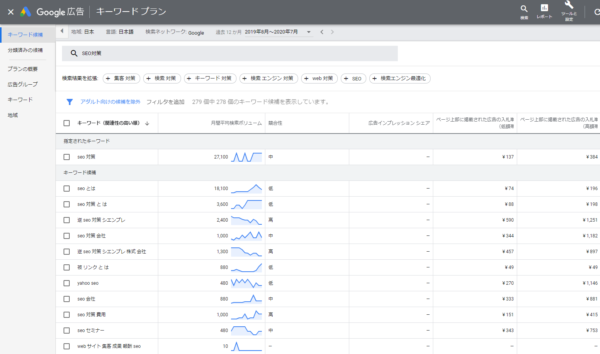
Since we actually run Google Ads campaigns through this account, we can take a detailed look at the monthly search volume figures.
However, if you haven't submitted any ads, the functionality is limited, and you'll only be able to see an approximate volume.
<無料の場合>
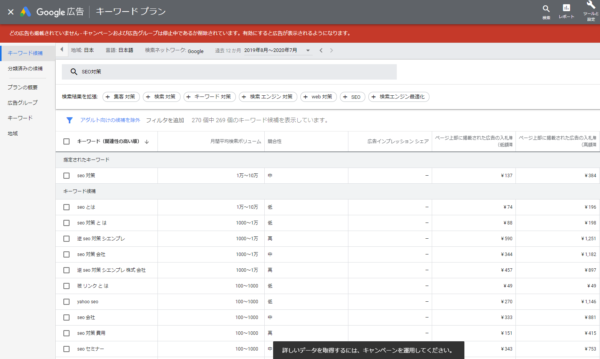
You'll need to make a payment when submitting an ad, but once you do, the restrictions will be lifted and you'll be able to view the metrics in greater detail.
Raccoon Keywords
Raccoon KeywordsThis tool suggests "suggested keywords" for the keywords you want to rank highly for.
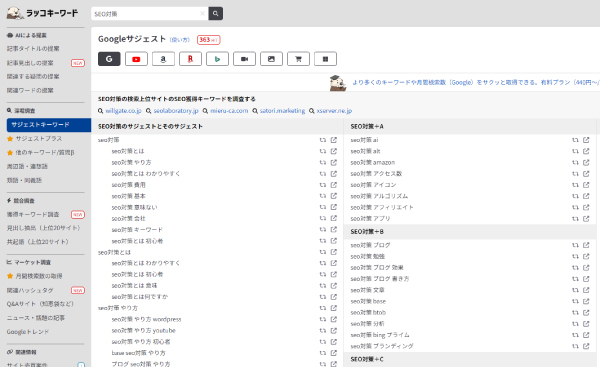
Suggested keywords are keywords that are frequently searched for in conjunction with the term you enter in the search bar. By incorporating them into your articles, you can expect to attract traffic from multiple keywords.
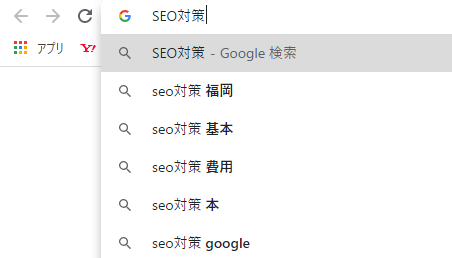
It’s said that you should sprinkle your top 10 keywords throughout your article, so please be sure to take advantage of this tip.
Google Analytics 4
Google Analytics It is an analytics tool that automatically collects data such as website traffic and user information.
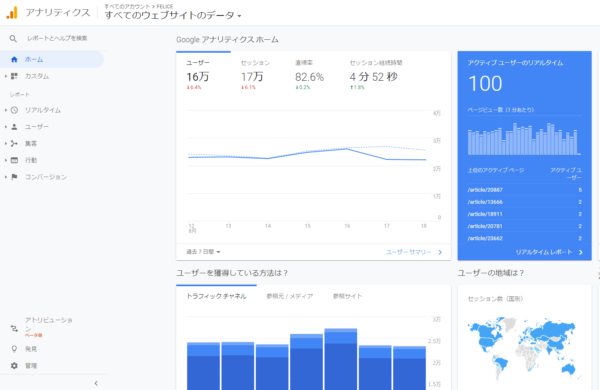
Since you can see metrics like bounce rate and time on page, it’s very helpful when creating content.
You can also set up conversion tracking, which will let you see things like “how many inquiries or purchases came from which pages.”
Google Search Console
Google Search Console This tool lets you know which keywords users searched for to find your page.
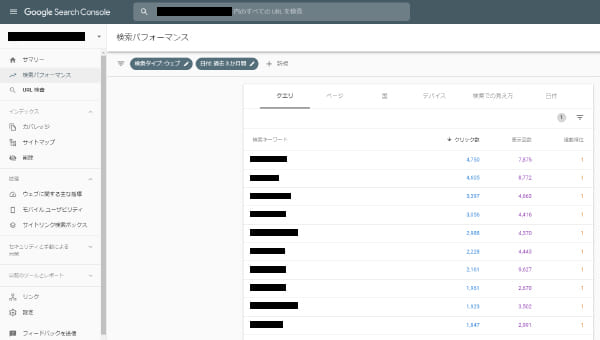
Since it shows which keywords are driving traffic and ranking highly, it’s often used when rewriting titles and content.
Also, as mentioned above, since you can see which pages have the most backlinks, there’s no one who doesn’t use this for SEO.
These four tools are essential for SEO.
Many of these require registration, so be sure to register so you can use them.
Summary
Since Google is constantly rolling out updates, the tasks involved in SEO are constantly changing.
However, when it comes to SEO, the fundamental principle of “providing high-quality content to users” will likely remain unchanged.
The SEO strategies we’ve covered here are the absolute basics, so make sure you’ve completed these basic settings first, and then focus on creating high-quality content.
In this article, we’ll show you how to effectively select keywords for SEO and how to place them in your content.
Thank you for reading to the end!