
When it comes to e-commerce marketplaces, the three major ones are Rakuten, Amazon, and Yahoo! Shopping.
In this article, we’ll focus on the benefits of opening a store on Rakuten and
We’ll provide a thorough explanation of the drawbacks and—most importantly—the costs.
If you're thinking about opening a store on Rakuten,
Be sure to read this!
Benefits of Opening a Store on Rakuten
First, let’s take a look at the pros and cons of opening a store on Rakuten.
Please use this as one criterion for determining whether your company’s products and business direction are a good fit for Rakuten.
Explosive ability to attract customers
Rakuten has 39 million monthly active users (April 2022)
This means that about one in four people in Japan shops on Rakuten.
The fact that there is already a large customer base is probably the biggest advantage of opening a store on Rakuten.
*Source:https://qr.paps.jp/Uycvo
Rakuten has its own unique system for driving sales
Rakuten offers a points program, as well as the Shopping Marathon, which is held twice a month,
Rakuten has its own unique sales strategies, such as the Super Sale, which is held four times a year.
Therefore,Another feature of Rakuten is that it makes it easy to devise strategies for “selling as much as possible when sales are strong.”
The pages offer a high degree of flexibility, making it easy to prioritize branding
"I want to open a store on an e-commerce marketplace, but I don't want to compromise my brand's image..."
For people like that, Rakuten is our top recommendation.
Compared to other online malls, the homepage and product pages,
Because CRM offers significantly greater flexibility, it allows you to expand your sales channels without compromising your brand image.
Therefore,Another advantage of Rakuten is that it makes it easier to turn customers into loyal fans.
▼Click here for an article comparing Amazon, Rakuten, and Yahoo! Shopping
Disadvantages of Opening a Store on Rakuten
The usage fees are high
The monthly fee is a little higher than at other online marketplaces.
Regarding costs,4. Costs Associated with Setting Up and Operating a StoreI'll explain this in more detail later.
Opening and running a store is time-consuming
While the pages offer a high degree of flexibility, creating them can be time-consuming, or
Preparing for monthly events isAnother characteristic of Rakuten is that it requires certain steps and involves a fair amount of administrative work.
However, since creating high-quality web pages and participating in events are key to increasing sales,
It’s worth investing a lot of resources here, even if it takes some effort.
Rakuten has its own rules regarding sales methods, advertising, and data collection.
Rakuten has its own set of rules.
Just as Amazon has its own set of rules, this is a drawback common to all online marketplaces.
In the case of Rakuten, examples include the cost of funding the points awarded to customers.
Also,Since customer information is managed by the mall, the users' age groups and gender ratios,
Another characteristic of e-commerce marketplaces as a whole is that it is difficult to analyze traffic sources and other factors.
Steps to Opening a Store
From here on, we’ll explain what you need to do to actually open a store on Rakuten.
Looking ahead,The information is current as of January 2025.
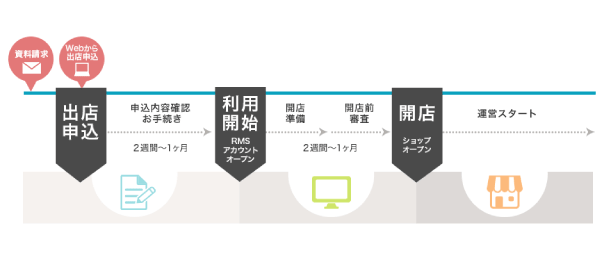
*Source: Steps for Opening a Store on Rakuten Ichiba
https://www.rakuten.co.jp/ec/open/?l-id=PC_common_navi_to_open
Vendor Application
To apply to open a store, you must enter the required information into Rakuten's application form,
You will be required to submit official documents, such as the registry.
It usually takes two weeks to one month for an application to be approved.That's it.
Setting Up a Store After Passing the Review
If you pass the screening,Store RMS(Rakuten Merchant Server) will be set up.
RMS is the admin panel for Rakuten stores.
If you pass the screening, it will take anywhere from two weeks to three months
Let's start setting up the store in preparation for the open review.
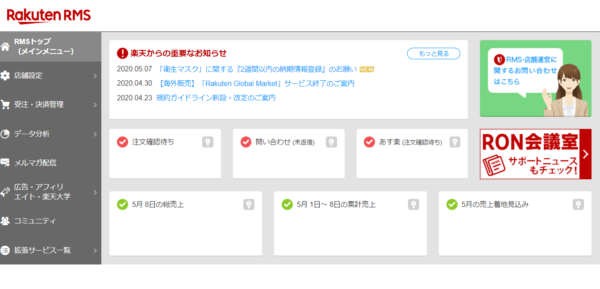
Here, regarding passing the open review,
11 Steps You Must TakeI'll explain this in detail.
[1] Request for Open Review
Requests for open reviews are submitted within RMS.
Since the review process does not begin immediately after the request is submitted, you must submit your request while the store is still under construction.
[2] Taking the Store Rules Certification Exam
Passing the certification exam (with a score of 80 or higher) is required before the open review.
Estimated completion time: about 15 minutes; you can take the course as many times as you like each day.Yes, that's possible.
[3] Account Registration
You need to register two accounts.
The first is the bank account for receiving transfers from Rakuten. After opening the account,
In order for sales proceeds to be deposited into the store's account from Rakuten,Set up your account.
Please note the following rules regarding account names.
・Corporate Account: An account in the name of the contracting company
・Individual Contract: An account in the representative’s personal name (accounts registered solely under a trade name cannot be registered)
Second, the account set up for automatic transfers to Rakuten.
You must set up a Rakuten Bank account to receive payments after the initial setup fee.
While you're at it, be sure to transfer the initial booth setup fee as well.
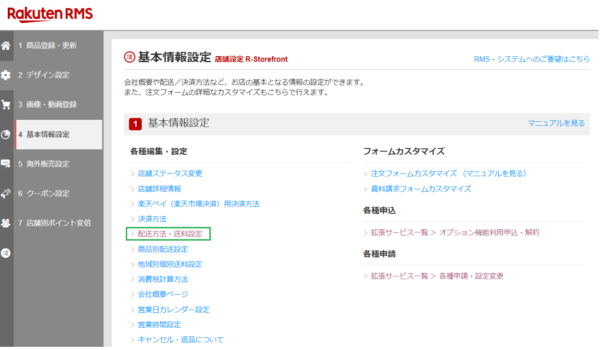
[4] Shipping Settings
You need to configure settings related to shipping, such as shipping methods, shipping fees, the shipping rate table, delivery times, and the notes field.
Also,Unless you add it as an option,
Since Rakuten does not handle shipping operations, we need to arrange our own logistics.
Rakuten Super Logistics※When using,
Since it may take some time to secure one,Let's get everything ready as soon as possible.
*An optional service where Rakuten handles shipping and inventory management
RMS Main Menu > Store Settings > 4. Basic Information Settings > Shipping Methods and Shipping Rates
[5] Product Registration
First, we'll create the product images that appear when customers search for products.
Per itemAt least three product images are required.
Once the image is ready, please register the following items.
(1) Product Name
(2) Selling Price
(3) Inventory Type
(4) Inventory Level
(5) Product Descriptions for PCs
(6) Product Descriptions for Smartphones
(7) Product Images
(8) Product Description for PC
(9) Directory ID
(10) Catalog ID
Also, the products we’d most like to promote at this time areLet's register it as a "featured product."
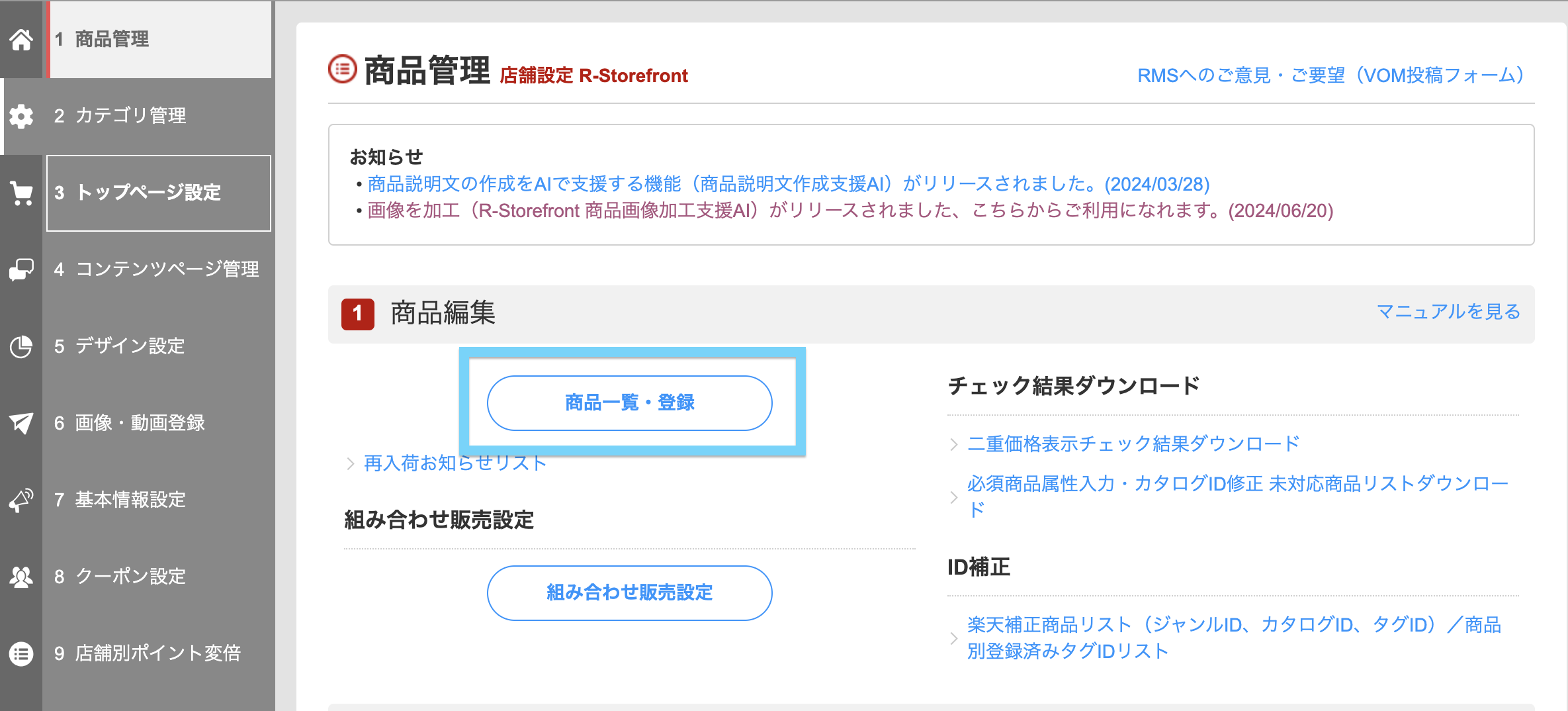
For more information on product registration, please read this.
RMS Main Menu > Store Settings > 1. Product Management > Product List/Registration > Register New Product
[6] Creating Category Pages
This page serves as a showcase for our products.
Since this is a page that customers frequently visit,Be sure to register.
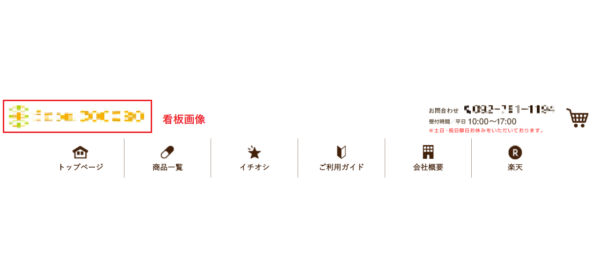
[7] Creating Sign Images
We'll create a sign image that serves as the face of the store.
This can be easily created using a template within RMSYes, that's possible.
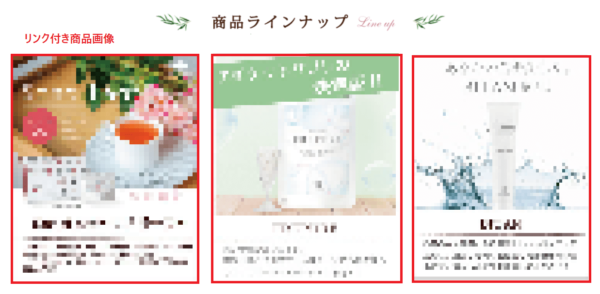
[8] Configuring Product Images with Links
You need to set up a product image with a link on the homepage.
For product images that are 700px wide,"Product Page"
Alternatively, set it up by adding a link to the "Category Page."
It is best to select the product you want to promote the most.
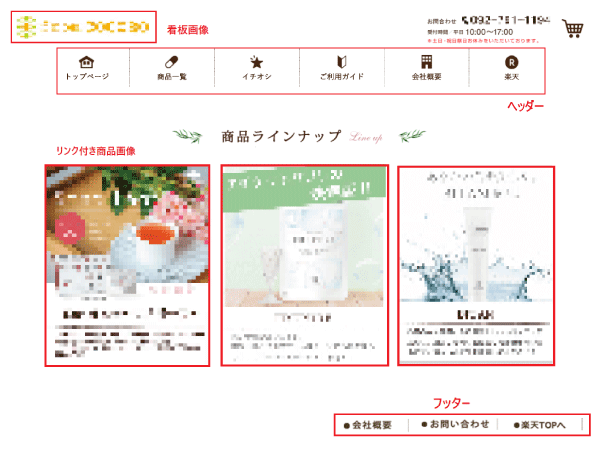
[9] Navigation Settings
The header and left navigation bar on the store's homepage,Set up the footer.
■Header
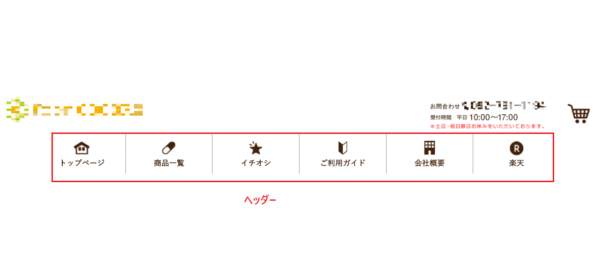
The header navigation bar displayed at the very top of the homepage includes:
(1) Store Home Page
(2) Company Overview
(3) Payment, Shipping, and Returns
(4) Shopping Cart
(5) Rakuten Home Page
The navigation buttons listed above are required. Be sure to include all of them.
■Left Navi
The left navigation bar displayed on the left side of the TOP page is,
In order from top to bottom: "Search Bar," "Categories," and "Calendar"
We recommend that you configure this setting.
■Footer
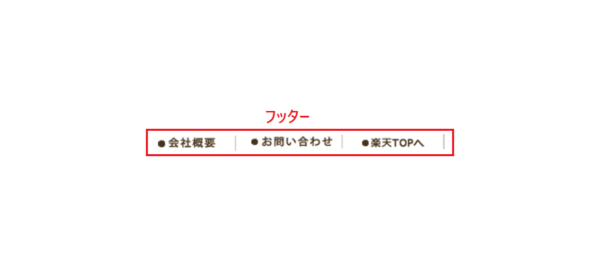
The footer displayed at the very bottom of the TOP page contains
"Business Hours," "Contact Information," "Payment Methods," and "Shipping Methods" are required.
Once all the settings are complete, the home page will be finished.
[10] Smartphone Page Settings
There are three things you need to set up on your smartphone.
(1) Smartphone-Compatible Signage
(2) Registering Featured Products for Smartphones
(3) Original Generic Banner
Since many purchases on Rakuten are made via smartphones, optimizing the mobile site is a must.
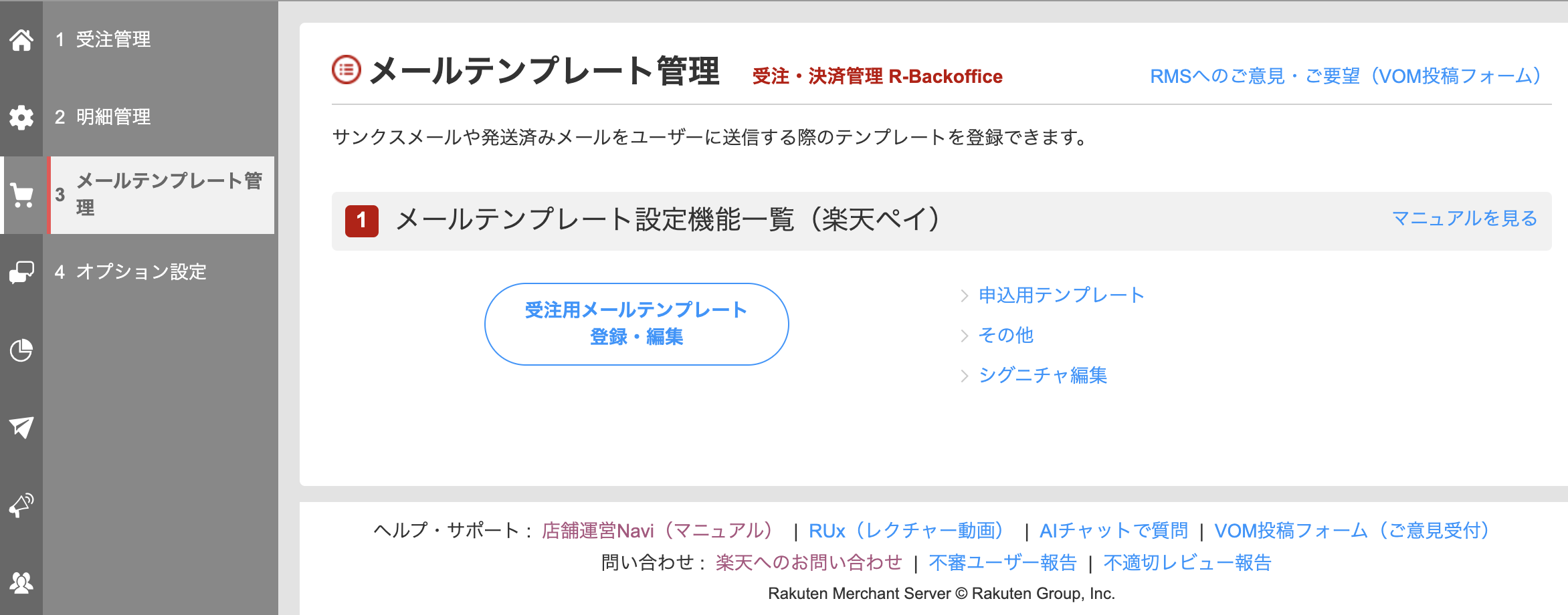
[11] Preparing a Thank-You Email
Let's create a template for the thank-you email we'll send to users when they place an order after we launch.
RMS Main Menu > Order and Payment Management > 4. Email Template Management > Register/Edit Order Email Templates
I’ve gone over the general process of opening a store, but,
I bet a lot of you are thinking, “That’s going to take a lot of time and effort…”
Actually, in order to pass the open screening,There are restrictions on the homepage, or
There are certain requirements, such as the need to create a flagship product.
As a result, the reality is that there isn’t much flexibility with the page at the time the store opens.
Once you pass the review, you'll be able to create pages with a certain degree of freedom, so
You don't need to worry about making your store perfect by the time of the open review.。
Anyway, let's focus on setting up our store so that it passes Rakuten's review process.
It's not that difficult if you use the templates in RMS.
Costs Associated with Setting Up and Operating a Store
I mentioned that “high costs” are a drawback of opening a store on Rakuten.
So, how much does it actually cost to open and operate a store on Rakuten?
Here is an explanation of the costs you may be wondering about.
First, there are three plans available for opening a store on Rakuten.
Monthly costs vary depending on the plan, so be sure to consider this carefully when applying to open a store.
■Initial Costs
The initial costs are the same regardless of the planA flat rate of 60,000 yenThat's it.
■Monthly Expenses
Since the monthly costs vary by plan, I’ll start by explaining the four plans.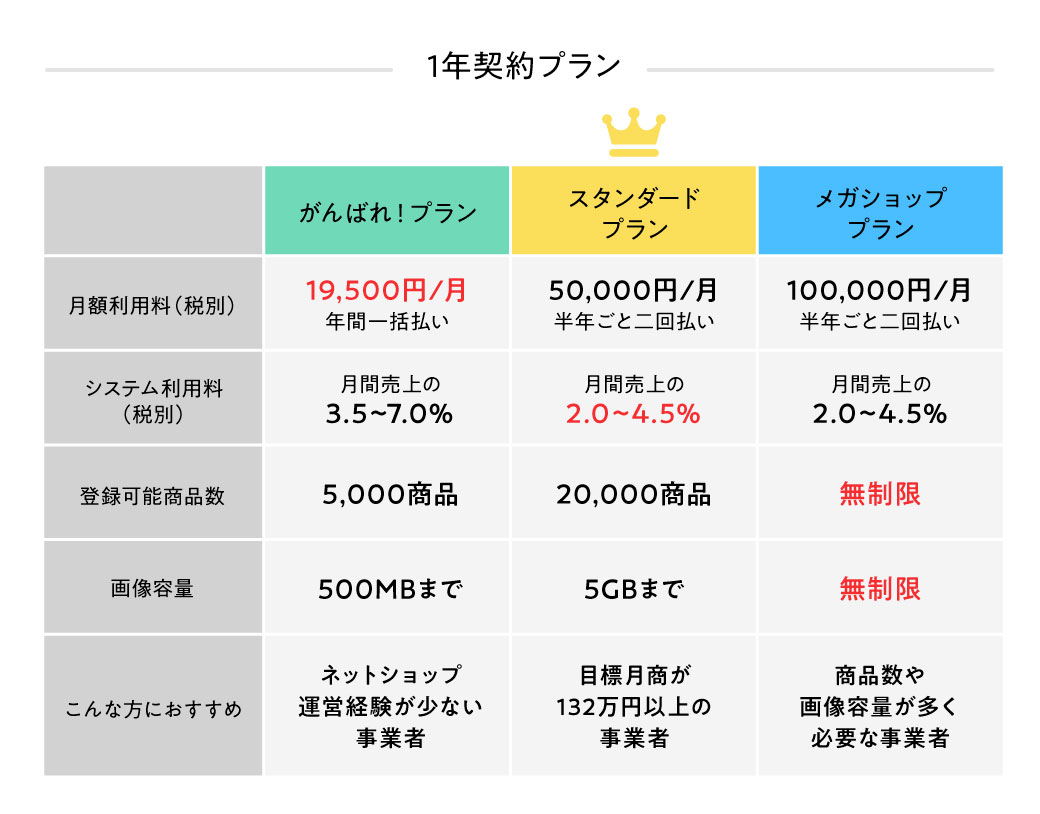
Allows for low-cost store operationsThe “Standard Plan” is the most popularThat's it.
Next, I’ll explain the additional costs that apply on top of the monthly service fee.
System Usage Fee
These are fees incurred as royalties based on sales on Rakuten.
For example, if the system usage fee is 5%,
In months when in-store sales total 10 million yen, a system usage fee of 500,000 yen will be charged.
Since system usage fees vary depending on the plan and purchase method (whether from a PC or a smartphone),
It's important to take all of that into account when choosing a plan.
Rakuten Super Points Fund
Customers who shop on Rakuten will automatically earn at least 1x points.
Therefore,Stores are required to pay Rakuten an amount equal to 0.01 yen multiplied by their monthly sales as a source of points.
Since one of the main reasons for Rakuten's popularity is its points system,
I'll give this one a pass, tooThis is a non-refundable service fee.
During events, there are a lot of Rakuten-funded points available, so
FewYou can create a sense of value using your own funds.
System Usage Fees to Improve Safety and Convenience
Fees related to Rakuten's security and improvements to user services.
Monthly sales ofSince the rate is only 0.1%, you don't need to worry about it too much.
Rakuten Super Affiliate Service Fees
Regarding sales generated through affiliate programs,
To Affiliates and RakutenIn return, we will pay the usage fee.
Performance-based commissions paid to affiliates depend on the product category,
Since the fees paid to Rakuten vary depending on affiliate sales,
Let's make sure to check this thoroughly.
Rakuten Pay Fees
This is a service that all stores operating on Rakuten must set up.
This is the fee paid to Rakuten for handling payment-related operations on our behalf.
R-Messe
A service that enables smooth communication between users and stores.
Depending on the plan, the monthly fee varies between 3,000 yen and 5,000 yen, but there is currently a free trial period.
For example…
Company A started selling three cosmetic products using the Standard Plan.
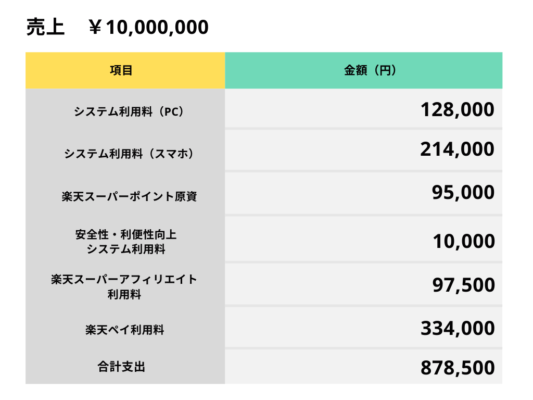
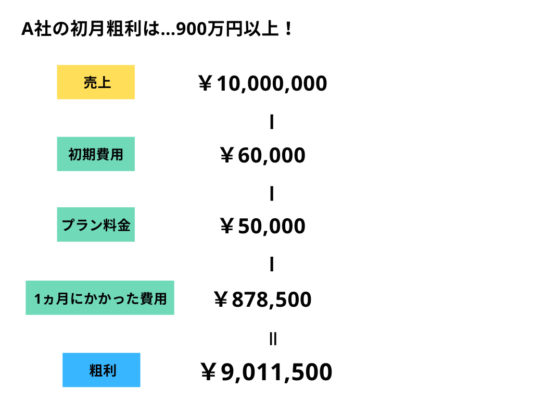
*Using the monthly payment calculator:https://www.rakuten.co.jp/ec/plan/cost_detail/
Rakuten's store setup fees are often perceived as being very high, but
If you take a close look at the benefits and profits of opening a store, you’ll see that it’s not necessarily always the case.
Also,
・R-SNS: Connecting Rakuten and Social Media
・You can register or modify products in bulkCSV functionality, etc.
Since some services can be added as paid options,
When your store starts to grow, it's time to think about it.
*Note: Details on Services and Fees:https://www.rakuten.co.jp/ec/plan/cost_detail/
▼ Try calculating it using Rakuten's official simulator
https://www.rakuten.co.jp/ec/plan/cost_simulation/?l-id=PC_plan_table_to_cost_simulation
▼If you're thinking about selling on Amazon, be sure to check out this article as well!
Points to Note When Opening a Store on Rakuten
We’ve covered everything from the pros and cons of opening a store on Rakuten to the process and costs involved.
When opening a store on Rakuten,Two Important Points You Must KnowYes, there is!
Finally, here is an explanation of those two points.
Resellers are already selling them at low prices
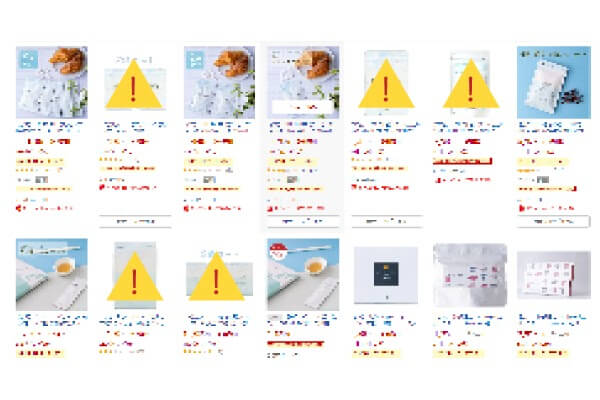
The image above shows search results for a certain health food.
Items marked with a yellow icon are being listed by resellers.
As you can see, there are many resellers on Rakuten.
Since they are almost always sold at low prices,
Unless resellers take down their listings, our official sales figures won't increase anytime soon.
You cannot specify an e-commerce consultant
When you open a store on Rakuten, you’ll be assigned a Rakuten consultant to serve as your store representative.
However, thisSince you can't choose your consultant, people often say it's "a matter of luck."
To commit to sales targets, CRM, branding, and
Another option is to bring in a consultant who is well-versed in Rakuten strategies through a different channel.
Summary
Did you get the hang of the basics of opening a store on Rakuten?
Although Rakuten presents high barriers to entry in terms of its unique rules and fees,
It is an attractive market that offers the potential for significant customer growth while allowing you to maintain your company’s brand identity.
Hide&Seek, the author of this blog, is,
We are a Fukuoka-based company that provides management services for Amazon, Rakuten, and Yahoo! Shopping.
"I want to open a store on an e-commerce marketplace, but I don't have the resources to spare."
"We want to expand our sales channels while maintaining the competitive edge of our own online mall."
"I opened a store on an e-commerce marketplace, but I haven't had time to...""We can't increase sales without him."
If you have any concerns like these, please feel free to contact us using the contact form below.
Thank you for reading to the end!


アイキャッチnew.jpg)