
For those who are just getting started with ad management or want to learn about the latest GDN (Google Display Network) specifications,
In this article, we’ll provide a detailed explanation of the GDN’s overview and features, as well as a comparison with YDA (Yahoo! Display Ad Network).
This article provides useful information for the following types of readers:
- Those Who Have Joined a Web Advertising Agency
- Those who have been assigned to manage their company's advertising campaigns
- A beginner who has just started learning about ad management
- For those who want the latest information on GDN
The content is designed to be easy to understand, even for beginners, so please feel free to use it as a reference.
What is GDN?
GDN (Google Display Network)This refers to the display ad network provided by Google.
This refers to a system that enables the delivery of ads to various media sites, YouTube, Gmail, apps, and other platforms.
As shown in the figure below, we can accept ad placements from many advertisers and deliver those ads simultaneously to multiple ad slots.
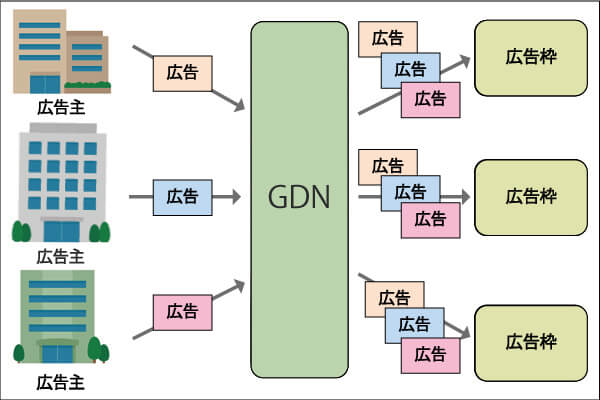
By using the GDN, you can deliver ads in the following ways:
- Wide-Reaching Ad Delivery: We place ads on a wide variety of sites that partner with Google.
- Targeting Tailored to Users: Allows for targeting based on hobbies, interests, and purchasing intent.
- A wide range of ad formats: text ads, image ads, video ads, responsive ads, and more.
In this post, I’ll explain the GDN in detail, but to help you better understand it,I’d like to explain this while comparing it to YDA (formerly YDN).I think so.
The Difference Between GDN and YDA
Differences in Publication Channels
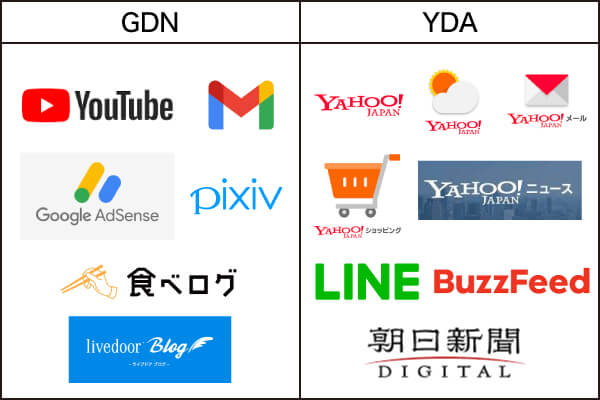
1. Differences in Publication Venues
| GDN | YDA (formerly YDN) |
| Distributed to Google's own services (such as YouTube and Gmail) and partner sites such as Tabelog and pixiv. | Distributed to Yahoo! JAPAN, Yahoo! News, LINE, Asahi Shimbun DIGITAL, and others. |
| It is also distributed to many websites that partner with Google AdSense. | Distribution is primarily to partner sites, with a focus on Yahoo!-affiliated services. |
One of the key features of the GDN is its wide range of ad placements, regardless of a site's size.
On the other hand, YDA’s strength lies in its distribution channels centered on Yahoo!-related services.
2. Differences in Targeting Methods
There are also differences in targeting methods between GDN and YDA.
| GDN | YDA (formerly YDN) | |
| User Attributes | Age Gender Household Annual Income Whether or not you have children | Age Gender |
| Users' interests and concerns | Affinity Categories | Audience Categories |
| Users are actively searching for Information and plans we have in place | Custom Intent Audience Content Target | Content Keywords Site Categories |
| Users can help your business Methods Used | Audience List (such as remarketing and Customer Match) | Audience List (retargeting, customer lists, etc.) |
| Past Search History | Search Keywords | |
| Region | National, municipal,Jurisdiction、Radius from a specific pointetc. | Prefectures, Cities and Counties |
| Device | Mobile Computer Tablet TV screen | PC Smartphone Tablet |
*Text in red indicates a characteristic unique to one of the two.
On the GDN,Enables detailed targeting based on users' lifestyles and purchasing intentThat's it.
Meanwhile, YDATargeting Based on Past Search History...is a key feature.
GDN Targeting Features
The image below provides an overview of GDN targeting.
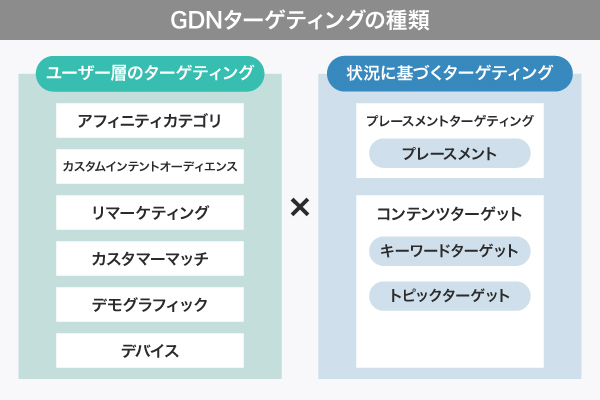
With GDN, you can combine "audience targeting" and "contextual targeting" to achieve a wide range of targeting options.
For example, you could target ”users who have visited your website within the last 30 days and have viewed ”youtube.com,’” or “women aged 55 and older who are beauty enthusiasts.”
Let's briefly explain each one.
1. Affinity Categories
We target users based on their lifestyles, hobbies, and preferences.
Examples: golf enthusiasts, business news fans, travel enthusiasts, etc.
2. Custom Intent Audiences
We serve ads on content that is highly relevant to specific keywords or URLs.
Recommended settings: 10 keywords, 5 URLs.
3. Remarketing
A feature that displays ads again to users who have visited the company's website.
By using Google Tags, you can reach people who are considering making a purchase.
If you'd like to learn more about retargeting, please check out the article below.
4. Customer Match
Upload customer data (such as email addresses and phone numbers) to Google to send messages to existing customers and similar users.
Although the volume of content distributed depends on the data uploaded, you can target only those who are likely to be highly motivated to make a purchase.
5. Placement Targeting
How to target specific ad placements. Example: Displaying ads on YouTube videos or specific websites.
So, as shown in the image below, you can select where the ad will be displayed and run the campaign, right?
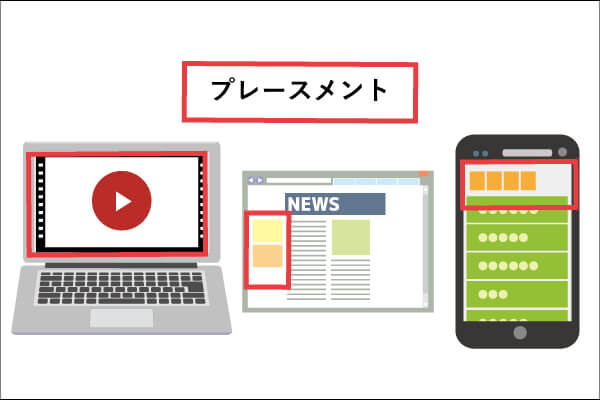
As you can see, the GDN offers a wide range of targeting options, andSince you can do all sorts of things by combining and getting creative,It's very complicated.
For this reason, the manager’s skills have a direct impact on results. If you plan to manage the investment in-house, be prepared to devote a significant amount of time to it.
Effective Ways to Use GDN
To cut to the chase,We recommend placing ads in both media as your budget allows.I will.
This is because the sites distributed vary depending on the platform.
To make as many users as possible aware of our products and servicesIt would be good to cover both GDN and YDA.
However, when the budget is limited, we must use those limited funds effectively.
In that case,First, try to think about what kinds of websites your target users are likely to visit on a regular basis.is important.

Since GDN can be featured across a wide variety of genres and on personal blogs, it’s a good fit for products related to hobbies, isn’t it?

It also depends on which demographic you're targeting.
GDN isCan be streamed to YouTube, smartphone apps, and other platformsSo,It is well-suited for content targeting people who use smartphones relatively frequently and younger audiences.That makes sense, doesn't it?
By the way, YDA isCan be distributed to news sites (such as Yahoo! News)So, office workers watching the news, or,Well-suited for reaching a relatively older demographicOne could think of it this way.
With a solid understanding of the GDN’s features,
・What kind of products do you want to advertise?
・What kind of audience do you want to reach?
With that in mind, we need to consider how much of the budget to allocate to each area.
In addition, the effectiveness of ads depends heavily on the skills of the person managing them.
Let's continuously improve our targeting settings and ad creatives to maximize results.
GDN Banner Sizes
Finally, I’d like to go over the banner sizes.
There are mainly two types of banners.

List of Banner Sizes
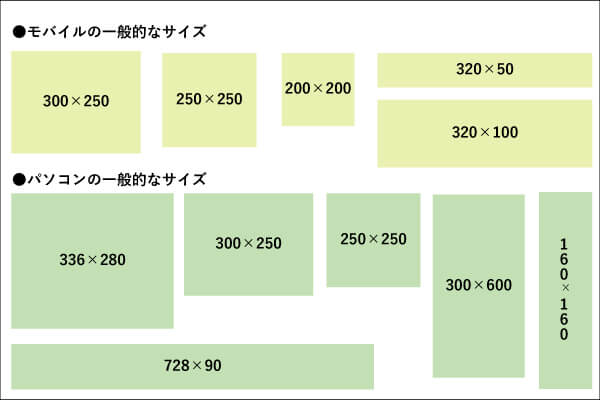
1. Image Ads (Static Images/Animations)
An image ad is an ad created using only images (banners), and
You can use still images and animated images of various sizes.
Among these, “300×250” is a responsive size that can be displayed on both mobile devices and computers.
If you're unsure about the image size, I recommend starting by creating it at this size.
■Banner Submission Guidelines
・Animations longer than 30 seconds are not permitted
・File formats are limited to "JPG, PNG, and GIF"
・Policy violations (e.g., slightly low image quality, low relevance to the landing page)
2. Responsive Ads
With responsive ads, the ad format adjusts automatically once you upload an image and text.
■Text Submission Guidelines
| Text | Character Limit |
| Ad Headlines (up to 5) | 30 half-width characters or fewer (15 full-width characters or fewer) |
| Long ad headline (only one) | 90 half-width characters or fewer (45 full-width characters or fewer) |
| Descriptions (up to 5) | 90 half-width characters or fewer (45 full-width characters or fewer) |
| Company Name | 25 half-width characters or fewer (12 full-width characters or fewer) |
■Submitting Images (Images to be included in the banner))
| Responsive Ads | |
| Horizontal | At least 600px × 314px (Aspect ratio 1.91:1) |
| Square | At least 300px × 300px (Aspect ratio 1:1) |
| Logo (optional) | At least 128px × 128px (Aspect ratio 1:1) |
| Maximum capacity | 5,120 KB |
Points to Note: For responsive ads, make sure the text in the image does not exceed 20% of the total area.
Summary
Thanks to its flexible targeting capabilities and diverse ad formats, GDN
This platform is suitable for a wide range of industries and target audiences.
At the same time, it is important to understand the distinct characteristics of each platform compared to YDA and to use them effectively based on your company’s products and objectives.
If you'd like to learn more about online advertising, please check out the following articles.
Let’s aim for more effective ad management by leveraging the GDN!