


[Benefits of Registering Variations]
Here, we'll discuss the benefits of registering variations
Let me introduce you to...
- Easy to manage
- Can aggregate reviews
- Encourage bulk purchases
- The product pages are easy to read
Benefit #1 of Registering Variations
"Easy to manage"
When I looked at the inventory management section in Amazon Seller Central,
Products with registered variations are:
Items are grouped and displayed by product.
(Hidden behind a tab)
This makes it easy to edit and review.
Benefit No. 2 of Registering Variations
"Can aggregate reviews"
By consolidating products onto a single product page,
Customer reviews for each product are
Everything can be consolidated and shared.
The more reviews there are, the higher the rating will be.
Benefit #3 of Registering Variations
"Encourages bulk purchases"
For multi-pack items, the price per item is also displayed, and
If buying in bulk is a good deal,
It can captivate users.
Benefit No. 4 of Registering Variations
"The product pages are easy to navigate."
Even if there are multiple colors and sizes,
Since everything can be consolidated onto a single product detail page,
Users can search for and compare products
You'll find it easy to do.
If a variation is registered,
Since I can't find the same T-shirt,
The search screen will also be easier to read.
Even if you overlook the color or size,
You can prevent this by registering variations!
[Variation Registration]
To register a variation,
You need to understand parent ASINs and child ASINs.
In this section, we'll discuss the parent-child relationships between ASINs, and
Here are the actual steps.
1. Parent ASIN and Child ASIN
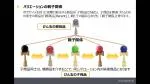
A parent ASIN is,
There is always at least one person who takes on the role of bringing the children together.
The parent product itself is not for sale, and
It is used for displaying rankings on the Amazon website, among other things.
A child ASIN refers to an ASIN that has variations in color or size
This refers to the actual products being sold.
Among child ASINs (products),
By linking it to a parent product,
It will appear as a variation on the same product page.
2. Registration Procedure
Here, we’ll briefly explain the registration process.
First, log in to Amazon Seller Central, and
We'll proceed in the order of inventory management and product registration.
Next, adding a new product, selecting a category, important information,
Variations, Listing Information, Compliance Information,
Enter the image, description, keywords, and details.
~POINT~
When registering a variation,
You do not need to enter the JAN code for important information.
〜〜〜〜〜
Next, open the "Variations" section, and
Configure the variations.
Variations mainly include color and size,
We mainly use three color and size variations.
Color map, SKU,
JAN Code/Type, Condition,
Enter the selling price and quantity in stock.
Once you've entered the type of variation,
Click "Register Variation."
This completes the variation registration.
For more information on product registration, please see the article below.
Please see below for detailed instructions on how to register variations.
▼amazonService
How to Register Variations Later
Please log in to Amazon Seller Central, and
Inventory Management and Variations
From the parent ASIN's inventory management page,
Proceed by editing the details, and
If you could add some variations,
You will be able to add variations.
[In Closing]
By registering a variation,
This will improve the product pages and is expected to boost sales.
Why not try making the most of these tools to create pages that users will choose?
▼Amazon Listing University




アイキャッチnew.jpg)