


Announced in TV commercials and other mediaAmazon sales are exceptionally effective at attracting customers。
If you use it effectively, you're sure to see an increase in sales!
"I don't know where to start..."
For sellers, we've put together an easy-to-understand summary of the listing requirements and procedures for Amazon sales.
Please feel free to use this as a reference.
For more details on Amazon's sale, please see the article below.
Please be sure to check it out.
What are the features of the Amazon Sale?
About the Amazon Sale
There are mainly two types of Amazon sales:
①Sales You're Invited to by Amazon
②Sales Requiring Approval from Amazon
Let's go through them one by one!
①Sales You're Invited to by Amazon
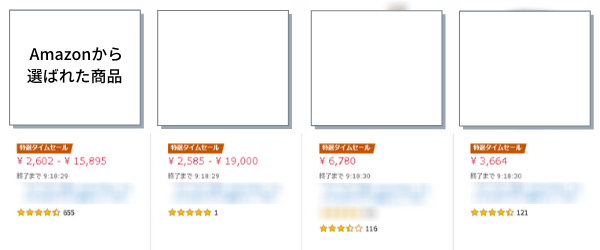
Only when invited by Amazon
This is a sale you can participate in.
Amazon selects the participating stores and products based on data such as sales figures.
<対象セール>
・Featured Time-Limited Sales
Held once a year
Amazon Prime Day, Prime Appreciation Day, Black Friday
These also qualify as invitation-only sales.
② Sales that require approval from Amazon
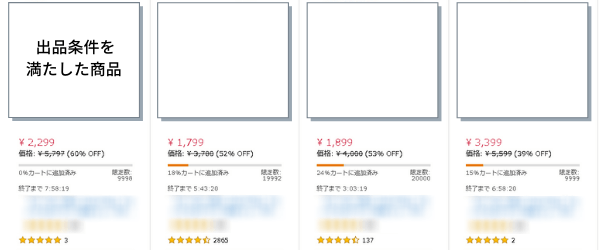
Only items that meet the sale listing requirementsThis is a sale where you can apply.
This will be implemented as soon as the application is approved.
<対象セール>
・Limited-Quantity Flash Sale
・Featured Time-Limited Sales
・Prime Members-Only Sale
・Coupon Discounts
・Brand Discounts
The listing requirements for each sale are explained in detail below.
How to Check Time-Limited Sale Items
The locations where Amazon's Time Sales are held are fixed.
Let's take a look together at how it appears!
①Go to Amazon and click "Time-Limited Deals"
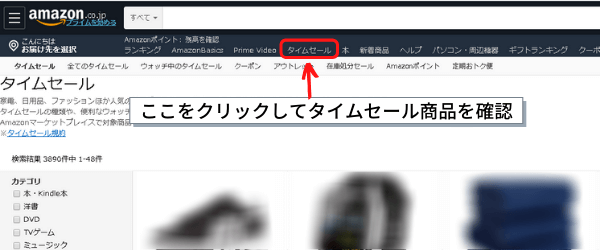
When you click "Time Sale,"
Items listed in the saleYou can check it.
What kind of...Competitive ProductsIt might be a good idea to check if it's listed for sale.
②Check the side banner
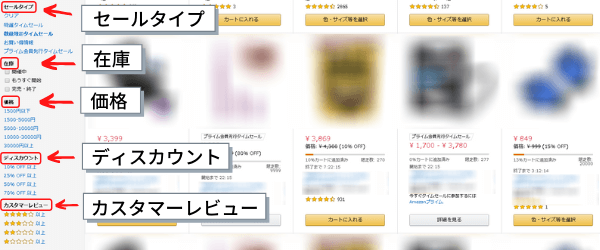
If you were planning to make a purchase, how would you narrow down your search criteria?
The buyer
What to Look for When Shopping During a Limited-Time SaleOr, it would be more effective to list items based on these points.
"Sale Type," "In Stock," "By Price"
It includes the terms “Discount” and “Customer Reviews,” andSearch by filtering itemsYou can do that.
Featured Time-Limited Sale
What is the "Special Time Sale"?
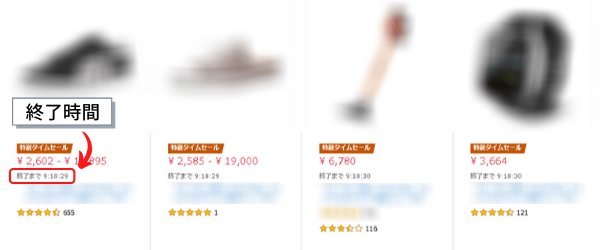
The items change daily, and the quantity isUnlimited...is the case.
The barrier to entry is high, andOnly products selected by AmazonThis is a sale where you can post items.
Since it appears at the top of the limited-time sale screen,
We can expect an increase in the number of buyers.
Requirements for Listing Items
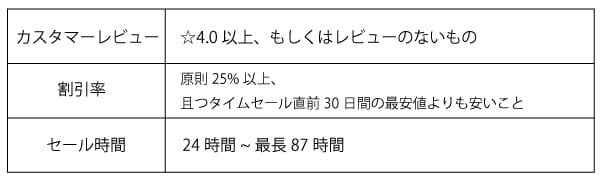
The discount rate is,Generally 25% or higher, and lower than the lowest price in the last 30 days
It is necessary.
Please check with the person in charge for details on the sale times.
Listing Procedure
We are not accepting applications for the Special Time Sale, and
You'll receive an invitation email from Amazon.
If a representative suggests listing your product in the Special Time Sale, please follow their instructions to complete the process.
Limited-Quantity Flash Sale
What is a "Limited-Quantity Flash Sale"?
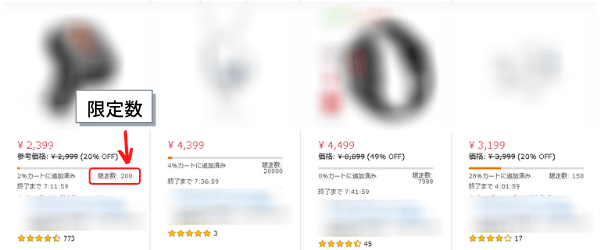
The limited-quantity flash sale isUp to 12 hoursand ended with,Limited in both time and quantityThis is a sale that is currently underway.
On the search results page, you can check the limited quantity and time remaining until the offer ends in real time.
As for user behavior, rather than searching for a specific product right from the start,
Buy the items you like from among the discounted productsA trend like this can be observed.
Requirements for Listing Items
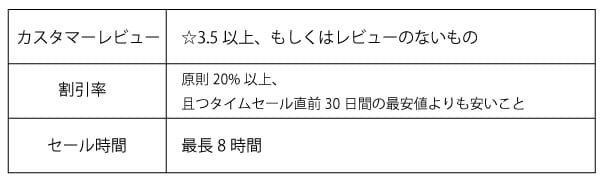
The discount rate was based on sales made immediately prior to the start of the sale
The price of the product in questionGenerally, 20% or moreIt must be.
Since the limited-time sale lasts only a short while,
Short reviews, product names, etc.Elements That Can Be Highlighted Based on TimeLet's get everything ready in advance!
Listing Procedure
The process for listing items in a limited-time sale is very simple.
Let's follow the steps!
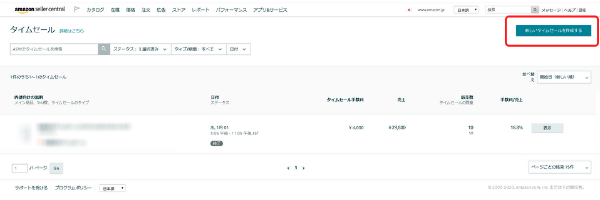
① “Under "Ads" → "Limited-Time Sales," click the "Create New Limited-Time Sale" tab
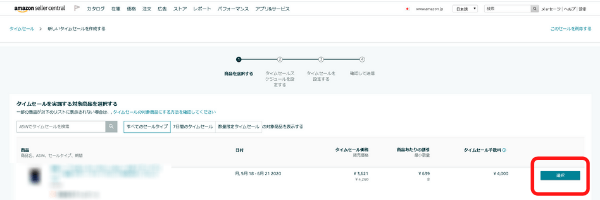
②Select an item from the inventory and click "Select."
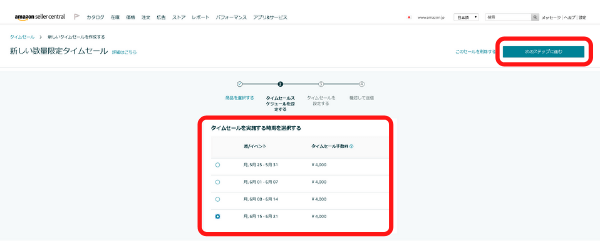
③ Select a schedule, then click "Proceed to the Next Step"
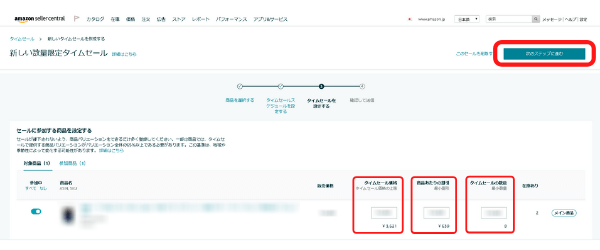
④ Enter the flash sale price or discount per item, as well as the minimum quantity for the flash sale, and click “Proceed to the Next Step.”
⑤ Review the details, then click "Submit New Time Sale"
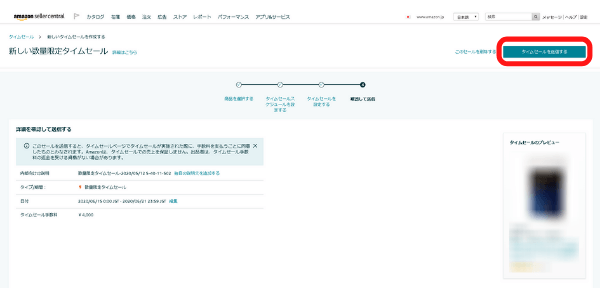
That's it—you've successfully listed your item for the limited-time sale!
Prime Members-Only Sale
What is the Prime Members-Only Sale?
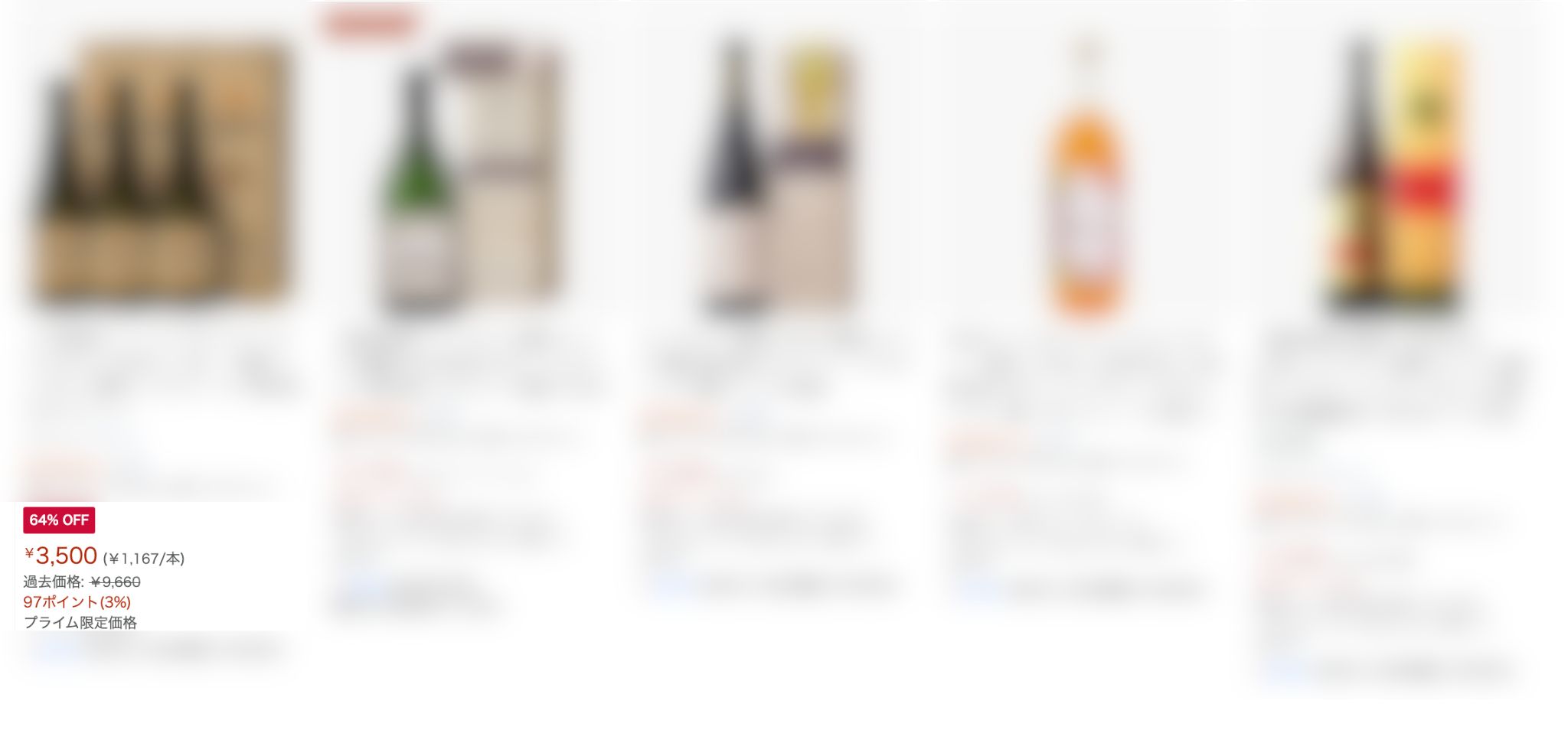
Exclusive to Prime MembersThis is a sale where you can set discounted prices.
For Prime members, eligible products will appear in search results and on product detail pages,Display prices with strikethroughwill be done.
Be sure to set your prices with the discount rates for Special Time Sales and Limited-Quantity Time Sales in mind!
Requirements for Listing Items
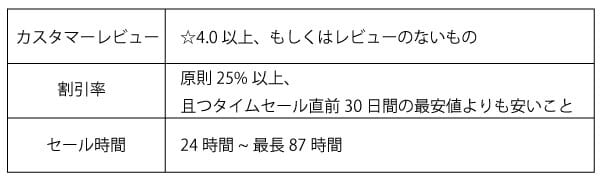
The discount rate was based on sales made immediately prior to the start of the sale
The price of the product in questionGenerally, 251 TP3T or moreIt must be.
Listing Procedure
① On the "Ads" tab, click "Price Discount"

② Enter the period, eligible customers, products, and discount rate
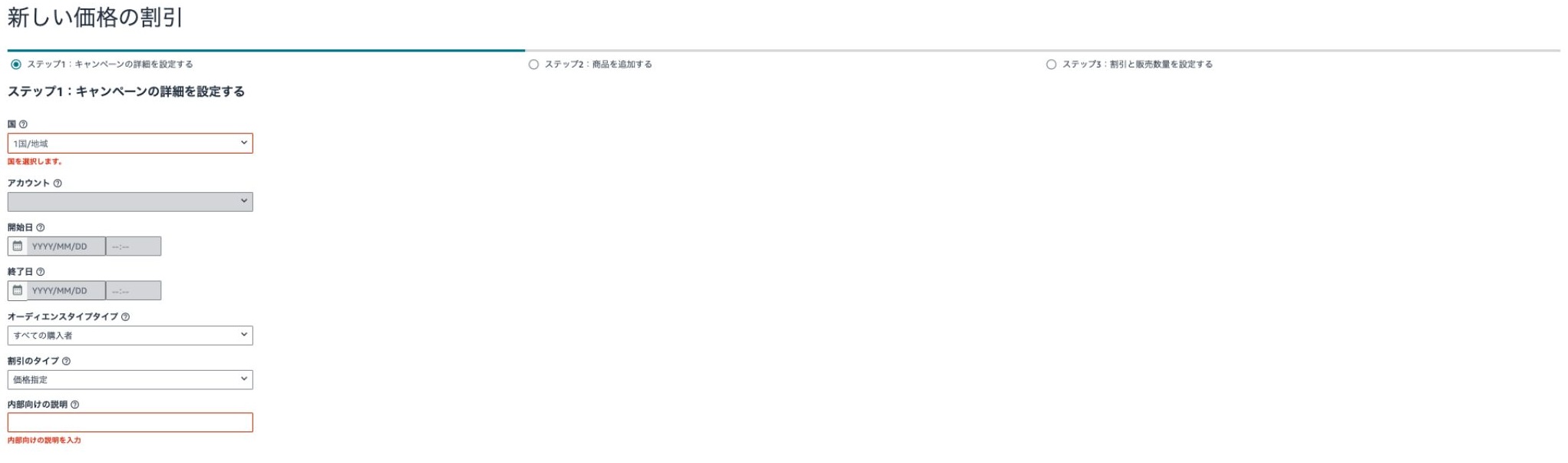


③ Click the "Submit" button to complete your application
Coupon Discount
What is a coupon discount?
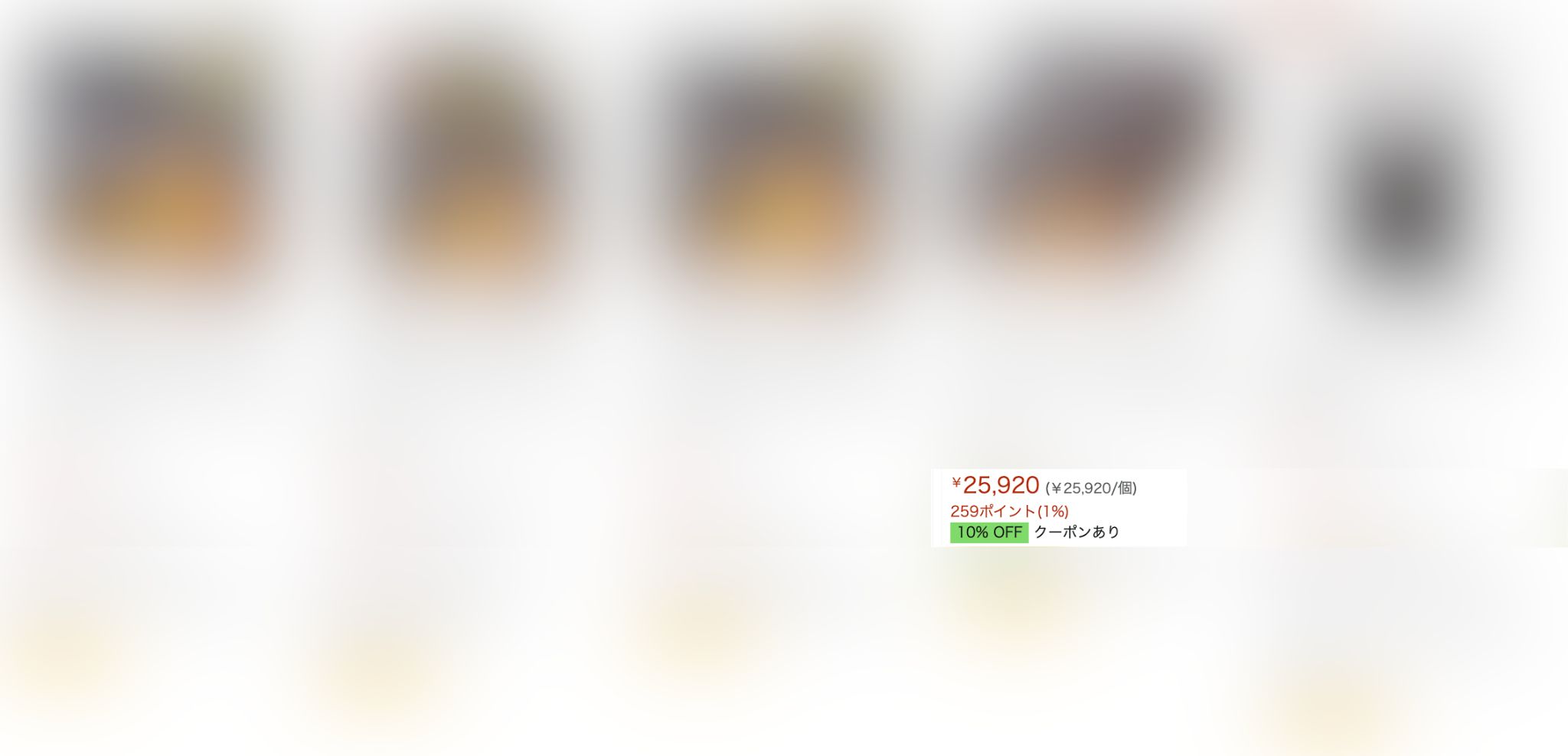
When you issue a coupon,
A coupon icon is displayed on the productwill be done.
Since it is displayed in color,
This makes it possible to make your product stand out more than others on the search results page.
You can reach customers on the search results pageTherefore, this is a recommended strategy for those who want to set themselves apart from the competition.
Requirements for Listing Items
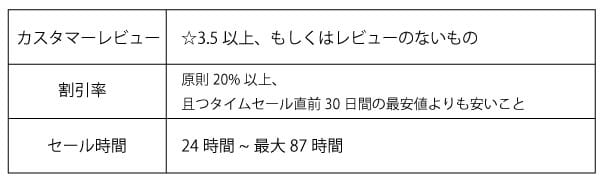
When issuing Amazon coupons as usual,
There are no requirements.
However,When Adding a Coupon to a Listing for a Limited-Time SalePlease note that you must meet the above conditions.
Listing Procedure
① Click “Ads” and “Coupons”
② Click “Create a New Coupon”
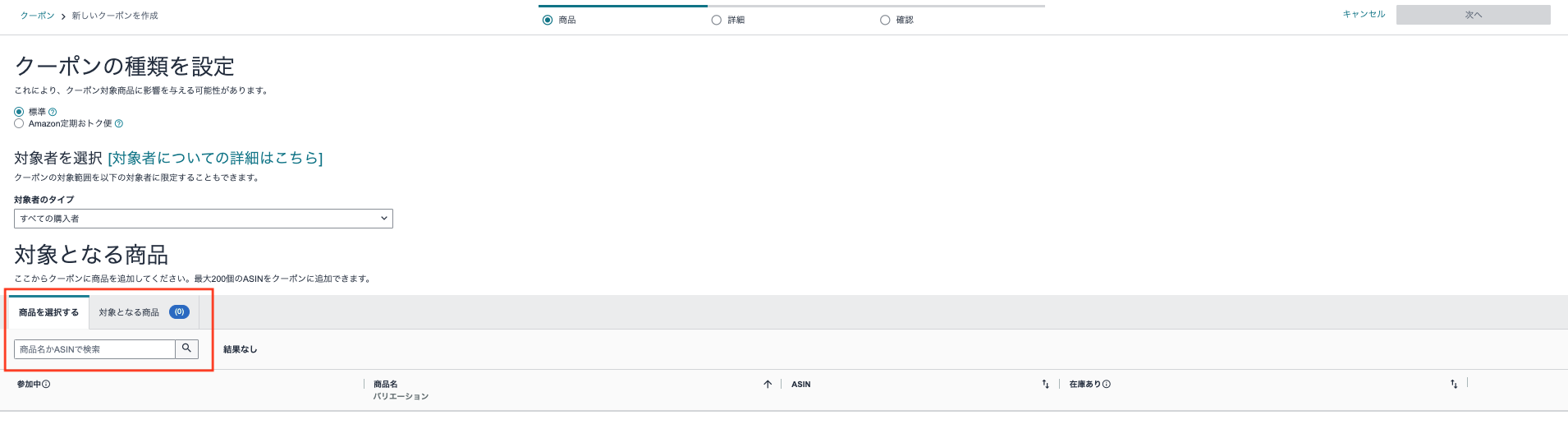
③ Search for the item you want to apply the coupon to by "SKU" or "ASIN"
→ “Add to Coupon”
→ Click “Next Step”
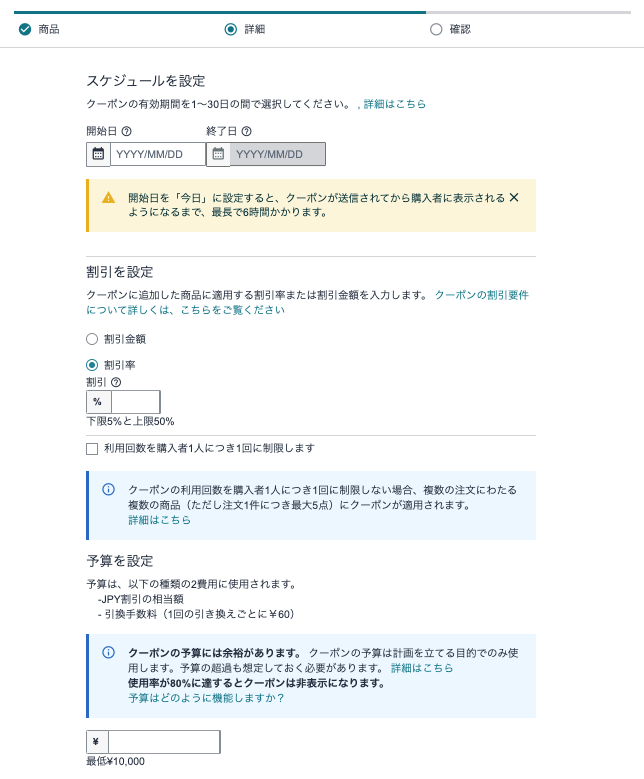
④ Discount rate or discount amount, how coupons are displayed, coupon name, and coupon validity period
・Enter the total budget → "Proceed to the next step"
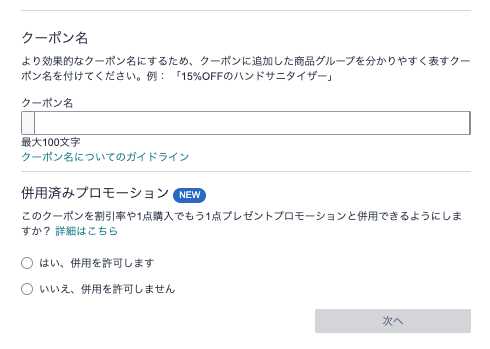
⑥ Review the details and click “Register Coupon”
8 General Listing Requirements for Time-Limited Sales
A high-volume seller
There are two ways to list items on Amazon:

To list an item in a limited-time sale:
Being a high-volume selleris the condition.
This article provides a detailed explanation of the differences between "bulk listings" and "small-volume listings."
Be sure to check it out!
About Reviews
Receive at least 5 reviews per month
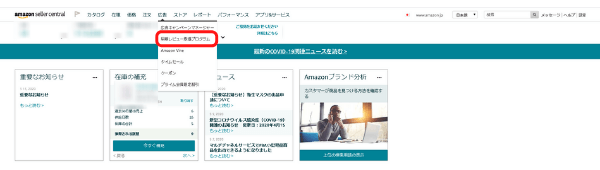
To list an item in a limited-time sale,
Get at least 5 reviews in one monthLet's do it.
Has a sales history and has received at least 3 stars on Amazon
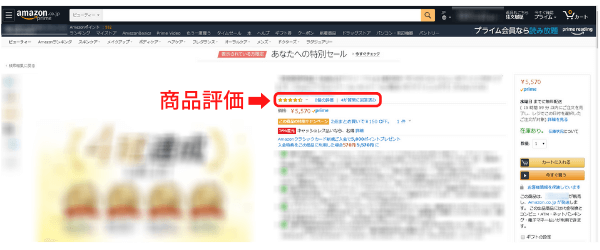
I've sold one before,
AndProduct ratings of 3 stars or higherThis is a requirement.
Products with low ratings are,
To improve your ratings, review the ★1 and ★2 reviews and take steps to raise your ratings.
Not only does it help you get reviews, butImproving the Quality of ReviewsThat’s necessary, too.
Buyers'Product Review Policyin accordance with
The following actions are considered violations.
・The sellerOur own products or competitors' productsPost a review on [site name].
・Gratuities, discounts, free products, and other forms of compensationIn exchange for that,Third PartyAsking customers to review your company's products or those of competitors.
・The seller's family and employeesHowever, posting reviews of the seller's products or those of competing sellers.
A wide variety
On Amazon, you can display products that come in multiple sizes and colors all on a single product page.
The setting for that is “Register Variations」。
For certain items, such as clothing, shoes, and bags,
The product variety offered during the limited-time sale differs from what is usually listed65% or more across all variationsIt must be that way.
These standards may vary depending on the region and time of year.
This article explains in detail how to register variations.
Be sure to check it out!
Eligible for Amazon Prime in all regions
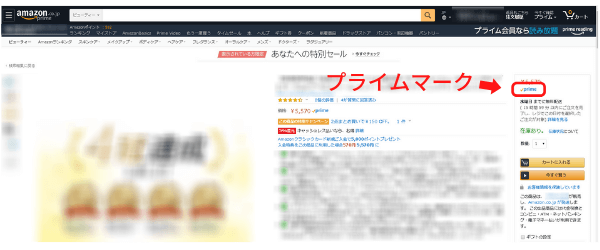
If you use FBA or Marketplace Prime,
List your products on AmazonPrime-eligible itemsYou can do that.
To use FBA and Marketplace Prime, you must first register for the listing service.
It is brand new.
Although Amazon allows the sale of used items, the items you list for sale must beBrand newIt must be so.
Pricing Policyin accordance with
Suggested PriceYou must display the price at which the seller or another seller actually sold the item.
(Suggested Price: The price you set that appears on the product page)
Whether an item is displayed is determined by the system, so even if you register it, it may not appear.
In addition, the suggested retail prices provided to Amazon are alwaysLatest PricesLet's go with that!
Policy on the Frequency of Limited-Time Salesin accordance with
Amazon strives to offer buyers new daily deals every day.
Therefore,Within 7 daysYou cannot run another limited-quantity time-limited sale for the same ASIN.
Also, for the 7-day time-limited sale for the same ASIN,Within 28 daysIt is also impossible to repeat the test.
Items Not Eligible for the Limited-Time Sale
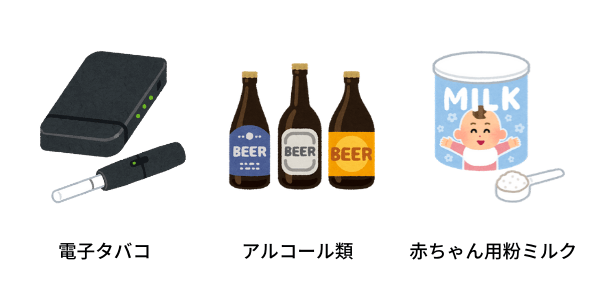
Restricted Products、Products that cause discomfort or disgust、Inappropriate Products(E-cigarettes, alcoholic beverages, adult products, medical devices, pharmaceuticals, infant formula, etc.) are not eligible for time-limited sales.
Also,Products with a High Return Rate...is also excluded from the limited-time sale.
Checking Your Status
Items that do not meet the listing requirements may be rejected at any time.
Once you've finished the listing process,Check the status regularlyLet's do it!
- Coming Soon: The sale isA status that begins in a scheduled week or on a specific dayThat's it.
Since the order has been approved, please confirm that the inventory has been shipped to FBA. - Action is required:A situation where the price or quantity options need to be reviewed and adjustedThat's it.
Check the "Requires Seller Action" tab on the Limited-Quantity Time Sale Dashboard.
After the adjustments are made, the case will be returned to the responsible team for re-review.
The re-review may take up to 7 days, so please respond as soon as possible! - Cannot be approved: My application for a limited-quantity flash sale was not approved, andA state in which no limited-time sales are being heldThat's it.
You cannot file an appeal against a decision to reject a Time Sale application.
If you want to offer a discount on your products, set up a promotion in Seller Central or set the sale price directly. - Remand: When it no longer meets criteria such as inventory levels or price caps, andThe submitted flash sale has been rejectedThat's it.
If a returned item appears in the list of eligible items, you can resubmit the application.
If this option is not displayed, it means you do not meet the application requirements and will not be able to apply for a while.
The list of eligible products is updated weekly, so be sure to check back regularly! - Draft: At the time of applicationA status where the application could not be completed due to a system errorThat's it.
- Canceled:The limited-time sale has been canceled and will not take placeThat's it.
This limited-time sale may have been manually canceled or may not meet the criteria.
Meet the Listing Requirements with These 3 Steps!
To meet the listing requirements for a limited-time sale,Preparing in AdvanceYou need to do this.
The following3Let's focus our efforts on these areas!
Maintain a high account rating
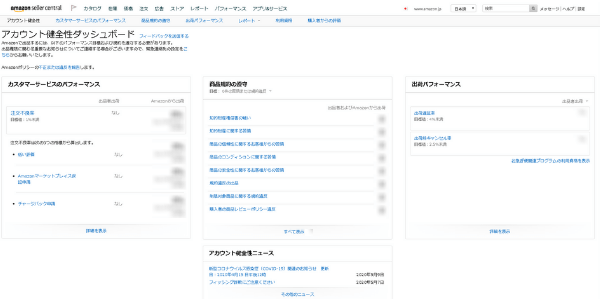
As mentioned above, to list an item in a limited-time sale,You need to build up your seller and product ratings.
Account Health DashboardとPerformance ManagementBy making use of,Let's work on improving our product appeal on a daily basis!
Switch Products to FBA or Enroll in Marketplace Prime
Registering for FBA and MakePrime not only meets the requirements for listing in Time Sales, but also,Improving delivery quality and increasing visibility on search results pagesThis leads to...
As a result,Differentiation from CompetitorsIt is possible to measure this.
Let's take this opportunity to...FBA、MakePrimeWe recommend that you sign up!
Increase visibility through advertising
Before the limited-time saleAdvertisementTurn the...Ensure the product is prominently displayedAnd,You can make more effective use of limited-time sales.
Including advertising expensesCreate a SimulationSo, let's make some adjustments in preparation for the limited-time sale!
For more information about Amazon Ads, please click here.
5 Essential Tips for Listing Items in Time-Limited Sales
In addition to the listing requirements, the Time Sale also has,
There is some basic knowledge that’s helpful to review.
5 Things You Should Know at the Very LeastI'll explain this, so please use it as a reference!
About the Products in Question
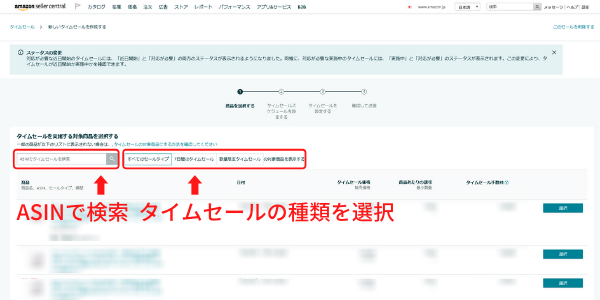
Depending on the type of limited-time sale,
You can narrow down the selection of eligible products.
Eligible products areSearchable by ASIN。
Items not displayed here do not meet the sale criteria.
"3. Listing Requirements for Limited-Time Sales"Let's compare them and analyze what's missing from the products that don't meet the criteria!
About the Schedule
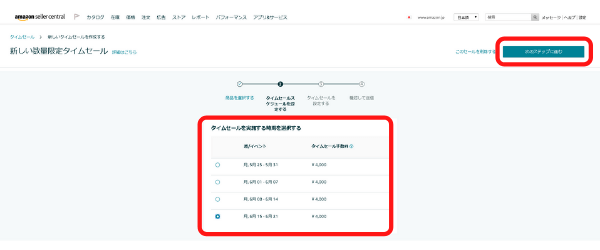
"Limited-Quantity Flash Sale"
For the “7-Day Flash Sale,” you can choose the week during which the flash sale will take place, butYou cannot select a date or time.。
Once your application is approved, you will be able to view the scheduled date and time on the Limited-Quantity Flash Sale dashboard one week before the scheduled date.
About Product Names
Product names displayed during the sale include:Parent ASIN...is used.
Since there is a limit to the number of characters that can be displayed on the search screen,Put the keywords you want to convey at the beginning to appeal to buyersLet's try these and other strategies.
If you want to change the product name for a limited-time sale, you must update the product name for the ASIN or parent ASIN before creating the limited-time sale.
Please be sure to carefully review the following guidelines regarding product names to avoid the risk of having your account suspended.
Regarding Quantity
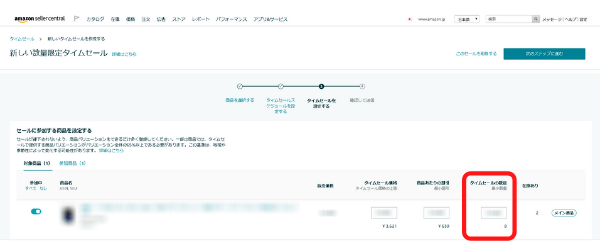
In the "Eligible Products" section,Minimum Quantityis listed.
Set a value that exceeds the specified quantity.
In addition, by 7 days prior to the scheduled date of the limited-time sale,Confirm that the requested quantity is in stockIt is necessary to do this.
Since we can't sell anything once we run out of stock,
Don't forget to check.
About Fees

When you apply for and run a limited-time sale, the commission will beBilled for each limited-time salewill be done.
The price is part of a limited-time saleVaries depending on the date of implementation。
In weeks when fees are higher than usual,Times When Traffic to Amazon SurgesThat's it.
Although the price is high, this may lead to increased traffic to the product and higher sales.
Please note that if a time-limited sale is canceled because a product violates the guidelines, you may not be eligible for a refund of the fee.
<手数料が請求されない場合>

If you do not agree to the applicable fees,
25 hours before the start of the limited-time saleIn that case,No penalty feeYou can cancel a limited-time sale there.
However, if a seller cancels a limited-time sale while it is in progress,The full fee will be chargedwill be done.
Summary
What did you think?
As you compete on Amazon, participating in sales isStudy and ExperienceThis will also help inform future initiatives.
By continuously improving the quality of our products to meet the requirements, andIncreasing Sales During Sales EventsLet's aim for that!



アイキャッチnew.jpg)