
"Keyword selection" is crucial when writing articles optimized for SEO, but what kind of keywords should you use to increase your chances of ranking higher in search results?
So in this article, we’ll explain the basics and tips for selecting keywords that are effective for SEO, and we’ll also show you exactly what kinds of keywords you should include.
Consider keyword selection based on three criteria

Keywords are very important when it comes to SEO.
BecauseThere are certain trends regarding the keywords users actually search for and the keywords that are most likely to prompt users to take action.That's why.
In addition, there are “keywords that have similar meanings but vastly different search volumes,” as well as “keywords whose search volumes fluctuate depending on the time of year (trending keywords).”
The following three key concepts serve as the foundation for selecting keywords and discerning the differences between them:
① “Finding” Keywords
② "Narrow down" your keywords
③ “Combine” keywords
Let's take a closer look at each one.
"Finding" Keywords

First of all, when you write an article, how do you decide on your SEO keywords?
Since the genre of the site I run is fixed, I think it’s pretty much decided which keywords I’ll use when writing.
The topics I'll be discussing here areFiguring out which keywords work best in combination with the content, even when the content itself is already largely determinedThat's it.
For example, “I want to write an article on SEO, but what should I write about? Maybe backlinks in SEO?” and so on.
If you haven't decided on a niche yet—unless you're running a trend blog—you should decide on a niche first.
Find it on Rakko Keyword
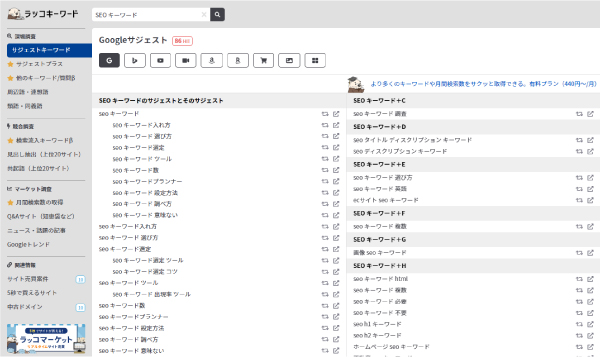
First, let's start with the keywords you've already decided to include to some extentRaccoon KeywordsEnter it intoLet's extract the top 10 or so suggested keywords.。
Rakko Keyword is a tool that displays suggested keywords from search engines like Google all at once, andCombinations of keywords that users frequently search forYou'll understand.
One way to use Rakko Keyword is to decide on the content of your article based on the keywords you find there, but,There's one more way to use Rakko Keyword.。
That is"Scattering Keywords"That's it.
From an SEO perspective, it’s said that you should sprinkle plenty of SEO keywords throughout your articles.
SoI'll also sprinkle in some suggested keywordsThat's right.
It is said that, according to Google’s algorithm, the more relevant keywords a page contains, the higher its ranking will be; therefore, incorporating keywords that users frequently search for will improve your SEO.
JustSince simply scattering a large number of keywords throughout the article could result in a piece that anyone who reads it will perceive as low-quality,To avoid that, let's make sure to plan the structure carefully.
Find them using the Keyword Planner
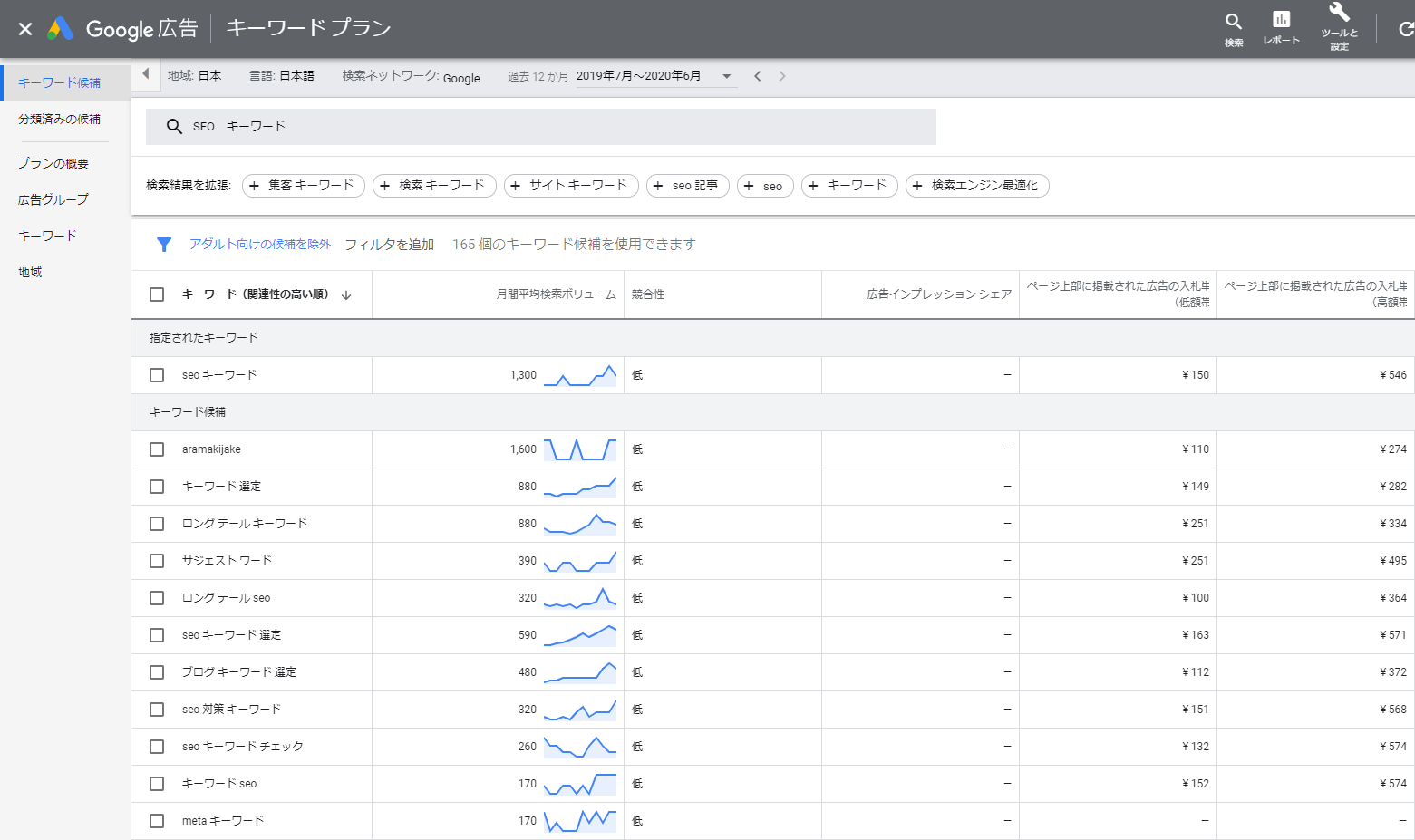
Similarly, when you enter a keyword into the Keyword Planner,Keywords Often Searched TogetherとMonthly search volume for that keywordYou'll understand.
AlsoIt also displays synonyms related to the keyword you enteredSo, it’s a good idea to include those synonyms in the article as well.
Google AdsIt's free once you sign upIt can be used with...
However, since the free version only provides a rough estimate of search volume, if you want more detailed search volume data, you’ll need to actually run ads through Google Ads and spend some of your ad budget—otherwise, you won’t be upgraded to a paid plan.
Incidentally, the threshold for when users will switch to a paid plan based on their ad spend has not been disclosed, and it is said that ongoing ad spend is required.
Find it on Google Trends
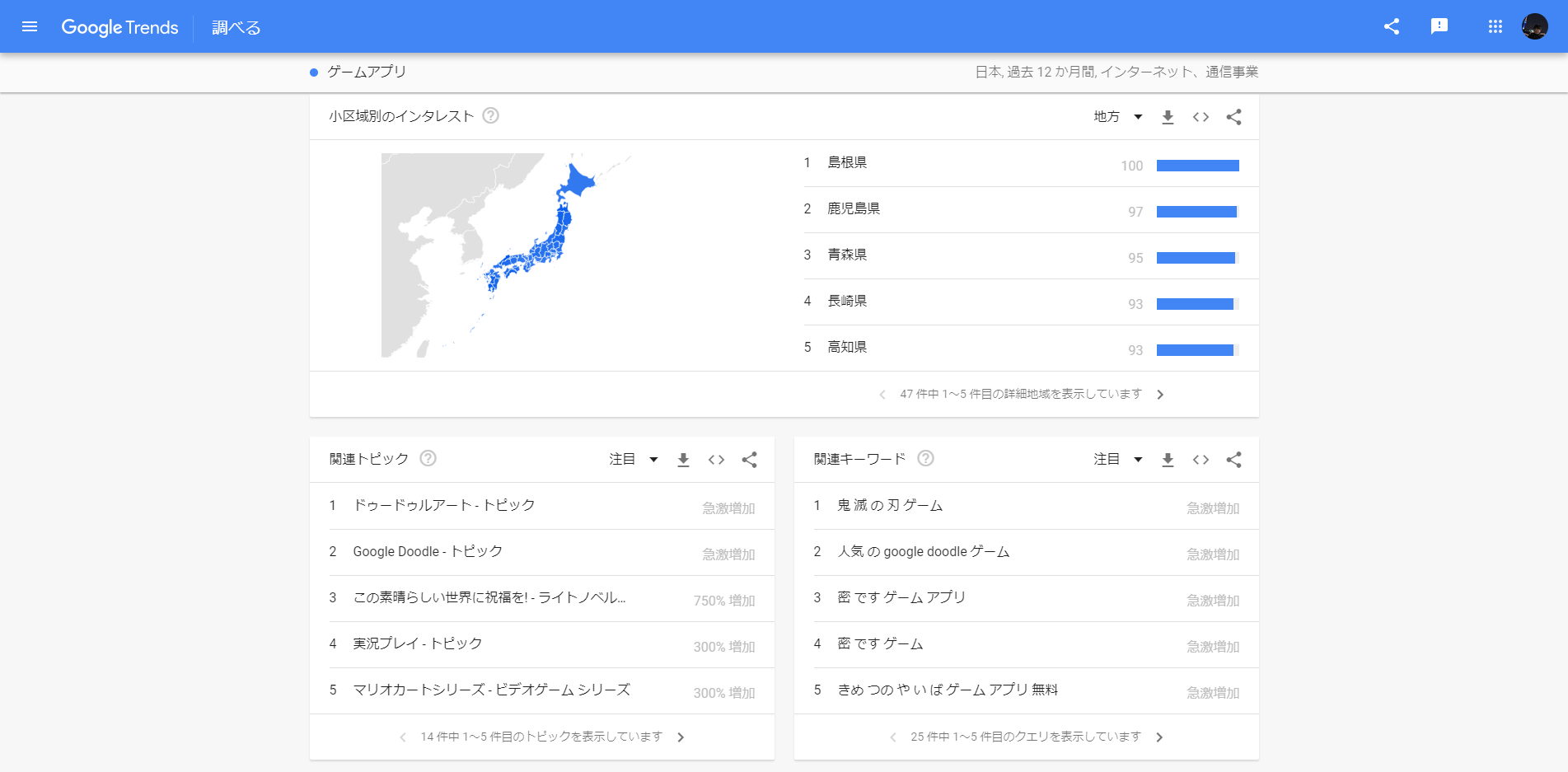
Google TrendsWell thenWhat keywords are searched for most often every day?or specific keywordsWhen do search volumes increase?You'll learn things like...
That’s why it’s essential for those who run trend-focused websites, and even those with niche sites should keep track of when search volume for specific keywords increases, so that they canTo have articles ready in advanceI use it for that, too.
"Narrow Down" Your Keywords

The next step is"Narrow Down the Keywords You've Found"That's the point.
I'll use these narrowed-down keywords as the core of my article.
Narrow down using the Keyword Planner
First, use the Keyword Planner to check the monthly search volume for the keywords you’ve found.
As mentioned above, the free Keyword Planner can only provide rough estimates.
For those using the free plan,1000~10000Let's decide on the keywords to use based on this guideline.
10–100
100–1,000
1,000 to 10,000
10,000 to 100,000
100,000 to 1,000,000
1 million to 10 million
If you're running ads, you'll see more detailed figures.
If you are someone who...500~3000It's a good idea to aim for that length when writing an article.
The reason is that if there are too few, traffic won’t grow in the first place, and if there are too many, you’ll get lost in the crowd because of the competition.
Focus on keywords that are highly relevant to the site
AlsoOnly keywords that are highly relevant to the siteLet's narrow it down to that.
For example, even if you run a website that compiles information on “travel in Southeast Asia,” you shouldn’t write articles on topics outside that genre—such as “travel in Greece”—just to increase traffic.
As for Google's algorithm,"Expertise"is an important indicatorIt is said that...
In other wordsIf the scope of the content becomes too broad, ratings may drop, and conversely, there is a possibility that overall traffic will decrease.That's the way it is.
That would defeat the whole purpose, so let's be careful not to stray from the site's genre.
"Combining" Keywords

The third axis is"Combining Keywords"That's it.
Combining specific keywords based on your objectives will increase your response rate.
When You Want to Drive Conversions from Your Articles
From the articleConversions (purchases, requests for information, phone calls, etc.)If you want to increase [...], on the other hand,Keywords with low search volumeLet's go for it.
For example, the search volume for “Okinawa” is 301,000, but it’s 1,600 for “Okinawa scuba diving” and 10 for “Okinawa scuba diving reservations.”
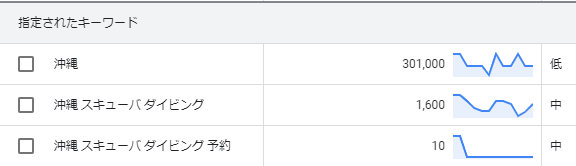
I think 10 is quite a small number, but,Since people who want to make a reservation will search for it, the conversion rate is quite high.。
Also,Keywords with low search volume also have less competition.Since this happens quite often,It's relatively easy to aim for a high rankingAnother benefit is...That's it.
By the way,"Purchase," "Compare," "Reserve," "Call," "Contact Us"Combining keywords like these will increase your conversion rate.
If you want to drive conversions, be sure to include this.
Since conversion rates for product and service names are also relatively high, it might be a good idea to keep them in mind when writing your keywords.
When You Want to Increase the Number of Views on Your Article
When I want to increase the number of views on an article, I focus not only on the content but especially on the title.
For example
"How Do You Choose Keywords That Will Drive More Traffic?"
From
“[SEO] 2,001 Page Views and 3 Visits in Just One Month!? How to Choose Keywords That Drive More Traffic”
etc.,Specific figuresやUnexpectednessYou should add it.
You can also mention proper nouns, such as the names of people or companies that are well-known in specific fields, andAuthorityor phrases like “Latest” or “2023 Edition,” etc.,Timeliness of InformationThere are also techniques such as displaying [...].
It might be a good idea to practice this by coming up with about five title ideas when writing an article.
Effective Keyword Placement for SEO

FinallyEffective Keyword Placement for SEOLet me introduce...
In fact, it’s not entirely clear where in an article keywords should be placed to be most effective for SEO.
However, based on the data, there is a spot where it would be better to place it here,3 locationsYes, there is.
Place keywords on the "left side" of the title
First of allIncluding keywords in the title isRequiredThat's it.
From the user’s perspective, if a title doesn’t include the keyword, they’ll assume, “This article probably doesn’t cover what I want to know,” and search engine crawlers will also conclude that “this article is not very relevant to the keyword.”
Also,When including keywords in the title,Left sideLet's put it in.
This is because if the text is aligned to the right, it may be cut off automatically.

(This article is actually 41 characters long—the full title is “[It’s Dangerous to Ignore This!] Please Reconsider the Risks of Your Products Being Resold!”—but only 25 characters are displayed.)
In addition, Japanese is read from left to right when written horizontally, and as for a single sentence,People tend to perceive what is written first as more important (primacy effect)That could be one reason.
Also, the number of characters displayed in search results varies from time to time, andThe minimum number of characters is 25.、Maximum character count: 38.5 characters, andThe average number of characters is32In textDisplay Rate: 90%It is said that...
It's best to keep the title to 32 characters or fewer.That’s why people say that.
However, if you focus too much on the character count and end up with a title that’s hard to understand, you’ll be missing the point.
Please take a look at this data.
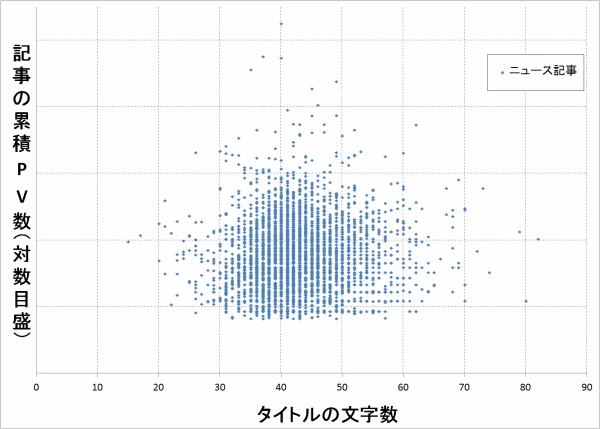
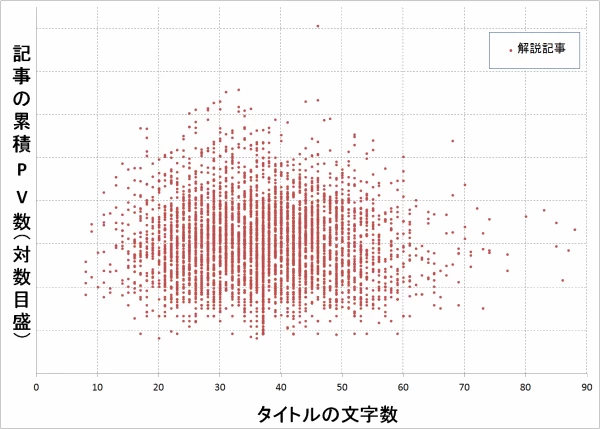
Based on data from approximately 9,000 articles,There is some variation in the number of characters in the titles and the number of page views...as you can see.
In other wordsWhat matters isn't the number of characters in the title, but howIs that a catchy title?PleaseThat's it.
Include "Extracted Keywords" in the headline
It is a heading tag.<h2></h2>や<h3></h3>にLet's add some keywords, too.
Just like with title tags, it is said that crawlers check whether keywords are included in heading tags as well, and use this information to evaluate a site.
However,You don't need to include keywords in every heading tag.。
BecauseGoogle's CriteriaはUser-Firstand,We don't place the highest priority on keyword density.That's why.
You probably understand intuitively that if there are too many keywords, the content simply becomes hard to read, right?
Above all, make it easy to read as contentTo do this, make sure to include keywords in your heading tags.
Place keywords at the beginning of the text
At key points throughout the text"Introduction"Be sure to include keywords in [...].
Because,In the main text,Excerpts appear in search resultsfromThat's it.
In some cases, if a link card that opens the article’s headline is posted on the linked page, approximately 100 characters from the top of the headline’s text may be displayed on a desktop computer.
In other words, if a keyword appears at the beginning of a headline,It makes it more likely that users visiting the linked page will think, “This article contains the information I’m looking for.”That's right.
By putting yourself in the user’s shoes and considering where keywords should be placed to best guide them and make the content easier to read, you’ll naturally come to understand effective keyword placement.
Please take a moment to review your own articles and check whether the keywords are placed appropriately.
JustThere is no single correct answer.So,Daily testing is also an important concept in SEOThat's it.
Summary
The keyword selection method introduced here is useful when you’ve already decided, to some extent, what kind of article you’re going to write.A tool for finding keywords that boost SEO effectivenessThat's it.
In this post, I’ve explained everything from the basics of keyword selection to some handy tips for expanding the scope of your content.
As an aside, at first you’ll probably think, “I’d like to write an article like this myself.”
However, if you do that, you won’t be able to identify keywords that are effective for SEO, and even if you write a good article, it’s highly likely that it won’t rank highly.
The important thing is"Writing articles based on the keywords users search for"。
To master SEO, you need to understand Google, which puts users first.
We explain SEO strategies in greater detail in this article, so please be sure to check it out.