


There are two types of product images on Amazon: main images and secondary images, and
It is important to choose the appropriate one based on each rule and characteristic.
For those considering selling on Amazon or looking to increase their sales
I'll explain Amazon product images in detail.
About the Main Image
Location and Rules for the Main Image
First, I'll explain the main image.
The main image is the one displayed in the area indicated in the image below.

Generally, the images show only the product itself against a white background.
When listing a product, you must include this main image.
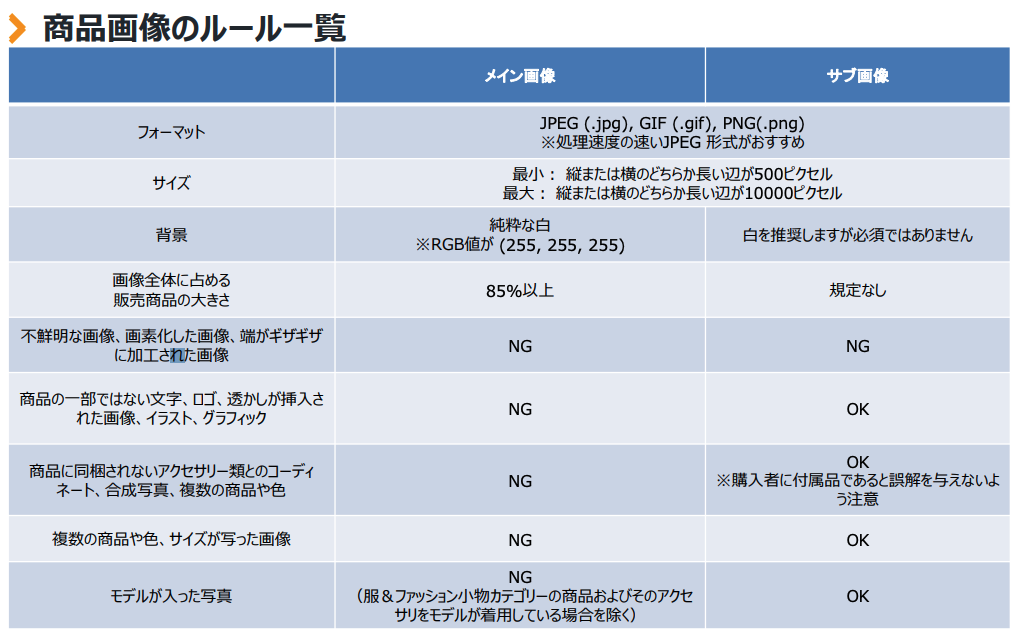
Image source:Amazon Seller University Documents
As shown above, there are many detailed rules regarding the main image, but to summarize them briefly, they are as follows.
| ・HeightSet the image to pure white (RGB values: 255, 255, 255). |
| ・Photograph only the product being sold (omit accessories or keep them to a minimum) |
| ・The products for sale must account for 85% of the entire image. |
| ・At least one dimension must be 1,000 pixels or more, and the longest side must be 500 pixels |
| ・Minimum size: The longer of the vertical or horizontal sides must be 500 pixels |
| ・Maximum size: The longer of the vertical or horizontal sides must be 2,100 pixels |
I sometimes see main images on Amazon that don't have a white background, but,
If you violate the terms of service,Products Excluded from Search Resultsor,Suspension of Listings...may be taken.
Please make sure to follow the rules for the main image when registering.
The main image is a key element related to CTR
The main image will also appear on the search results page, as shown below.
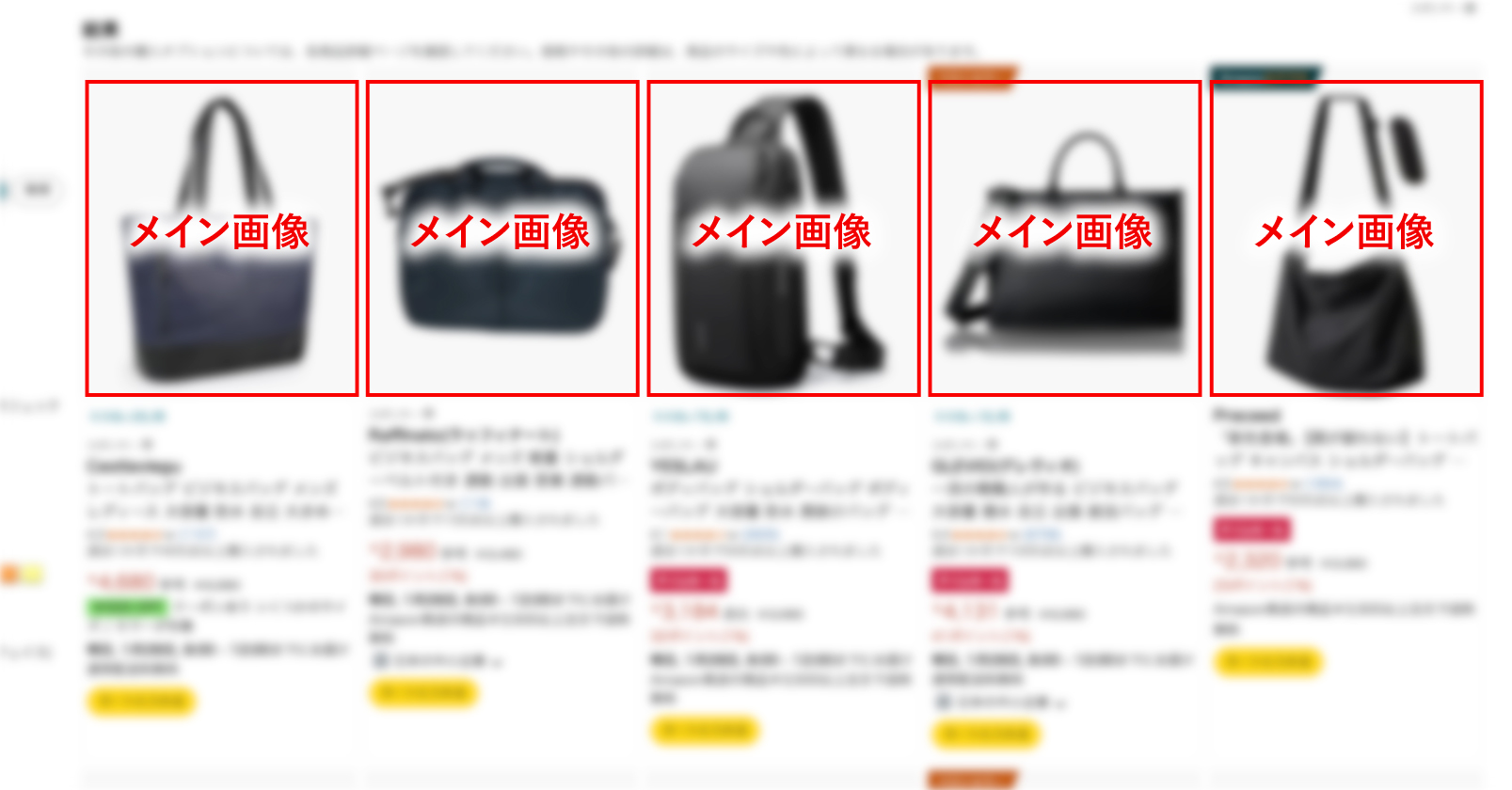
You need to get people to click through from the products listed on the search results page to the page for the item you're listing.
The search results page displays product names, prices, reviews, and more, but
Things that are particularly eye-catchingSpeaking of which, here's the main image.
Therefore, it is one of the key factors in increasing the CTR.
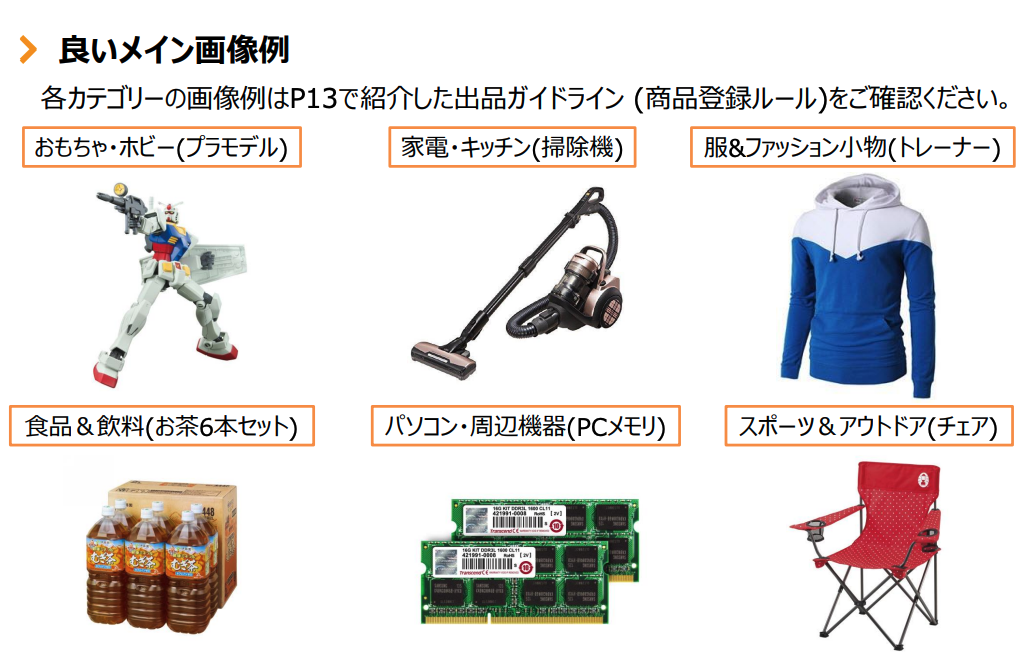
Image source:Amazon Seller University Documents
Make sure your images are clear, easy to understand, and visually appealing so they catch users' attention.
About Sub-Images
Location and Rules for Sub-Images
Next, I'll explain about the sub-images.
The "sub-image" refers to the part indicated in the image below.
The second and subsequent images are secondary images.

While there aren't any specific rules for secondary images—such as requiring a white background like the main image—
The size requirements are the same as those for the main image.
Also, the number of sheets you can set isUp to 8 sheetsThat's it.
Sub-images should be used to supplement information that cannot be conveyed by the main image.
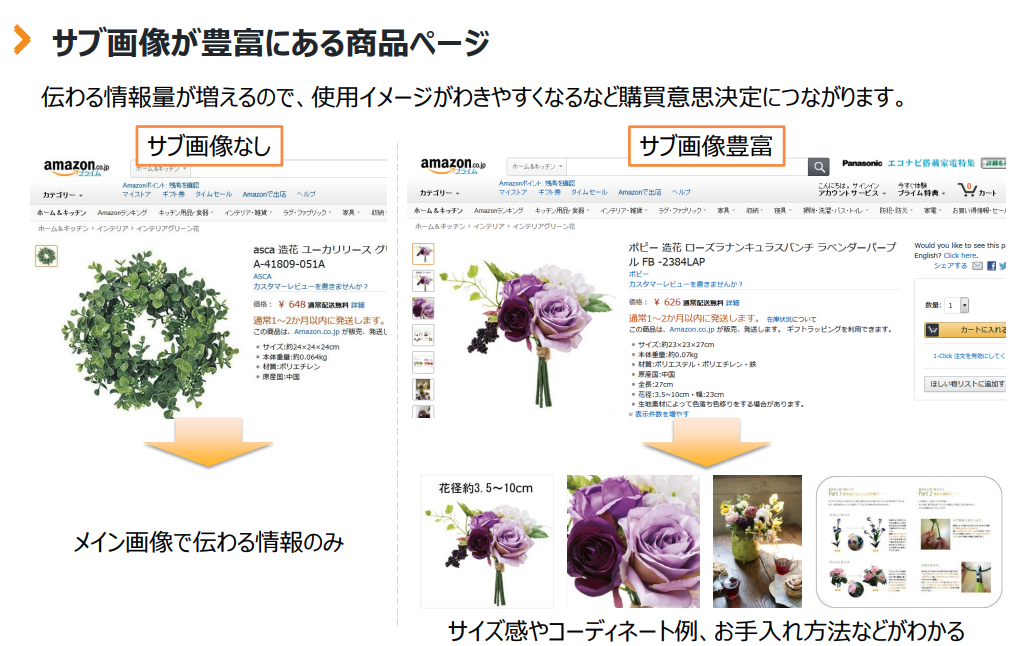
Image source:Amazon Seller University Documents
You can convey the product's feel, how to use it, and its strengths.
It’s a good idea to create your content with the message you want to convey and the color scheme that conveys the product’s vibe in mind.
Also, because it conveys the product's atmosphere,
One aspect of brandingYou can also use the secondary image for this purpose.
The secondary image is a key element related to CVR
Unlike the main image, the secondary image does not appear on the search results page.
These secondary images are viewed by people who have come to the page or are interested in the products.
When a potential buyer is debating whether or not to purchase a product, what they need most is,
Information such as how to use the product, the expected benefits, and its strengths compared to competitors, such as”Information”Isn't that right?
Since you can't actually see or try out products when shopping online,
The information provided by the seller is very important.
Since conveying product information visually through secondary images also helps improve the conversion rate,
As you manage your Amazon store, it’s important to focus on secondary images as well.
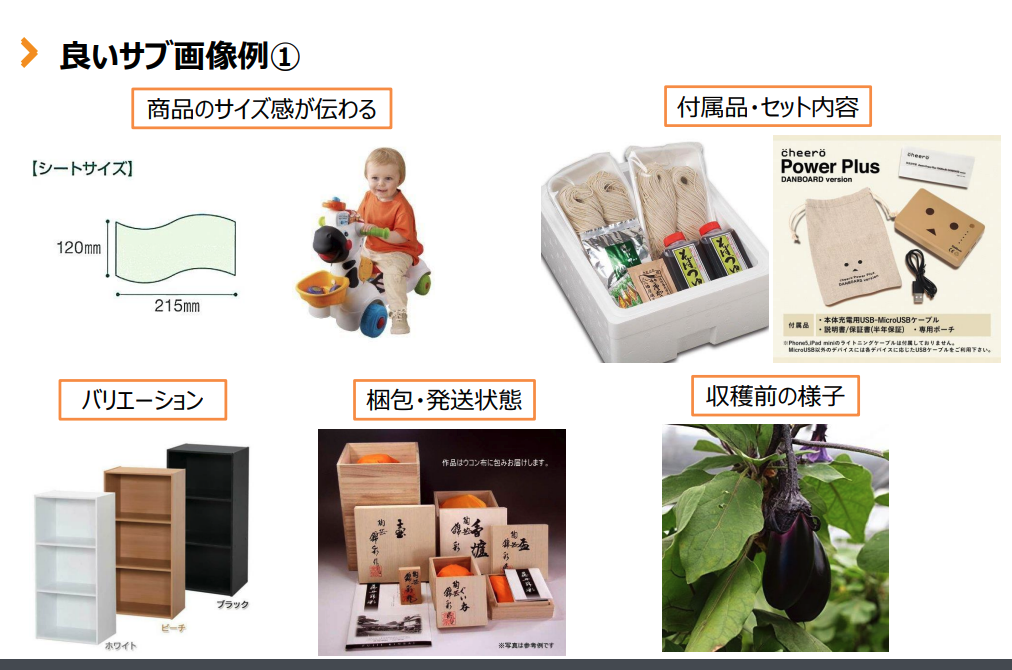
Image source:Amazon Seller University Documents
If you'd like to learn more about how to enhance your product pages with images, please read the article below.
Important Points About Amazon Images
Image size matters, too! Using the zoom feature
On Amazon, you can view images in a larger size.Zoom FunctionDid you know that there is such a thing?
As shown below, when you hover your cursor over the main or secondary images, the product is enlarged on the right side, and
This feature allows you to view every detail of the product.
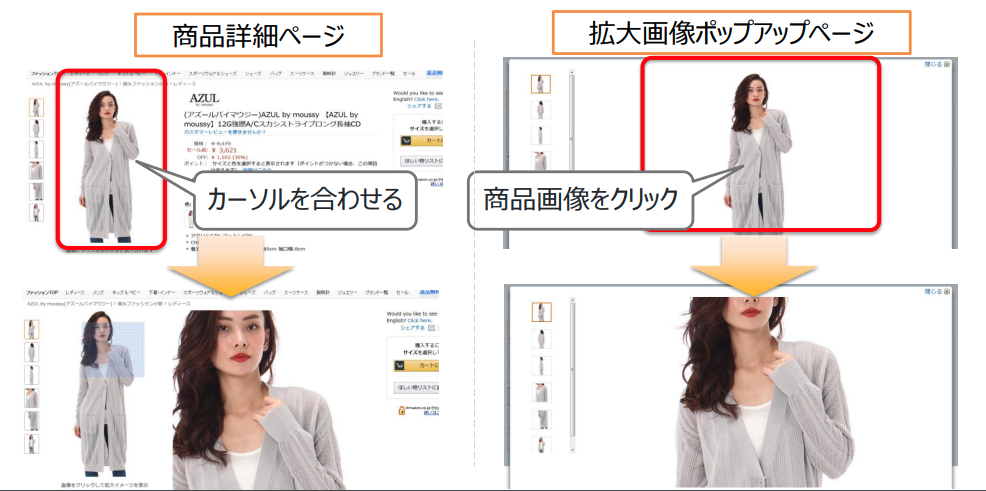
Image source:Amazon Seller University Documents
To use the zoom feature
"One of the longest sides is 1,000 pixels or more"
There is a rule that says...
Since you can't actually hold the product in your hands,
Having a zoom feature makes it easier for buyers to decide to make a purchase.
Please use this as a reference when creating images and feel free to make the most of it.
Optimization for Mobile View
Product images appear differently on computers and smartphones.
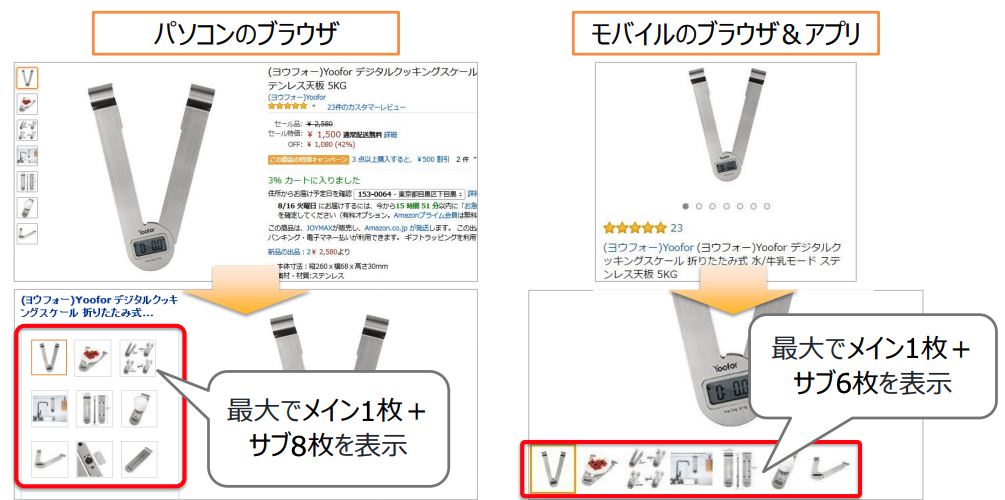
Image source:Amazon Seller University Documents
It is said that more than 70 percent of Amazon users search for products on their smartphones, so
Images need to be optimized for people who shop on Amazon using their smartphones.
On a smartphone, the image appears as shown below.
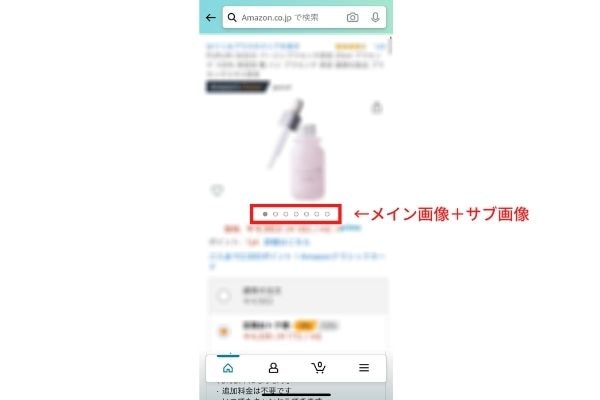
The number of pages displayed on a smartphone is"Main Image + 6 Sub Images"That's it.
The biggest difference from viewing it on a PC is that you have to scroll to see
The fact that I can't view the next page.
Therefore, when creating a thumbnail,"The Flow"It becomes important to create [...].
To encourage readers to scroll all the way to the bottom,
And thenTo get people interested in the productI need to create the layout for the image.
Let's create images from the buyer's perspective.
Be sure to comply with the Pharmaceutical and Medical Devices Act
Not only when creating Amazon product descriptions and content, but also
Another thing to keep in mind when creating images isPharmaceuticals and Medical Devices ActThat's it.
This imposes restrictions on the "language" used to describe products, and
Do not mislead people into thinking it is a pharmaceutical product, or convey incorrect information,
The basic principle is to avoid raising people’s expectations too high.
There are also provisions of the Pharmaceutical and Medical Devices Act that are specific to Amazon, but,
Basically, it is important to comply with the Pharmaceutical and Medical Devices Act as generally understood.
We explain this in detail in the article below, so please be sure to check it out if you're interested.
Be careful about the wording you use when creating images as well.
How to Add Images
Since a main image is required when listing a new item,
Let's get everything ready before registering the product.
If you'd like to learn more about how to list items, please read this article.
You can add additional images later.
Here's how to upload images to products that have already been registered.
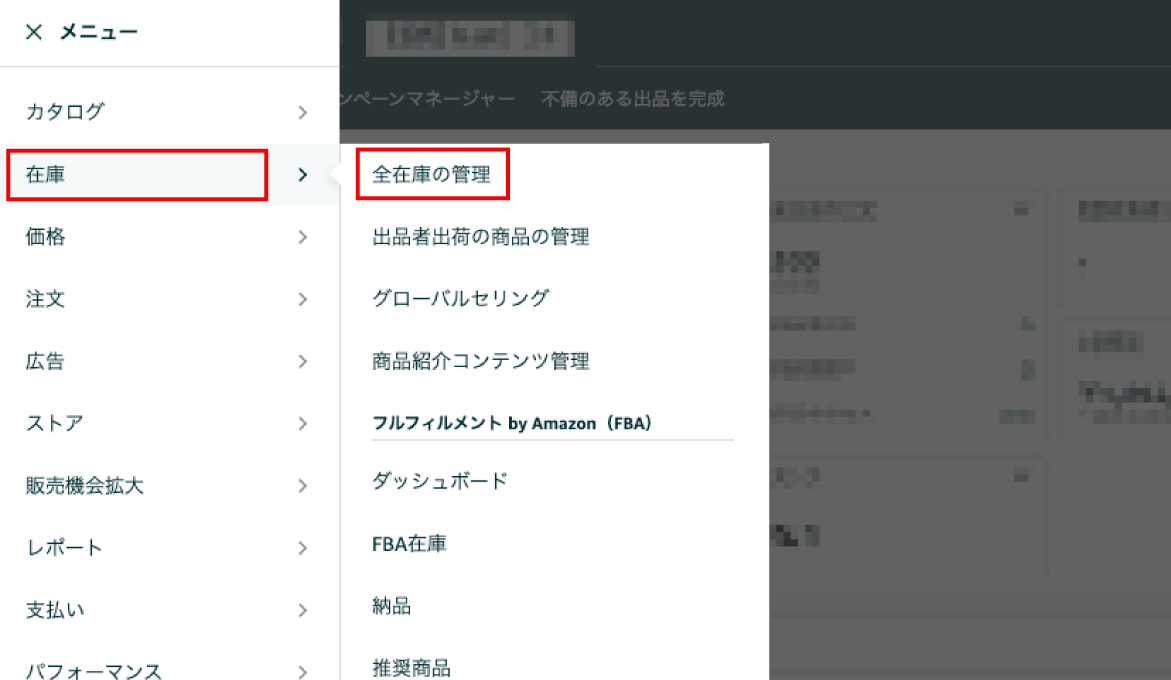
① Open Seller Central and click "Manage All Inventory"
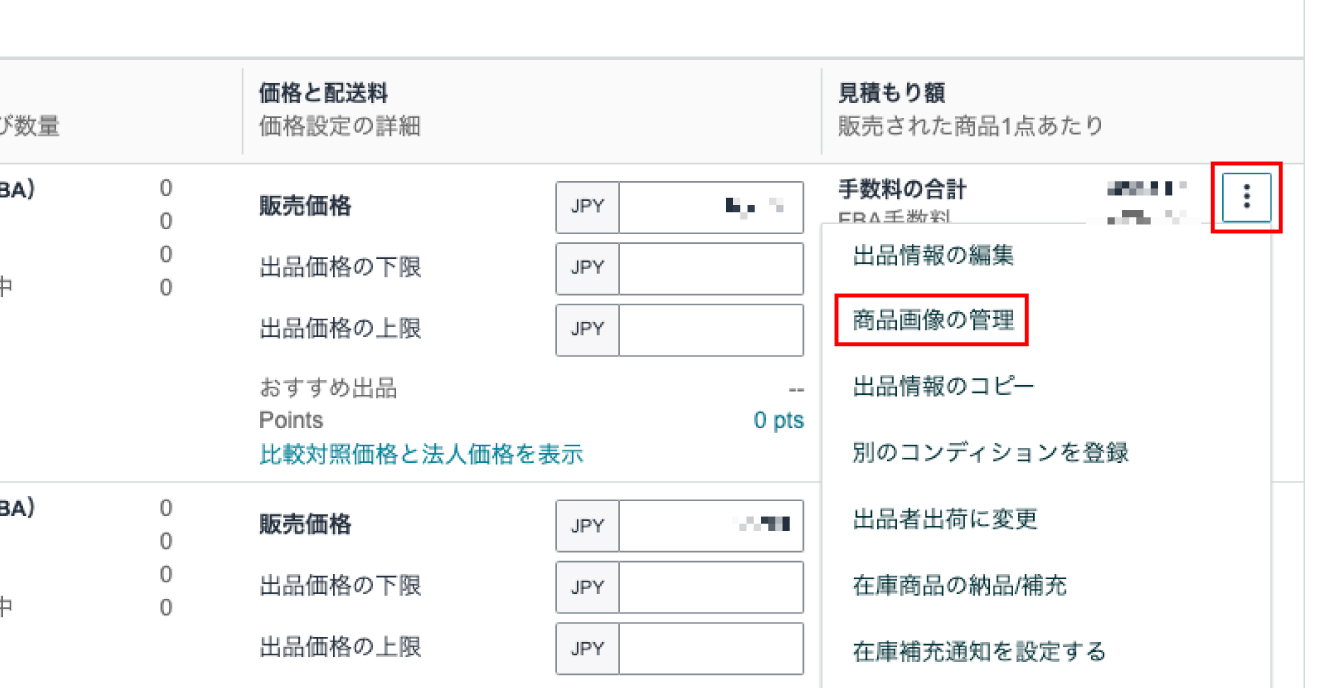
② Click the three dots to the right of the product you want to edit, then select “Manage Product Images.”
③ Upload to the area shown in the image
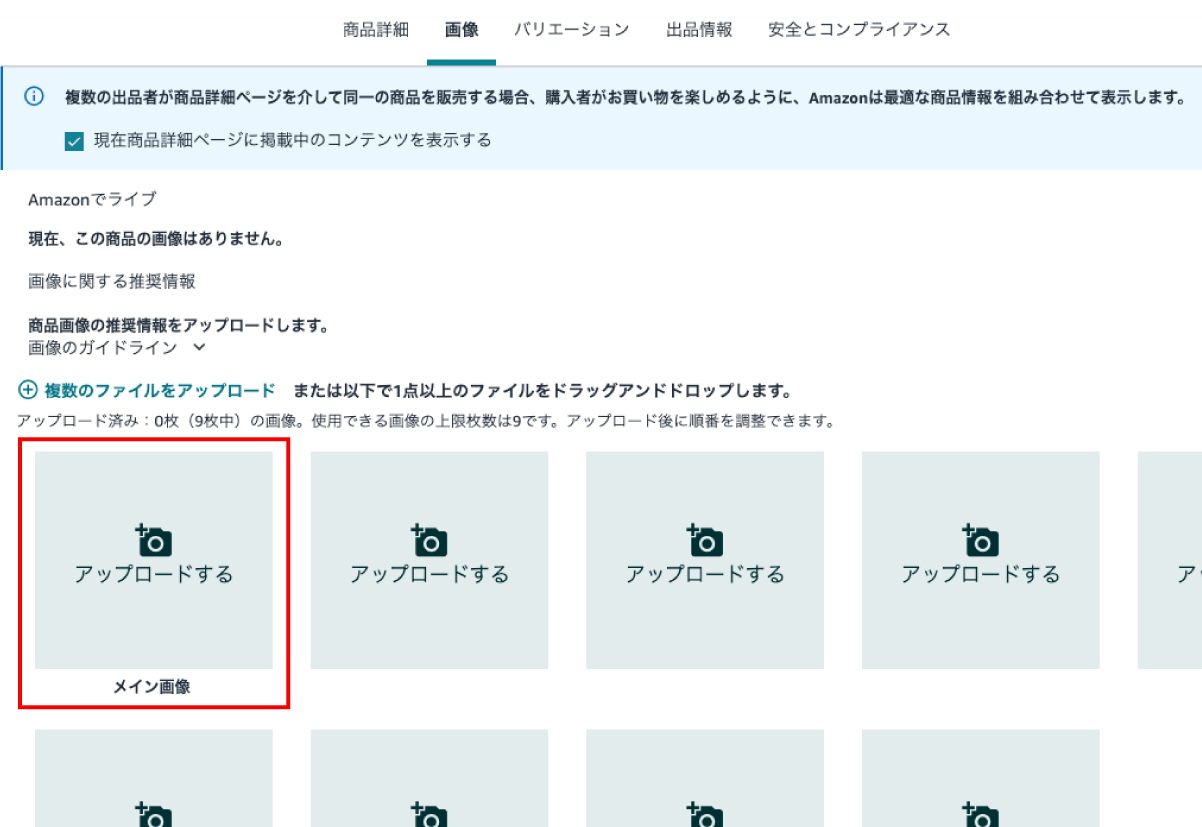
That concludes the instructions for adding images.
If the image is approved, the changes will take effect within 24 hours.
If the image still hasn't appeared after more than 24 hours,
Since there is a possibility of errors or rejection,
Let's double-check to make sure the images comply with Amazon's terms of service and the Pharmaceutical Affairs Law.
If the issue persists, please contact us through Seller CentralTechnical Supportに
It might be a good idea to inquire.
Summary
That concludes our explanation of Amazon's main and secondary images.
When it comes to online shopping
The product page is the only way to convey information to users.
In particular, images and other elements that can't be conveyed through text alone
The main image and sub-images are the elements you can use to convey information to users.
Let's make the most of it to enrich our pages!
Our company provides Amazon management services for more than 60 companies, and
We also create banners that meet Amazon's specifications.
If you're interested,
Please feel free to contact us using the contact form below.



アイキャッチnew.jpg)