

According to some data,
The ratio of new customers to repeat customers at successful stores on Rakuten is,
It's said to be at least 5:5.
Repeat customer strategies are essential for generating sales on Rakuten.
In this post, I’ll explain the importance of email newsletters for building a base of repeat customers!
What is the Rakuten Newsletter?
First of all, what is Rakuten’s email newsletter?
Stores create these on their own for users who have a purchase history or
Content that can be sent to users who have subscribed to the newsletter
This is about the email.
1 yen per messageSince it can be sent via,
A major advantage is that you can generate orders without spending a lot on advertising.
In the next chapter, we'll discuss why it's necessary to send email newsletters on Rakuten.
I'll explain it.
Reasons to Send Newsletters on Rakuten
Here, we’ll explain the three reasons why you should send email newsletters on Rakuten!
You can generate sales through email newsletters
The biggest benefit of sending a newsletter is,
You can generate sales through email newslettersThat.
Shopping Marathons, Super Sales, days that are multiples of 5, etc.
If you send out a newsletter timed to coincide with an event,It makes it easier to generate sales.
As shown below, the distribution of the email newsletter is
There are significant benefits for both users and stores.
<ユーザー側のメリット>
・You can easily find great deals, such as discounts and coupons
<店舗側のメリット>
・You can share special offers and the latest updates exactly when you want to.
By delivering useful information to users at the optimal time,
Maximize Sales Through Email NewslettersLet's do it.
This allows you to increase the number of interactions with users
The “mere-exposure effect,” in which people develop a more favorable impression of a subject with each additional exposure.
Through retargeting ads, etc.
I'm sure many of you have heard of it, haven't you?
By sending out newsletters regularly and consistently,
You can increase the number of times you interact with users.。
If you do not send out a newsletter,
There is only one point of contact with the user at the time of purchase.
However, if you send out a newsletter,
You can increase the number of contacts to two, three, and so on.
By increasing the number of interactions, customers won't forget about your products or store
To increase the number of users who make repeat purchases
Sending out email newsletters is one of the key strategies for encouraging repeat business.
Can be used for branding
In addition to great deals and the latest news, of course,
By sending out email newsletters that incorporate branding elements,
You can also aim to turn users into fans.
For example, you could include a short story in your newsletter along with an illustration by a staff member
Some stores are implementing strategies designed to turn customers into fans of the store and its staff.
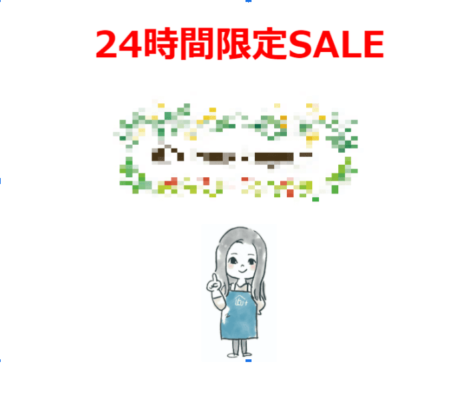
To encourage customers to continue purchasing our products,
One of the best ways to get customers to become fans is, of course, to make them fans of the store itself!
Not just to boost sales, but also as part of our branding strategy
Let's make the most of our email newsletter.
Tips for Creating a Successful Email Newsletter
In this chapter, we’ll cover three tips for creating email newsletters that you can put into practice right away.
I'll explain it.
A must-read for anyone who wants to create a successful email newsletter!
▼First, please read about the basics of email newsletters!
I'm extremely particular about titles
Key Metrics to Watch in Your Email NewsletterThere are the following three.
・Open Rate
・Referral Rate
・Conversion Rate
Of these three, which one should be prioritized first?
The answer is “open rate”!
The reason is that,If people don’t even open your email newsletter, they won’t read it.。
That's why getting people to open your email is
The first step in creating a successful email newsletter.
So, what do users look at?
Is that what determines whether or not I open the email?
The answer is "Title."
It’s no exaggeration to say that the open rate is almost entirely determined by the subject line, so
Let's go all out!。
Here are two recommended ways to come up with titles.
[1] Come up with three keywords to include in the title
A catchy headline that makes users want to click on it
Let's list three of them.
Please take a look at the following words for reference!
■During Shopping Marathons, Super Sales, and in-store flash sales
・10x points on all items in-store
・Limited-time sale now on!
■When You Want to Promote a Coupon
・A 〇-yen coupon valid for orders starting at 〇〇 yen
・Final coupons now available!
■When You Want to Convey a Sense of Urgency
・24-hour limited offer
・4 hours remaining
・Limited to 100 copies
Once you've come up with three keywords to include, rank them in order of priority.
[2] Use symbols to highlight the parts you want to draw attention to
Place symbols such as 【】, 《》, \/, and ★ in the parts you want to highlight.
For example, even with the same keyword, whether or not you include a symbol can make a difference, as shown below:
It really makes a difference in how noticeable it is, doesn't it?
◎\★Please open this today★/We’re sending out a 《10% Off Coupon》—valid for only 12 more hours—exclusively to select customers!
× Please open this today! We're sending out a 10% off coupon—valid for only 12 more hours—to our special customers!
In the user's mailbox,
With dozens of emails arriving every day, how can you get people to open the emails you send?
It’s essential to find ways to make the title stand out。
Since black tends to catch the eye,
For the parts you want to highlight the most, we recommend using 【】 or ★!
Define Your Target Audience and Determine Your Message
What are the key points to keep in mind when actually creating content for a newsletter?
That is"Defining Your Persona"That's it.
Who is the target audience for this newsletter?
What kind of people buy this product?
Once you clearly define your target audience, your messaging will naturally fall into place.。
For example, when writing a newsletter about mouthwash.
The appeal “Before an important business meeting!” is likely to attract mostly male customers.
On the other hand, if the selling point is “You can use it in just 10 seconds—even on a date!” then
You might expect there to be a lot of women.
Define the persona for your email newsletter, and
Let's create email newsletters that really resonate with users.
Set Goals for Your Email Newsletter Before Creating It
Another important thing to keep in mind when creating a newsletter is
"Setting Goals for Your Email Newsletter"That is the point.
For example,
・Number of coupon clicks: 10
・Number of visitors directed to this product page: 10
It’s important to set goals for your email newsletter—such as these—before creating it.
If the goal is to get people to claim a coupon, then
You should focus on creating designs that people will click on.
On the other hand, if you want to increase the number of visitors to your product pages,
"This product looks great!"—that's what we want users to think
Slogans, product presentation, pricing strategies, and design will all be important.
To maximize the return on the time you spend on your email newsletter,
Always be clear about where to allocate resources.It is necessary.
Making Effective Use of Segments
One of the strengths of email newsletters is that you can create lists by setting up segments.
Specifically,
・Purchase Period
・Number of purchases
・Target Product ID (by product management number)
・Birth Month
You can segment by these criteria, among others.
"Promoting Bundle Offers to Customers Who Purchased Individual Items"
"Send a 'Happy Birthday' coupon to celebrate during their birthday month"
Since you can do things like that through the newsletter, there’s no reason not to take advantage of it.
How to Create a Newsletter
Here, we'll explain how to create Rakuten email newsletters efficiently!
First, there are five types of Rakuten newsletters:
・PC TextStormer
・HTML email
・Responsive Email
・Mobile Text Messages
・Mobile HTML email
On Rakuten, it's easy to create campaigns and track their effectiveness.
It's enough to send HTML emails and mobile HTML emails.I suppose so.
In this post, I’ll explain how to create these two types!
HTML Email
On Rakuten, an HTML email is,
Emails that can be sent to PC email addresses such as Gmail and iCloudThat's it.
You can measure metrics such as open rates, referral rates, and conversion rates.
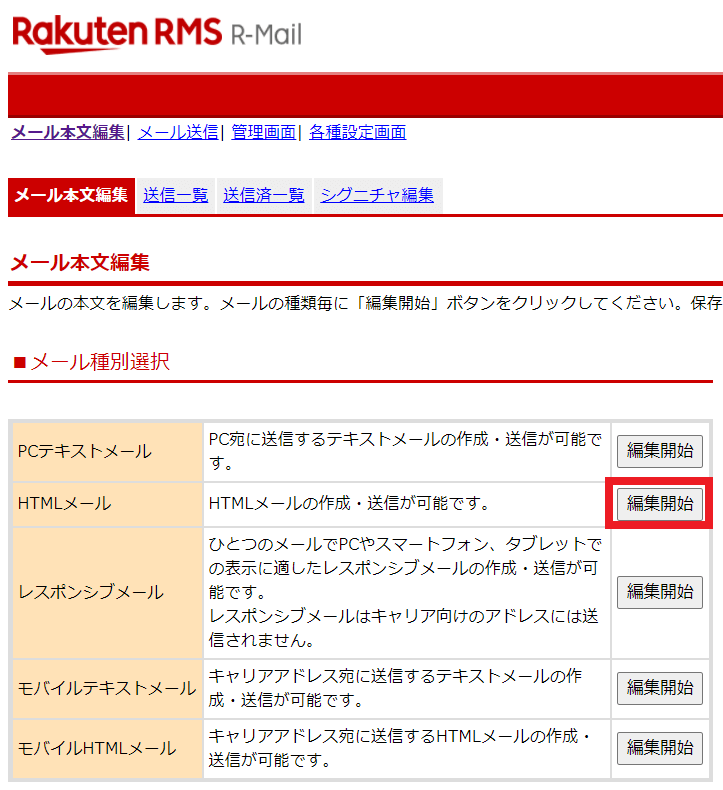
RMS Home > Newsletter Distribution > Edit Email Body > HTML Email
① Title
② Main Text
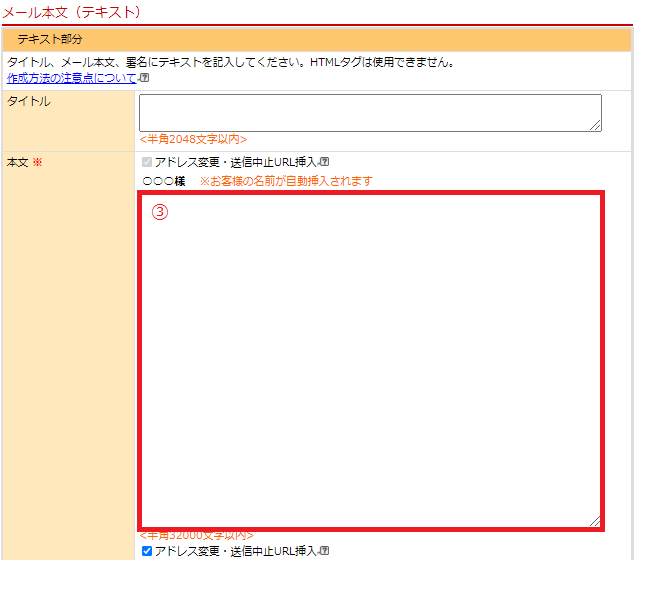
③ Main Text
I'll write about these three things.
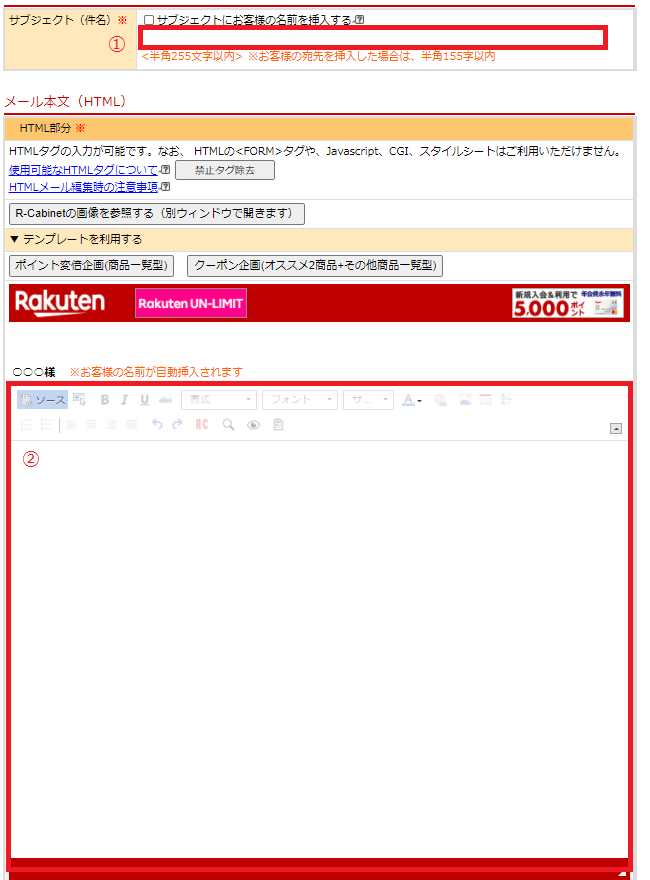
① Title
Enter the title you've come up with.
② Main Text
Enter the email body.
You can also create it by entering HTML tags, but
You can create them efficiently using the features within RMSThat's it!
It's also possible to send everything as text, but
Stores that include images in their posts to appeal to users' visual senses
A common trendis located at.
We recommend an image size of 800–1000px!
③ Main Text
Enter the content to be sent to addresses where images are set to not be displayed.
Please type out the content you entered in the main text as a paragraph.
Mobile HTML
Mobile HTML includes services such as docomo, ezweb, and softbank, etc.
This email is sent to users with a carrier email address.
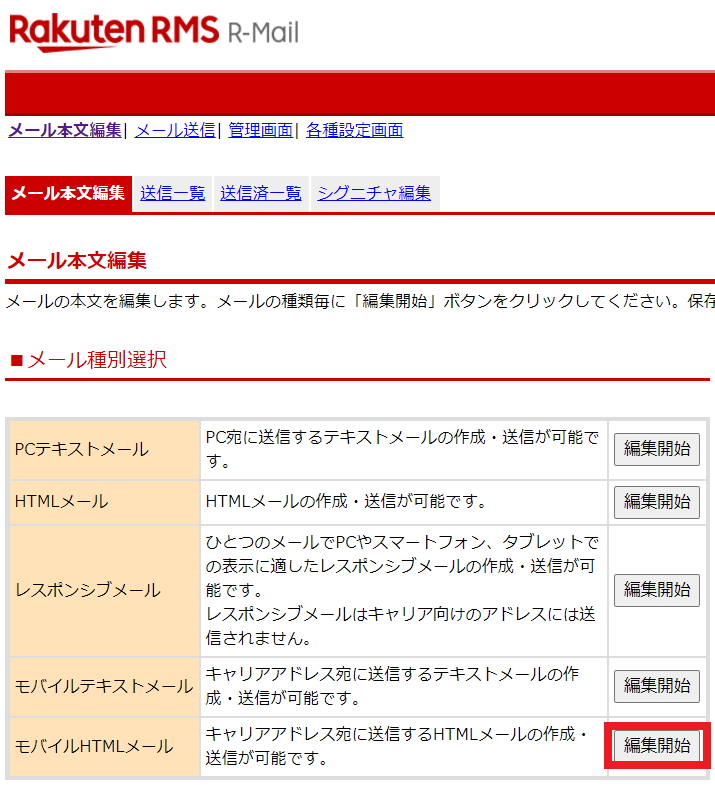
RMS Home > Newsletter Distribution > Edit Email Body > Mobile HTML Email
Just like HTML email
① Title
② Main Text
③ Main Text
Enter the following.
There are two main differences from HTML email:
・You can only insert images up to 240px wide
・There are no image buttons, as in HTML emails
Therefore, if you want to insert an image into a mobile HTML email,
You'll need to write and enter the HTML code yourself.
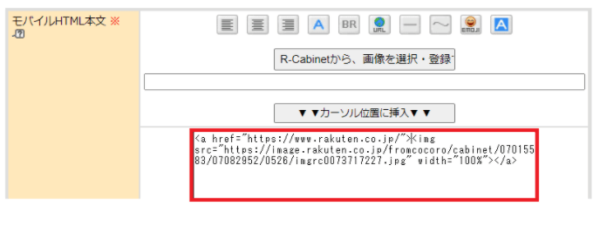
Once you get used to the controls, it won't take that long to
You'll be able to create them!
Except for inserting images, you can create it using the same steps as for HTML emails!
Points to Keep in Mind When Creating a Newsletter
Finally, when creating a newsletter on Rakuten,
Here are two key points to keep in mind!
Create it early and schedule it for delivery
Spots for the newsletter are available on a first-come, first-served basis.
The dates of the Shopping Marathon and Super Sale, and
It’s not uncommon for all the slots to fill up on days that are multiples of 5.。
Since slots tend to fill up quickly starting at 12:00 and 20:00—times when open rates are typically higher—
To Deliver Email Newsletters More Effectively
Create it early and schedule it for the optimal delivery time.
Be sure to review the performance metrics and implement the PDCA cycle.
HTML emails and mobile HTML emails are
You can measure the effectiveness of your campaigns using metrics such as open rates, referral rates, conversion rates, and heat maps.

Trends in titles with high open rates, and
Banner designs with high click-through rates, etc.,
Be sure to review the performance metrics and keep the PDCA cycle going.。
Summary
We’ve explained the benefits of Rakuten newsletters, how to create them, and key points to keep in mind when sending them!
Not only stores that haven't sent out newsletters yet, but also,
I hope this will be helpful to stores that are already streaming.
Hide&Seek, the author of this blog, is,
We are a Fukuoka-based company that provides management services for Amazon, Rakuten, and Yahoo! Shopping.
"I want to open a store on an e-commerce marketplace, but I don't have the resources to spare."
"We want to expand our sales channels while maintaining the competitive edge of our own online mall."
"I opened a store on an e-commerce marketplace, but I'm too busy to manage it properly, so my sales aren't going up."
Thank you for reading to the end!

アイキャッチnew.jpg)