

Are you familiar with Amazon's promotional discounts?
This is a feature we highly recommend you use to boost your sales on Amazon.
In this post, we'll cover everything from the benefits of Amazon promotions to how to set them up
I'll explain this in simple terms.
Please feel free to use this as a reference.
What is the Amazon Promotional Discount?
In marketing, “promotion” refers to raising awareness of a product, and
These are measures designed to promote purchases.
"Amazon Promotions"It is one of the promotional strategies.
When considering the purpose of the “Amazon Promotion” initiative,
First, let's review the principles of increasing sales.
=========================
Revenue = Number of Customers × Average Transaction Value × Conversion Rate (CVR)
=========================
When implementing strategies on Amazon,
"Number of Customers," "Average Revenue Per Customer," "Conversion Rate (CVR)"What aspect of this is the initiative aimed at?
We need to think about it.
"Amazon Promotional Discount" is
Through upselling and cross-selling客Measures to Maximize Unit Price。
If you'd like to learn more about upselling and cross-selling, please click here.
Have you ever seen a message like this on Amazon?
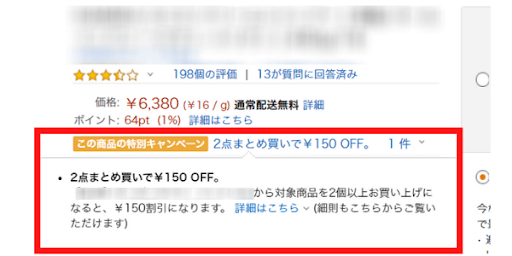
In this section, you can inform users about the details of the Amazon promotional discount.
This is one of the strategies we definitely want to implement to increase the average transaction value.
In addition, as promotional strategies to maximize sales on Amazon:
Posting ads and sales listings, issuing couponsinclude the following.
If you'd like to learn more about each topic, please see the articles below.
What are the requirements for setting up an Amazon promotion?
There is only one requirement for setting up an Amazon promotional discount.
"High-Volume Seller"That is the case.
Please note that small-scale sellers are not eligible for this promotion.
If you'd like to learn more about large-scale and small-scale listings,
Please take a look at this article.
Benefits of Amazon Promotions
Average spending per customer increases
As explained in “1. What Is the Amazon Promotion Discount?”,
When users take advantage of Amazon promotional discounts,
Increase in average revenue per customerI will.
You can reduce FBA shipping fees
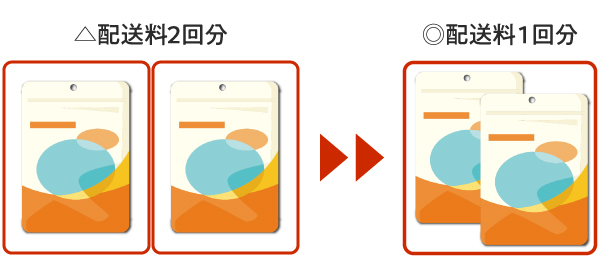
For FBA shipments where you can send two items together in a single shipment,
By purchasing in bulk,Keep shipping and handling costs downYou can.
By keeping shipping costs down,Profit Margin IncreasesI'll do that.
Leads to earning a cart box
Amazon promotional discounts areEarning a Cart BoxIt also affects...
Since the shopping cart conversion rate has a significant impact on sales, let's take steps to improve it.
Types of Amazon Promotions
Amazon promotions can be broadly divided into two categories.
①Discounts Based on Purchase Amount
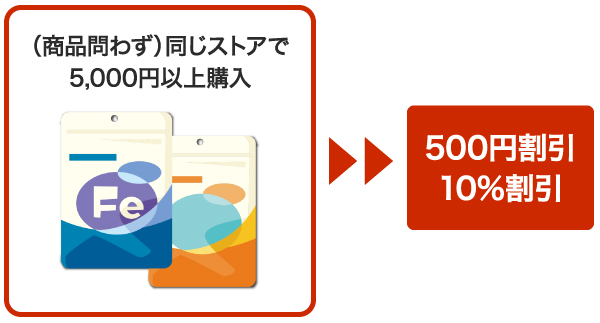
For example, a 500-yen discount on purchases of 5,000 yen or more, or 10% off,
This is a discount offered when the total purchase amount in the store exceeds a specified amount.
===============================
・The store offers a wide variety of products
・We want to encourage cross-selling
===============================
This is a recommended discount method for products like the ones listed above.
②Discount for Purchasing the Same Item
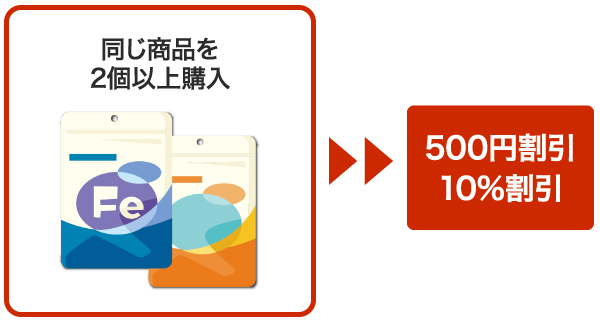
For example, a 500-yen discount or 10% off when you buy two or more items
Items for which a discount is applied when multiple units of the same product are purchased.
=====================
・I want to clear out my inventory
・I want to encourage upsells
=====================
This is a recommended discount method for products like the ones listed above.
Next, let's take a look at the specific discount methods.
*===*===*===*===*===*===*===*===*===*
・(For self-shipment) Free shipping on orders of 〇 yen or more
┗ Books, CDs, records, and videos/DVDs cannot be set up for free promotions.
・Get a discount on your purchase when you spend 〇 yen or more / buy 〇 items or more
・Get a discount on the product for every 〇 items purchased
・Discount for every 〇 items purchased in a single order
・Buy X items and get one free
*===*===*===*===*===*===*===*===*===*
What sales strategy do you want to pursue?After giving it some thought,
Let's choose a discount method.
Steps for Setting Up Amazon Promotions
First, log in to Seller Central, and
Click “Ads” → “Promotions.”
To set up a promotion, you need to follow these four steps.
1. Create a “Promotion”
2. Set "Discount Conditions"
3. Set the “Promotion Period”
4. Configure “Additional Settings”
Creating a Promotion
You can create a promotion from the "Create Promotion" tab.
There are also tabs labeled “Discount Rate” and “Buy One, Get One Free,” so choose the one that best suits your needs.
In this post, we'll look at the commonly used "Discount Rate" I'll walk you through this using the admin panel as a guide.
Step 1: Conditions
Let's set the terms for the promotional discount according to the items listed.
--------------------------------------------------------------------------------
①Eligibility Requirements
・Minimum Purchase Amount
If you select this option and enter "5000,"
「Get a discount of 〇 yen (〇%) on purchases of 5,000 yen or more"You can set up a promotion called '...'."
・Minimum Purchase Quantity
If you select this option and enter "2,"
「Buy two or more items and get a discount of 〇 yen (〇%)"You can set up a promotion called '...'."
・By purchase quantity
If you select this option,
「Number of items eligible for this promotionA field labeled "..." will appear.
Eligibility Criteria: "2"
Number of items eligible for this promotion: "1"When you enter,
「For every two or more items purchased, receive a discount of 〇 yen (〇%) per item"..."
You can set up promotions.
--------------------------------------------------------------------------------
②Items Purchased
・Entire Catalog
This applies to all currently listed items.
・ASIN List
・SKUList
Please enter all applicable ASINs or SKUs.
You can enter the next ASIN (SKU) by using a line break or a comma.
--------------------------------------------------------------------------------
③Promotion Details
・Discount Amount
Set the discount as a specific amount. (〇 yen off)
・Discount Rate
Set the discount as a percentage. (X% off)
・Fixed price (¥) for all items
The price of the item eligible for the discount will be the value you entered.
--------------------------------------------------------------------------------
④Apply Next
・Items Purchased
The discount will be applied to all products specified in “② Purchased Items.”
・Eligible Products
Only the specified ASINs are eligible for the discount.
--------------------------------------------------------------------------------
⑤ Set a budget
Please enter the budget for the campaign.
*Please note that the promotion will be suspended once 80% of the budget has been used.
We recommend setting aside a slightly larger budget.
--------------------------------------------------------------------------------
Step ⑥
You can add more perks as your product lineup grows.
・Get 5% off when you buy 5 items
・10% off when you buy 10 items
etc.
--------------------------------------------------------------------------------
Step 2: Implementation Timeline
Start Date, End Date
Period During Which the Promotional Discount AppliesSet the following.
The settings will take effect no sooner than 4 hours from the current time.
Therefore, you should make a schedule in advance
Let's set this up early.
In addition, the promotion has been canceled
It takes about 4 to 5 hours for the settings to take effect.
Since I can't just stop doing it right away,
It is important to carefully review the settings before applying them.
--------------------------------------------------------------------------------
Step 3: Additional Settings
--------------------------------------------------------------------------------
① Promotion Title
Please choose a title for your own reference so you can track the progress of the campaign.
This will not be displayed to Amazon customers.
--------------------------------------------------------------------------------
②Promotion Tracking ID
This field is optional.
It is recommended that you enter the information displayed initially.
--------------------------------------------------------------------------------
③Promotional Code
・Valid for one time only
Once among all usersYou can only use this.
・Group
When you select this option, you can generate a promo code, and
Only users who are codingYou can take advantage of promotional discounts.
・None
If the conditions set in Step 1 are met,
Users can take advantage of promotional discounts.
When setting up multiple promotions, you can configure conditions for how they are combined.
--------------------------------------------------------------------------------
④Combined Promotion
You can choose whether or not to allow this coupon to be used in conjunction with other coupons you have set up.
If you enable this, multiple discounts may apply, so please be mindful of the total discount amount when configuring the settings.
--------------------------------------------------------------------------------
⑤Display Promotions on Product Detail Pages
You can choose whether or not to display this on the product page.
Please be careful with your settings when implementing strategies outside of Amazon.
--------------------------------------------------------------------------------
Summary
This time, we'll discuss strategies for increasing average order value on Amazon.
「Amazon Promotional Discount"I explained [...].
Please be sure to take advantage of these strategies to maximize your sales.
Thank you for reading to the end!



アイキャッチnew.jpg)