

Advertising is essential for maximizing sales on Yahoo! Shopping.
70 to 80 percent of users use search results,
Or, as can be seen from the data on purchases made via categories,
Implementing search engine optimization is the fastest way to maximize sales.
In this post, we’ll cover Store Match ads, which are essential for search optimization.
Here’s the latest information on how to operate efficiently!
What are Store Match Ads (Item Match Ads)?
Store Match ads (also known as Item Match ads) are,
These are listing ads on Yahoo! Shopping.
It’s similar to RPP ads on Rakuten, but,
Instead of bidding on keywords,
The difference is that bids are placed on categories.
The content is displayed on both PCs and smartphones
The top four spots in the search results andIt's already been decided.
In the upper-left corner of the product imageProducts labeled "PR" are
This is displayed through Store Match ads.。
In the past,Although the bid was only for that category,
By signing up for StoreMatch Pro, you can now place bids on keywords.
Before running Store Match ads,
Please note that there are the following advantages and disadvantages:
Let's make sure we understand this.
Benefits
[1] You can get started with a minimum bid of 25 yen
The minimum bid for Store Match ads is 25 yen.
You can start running ads on a low budgetThat is one of the benefits of StoreMatch ads.
In addition, since it supports page navigation,
Even if you don't place the highest bid, your listing may still appear near the top of the search results.
[2] You can check the bid ranking
With Store Match ads,
On the ad settings screenYou can check the bid ranking.!
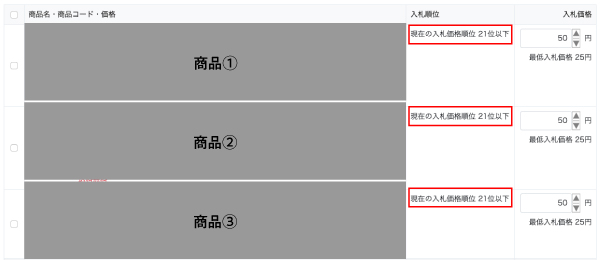
While referring to the bid ranking,
You can adjust the CPC to maximize cost-effectivenessis
That’s a benefit unique to Store Match ads.
[3] Easy for Beginners to Get Started
Rakuten RPP ads that bid on keywords, for example,
Which keywords to bid on and at what CPC
It can be difficult for beginners.
However, Store Match ads are
Simply select a product from the category and set the CPC to complete your ad campaign.。
Even beginners can get started easily.
Since you can set a monthly budget,
It is possible to expand while monitoring cost-effectiveness.
Start by setting a low budget, then implement the PDCA cycle,
Once things start running smoothly, let's increase the budget.
Disadvantages

[1] When submitting ads for a category, you cannot perform detailed targeting
Store Match ads that bid on categories are
A major advantage is that it’s easy for beginners to get started.
However,Just like ads that bid on keywords
Cannot perform detailed targetingThat is to say
It is important to understand that there are drawbacks.
For example, when placing an ad for portable mouthwash.
When bidding on a keyword,
"Travel-Size Mouthwash," "Single-Use Mouthwash," etc.
For those looking for a travel-sized mouthwash
You can run ads that target specific audiences.
However, item-match ads are
Since you can only bid on categories,
"Portable," and so onAs for specific keywords,
Strategies for product names, taglines, landing pages, etc.We have no choice but to do it.
[2] Even if you place the highest bid, you may not necessarily be displayed in first place.
Although Yahoo! Shopping's algorithm has not been disclosed,
The following factors are believed to be involved.
・Sales Results
・Product Name, Tagline
・Item Match Bid Amount
・PR option rates …etc.
To ensure that your products are displayed more frequently to your target audience,
We need to review product names, taglines, landing pages, and moreThere is, isn't there?
Even taking these drawbacks into account,
To Maximize Sales on Yahoo! Shopping
Running Store Match ads is essential.
Store Match Ad Settings

There are three ways to set up Store Match.
I'll explain each one in detail!
Bid on All Items at Our Discretion
StoreIt automatically manages all products at the optimal CPCHere are the bidding procedures.
For those who have just started using Yahoo! Shopping, or
Recommended for stores with a large number of products.
However, please note that you cannot exclude specific products.
Fixed-Price Bidding for All Items
Manage all products in the store using a flat CPC rateHere are the bidding procedures.
I just started using Yahoo! Shopping, and
Recommended for people who aren't sure which products will sell.
Individual Bidding
Choose the products you want to advertise yourself, and
This is a bidding method where you set a CPC for each product.
Of the three methods, this one allows for the most detailed configuration, so
It’s fair to say that this makes it easier to maximize cost-effectiveness.
First of all,After conducting a fixed-price bidding process for all items,
For products you want to promote more heavily, set a higher CPC through individual bidding.that
Here are some recommended settings!
Tips for Running a Campaign with a 600% ROAS

Review the performance report and implement the PDCA cycle
Be sure to review the performance report to maximize your return on investment.
Let's use the PDCA cycle to see if there's anything we can improve.
For example, despite the high number of clicks,
If you have products with low conversion rates,
Offering coupons or loyalty points might improve your conversion rate.
To avoid wasting advertising budgets
Be sure to have it adjusted regularlyLet's do it.
Don't forget to make adjustments to other aspects besides Store Match ads.
Store Match ads for which keywords cannot be selected are,
Product names, PR options, etc.
Factors other than advertising are also important...will eventually become.
Be proactive about the keywords you want to rank for in search results
Include them in product names and on product pages to optimize for search engines.
Also,It helps boost the foundation of SEO on Yahoo! Shopping
When it comes to PR options, it is also important to set the optimal rates
The Key to Search Engine OptimizationThat's how it works.
If you also manage a Rakuten store,
See also the article on Rakuten's CPC advertising, "RPP Ads"
Be sure to check this out too!
▼How to Manage Rakuten RPP Ads to Achieve a 900% ROAS
Summary
These are listing ads on Yahoo! Shopping.
We've explained Store Match Ads (Item Match Ads)!
This article is for those who operate Yahoo! Shopping
I hope this is helpful.
Hide&Seek, the author of this blog, is,
We provide management services for Amazon, Rakuten, and Yahoo! Shopping.
"I want to open a store on an e-commerce marketplace, but I don't have the resources to spare."
"We want to expand our sales channels while maintaining the competitive edge of our own online mall."
"I opened a store on an e-commerce marketplace, but I'm too busy to manage it properly, so my sales aren't going up."
If you're facing such concerns,
Please feel free to contact us using the contact form below.
Thank you for reading to the end!



アイキャッチnew.jpg)