

A Must-Read for Beginners on Selling on Amazon!
This time: ASIN, unit session rate, FBA, etc.
Here, we'll explain the basic terms you need to know for listing items.
When selling products on Amazon, you’ll encounter various technical terms, as mentioned above.
Let’s take the time to understand each of these terms and put that knowledge to use in our daily work.
When selling on Amazon, to increase sales,
These are terms you absolutely must know, so please be sure to use this as a reference!
Terminology Related to Amazon Product Information
First, I’ll explain the terminology needed to identify products on Amazon.
ASIN (Amazon Standard Identification Number)
ASIN (A-Sin) refers to items other than books sold on Amazon
This refers to the unique number assigned to a single product (product page).
It is similar to an ISBN or JAN code and is used to identify products on Amazon.
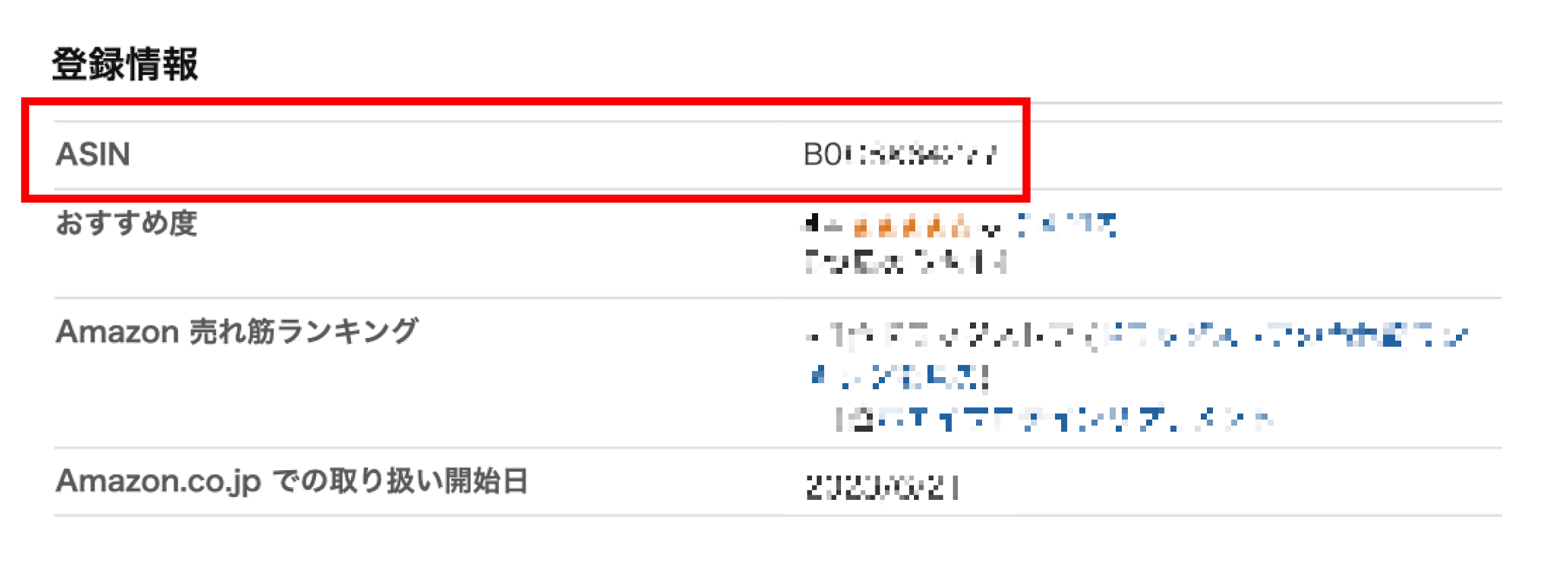
It begins with "BO" and consists of 10 alphanumeric characters.
Example: B071234567
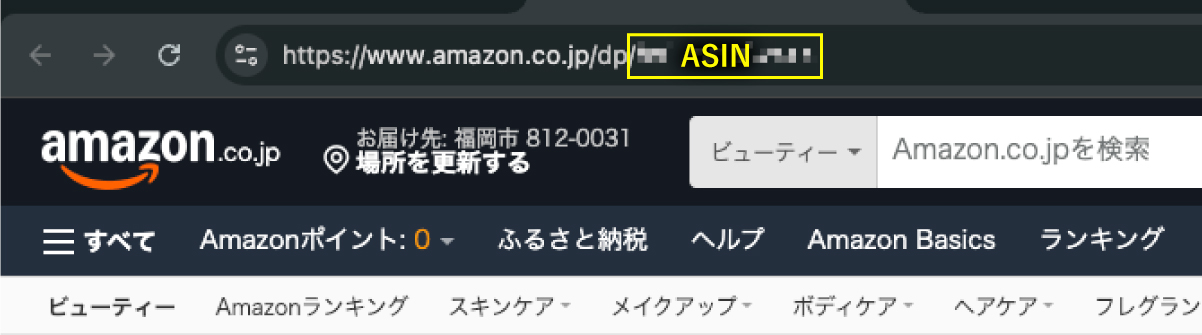
It is listed toward the bottom of the product page
You can check this in the "Registration Information" section or in the URL of the product page.
Parent ASIN / Child ASIN
There are two types of ASINs: "parent ASINs" and "child ASINs," and
This is a concept used to manage products that come in different variations, such as color and size.
The parent ASIN is a code that groups all variations together,
A child ASIN is a code assigned to each variation.
For example, let's say the same mascara comes in three colors: "black," "brown," and "red."
In that case, create a child ASIN for each of the three colors: “Black,” “Brown,” and “Red.”
A parent ASIN will be created on the product page that aggregates these items.
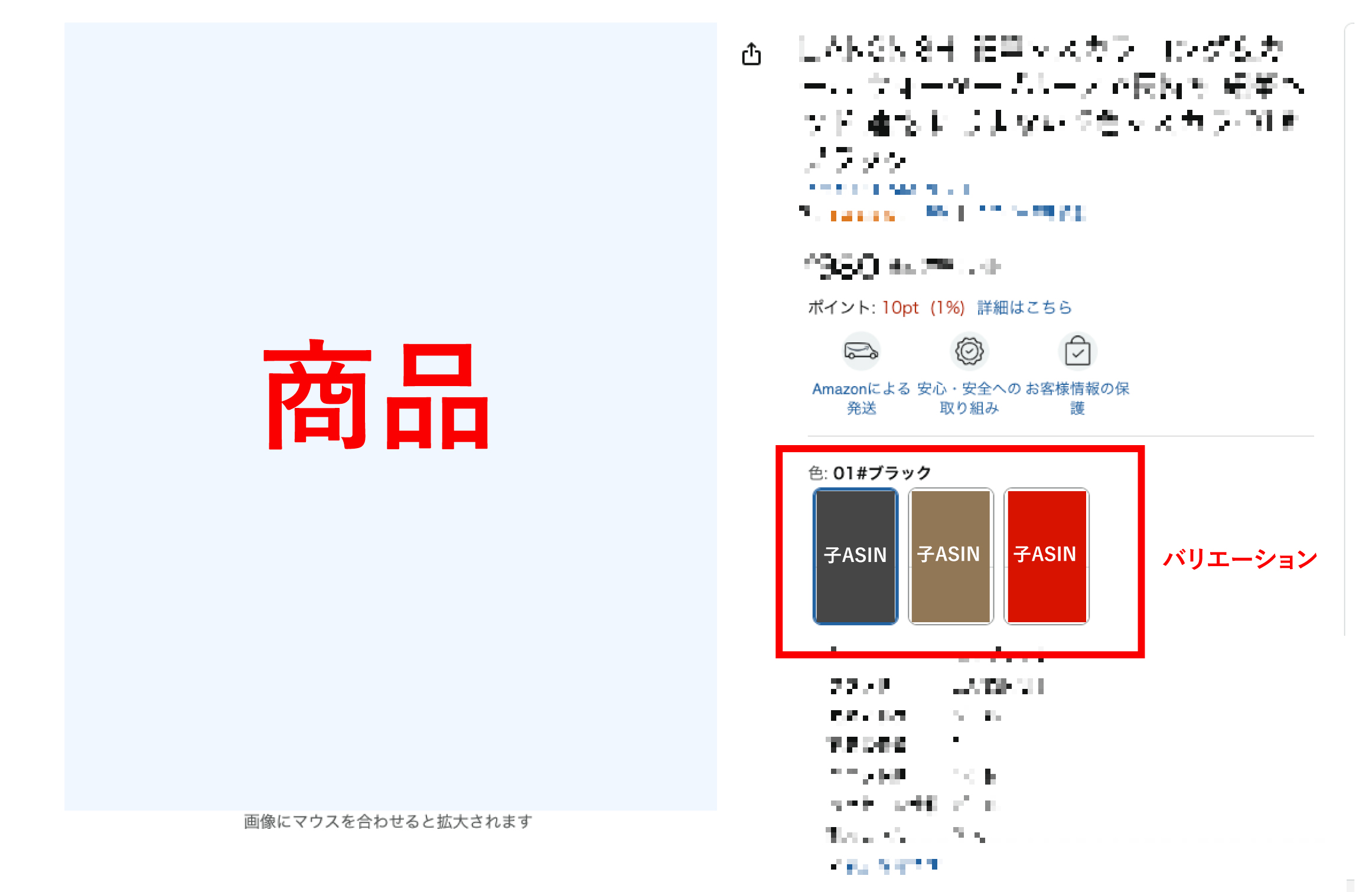
The parent ASIN isAn item that serves as the parent for multiple products (child ASINs) when creating variationsSo,
This is a fictional ASIN that is not associated with any specific product.
When creating variations, first register the parent ASIN, and then,
The process involves creating child ASINs for three different products so that they are linked to the parent ASIN.
By utilizing variations (parent ASIN, child ASIN),
Not only can users easily select colors and sizes on the product page, but
Managing product variations as a group also helps streamline inventory management.
For information on the procedure and benefits of registering variations,
We’ve covered this in detail in the article below, so please feel free to check it out!
SKU (Stock Keeping Unit)
SKU (SKU) stands for "Stock Keeping Unit," and
This refers to the codes used to manage product inventory.
This is a code used by sellers for inventory management; unlike an ASIN, sellers can set it freely on their own.
If you do not register, Amazon will automatically assign a name, which cannot be changed afterward.
If there are multiple sets of the same product,
It’s easier to understand if you add a number, such as 01 or 02, at the end.
JAN Code (EAN Code)
An international product identification code,
A JAN code is a 13-digit code used as Japan's standard product code.
It is assigned to many products and serves as an important code for identifying them.
The numbers located below the barcode on products sold in stores also fall into this category.
By the way, JAN codes are used in Japan, while EAN codes are used mainly in Europe,
UPC refers to the codes used in the United States.
When selling products on Amazon, it is possible to list products that do not have a JAN code, but
You may be asked to complete a procedure called an “Application for Product Code Exemption.”
For a detailed overview of the product registration process, please see the following article,
If you'd like, please check this out too!
Browse Notes
Browse Notes are a tree-structured representation of Amazon's product categories.
Setting up Browse Notes not only makes it easier for customers to find products, but also,
Since this is a very important factor for Amazon's search algorithm,
Be sure to categorize your products in the appropriate categories!
Sales and Ordering Terminology
Next, the following are necessary when formulating sales strategies or conducting numerical analysis based on business reports:
Here, we’ll introduce some terms related to sales and orders.
Amazon sellers can view a variety of dataBusiness Reportand,
You can view this by going to [Reports] → [Business Reports] in the Seller menu.
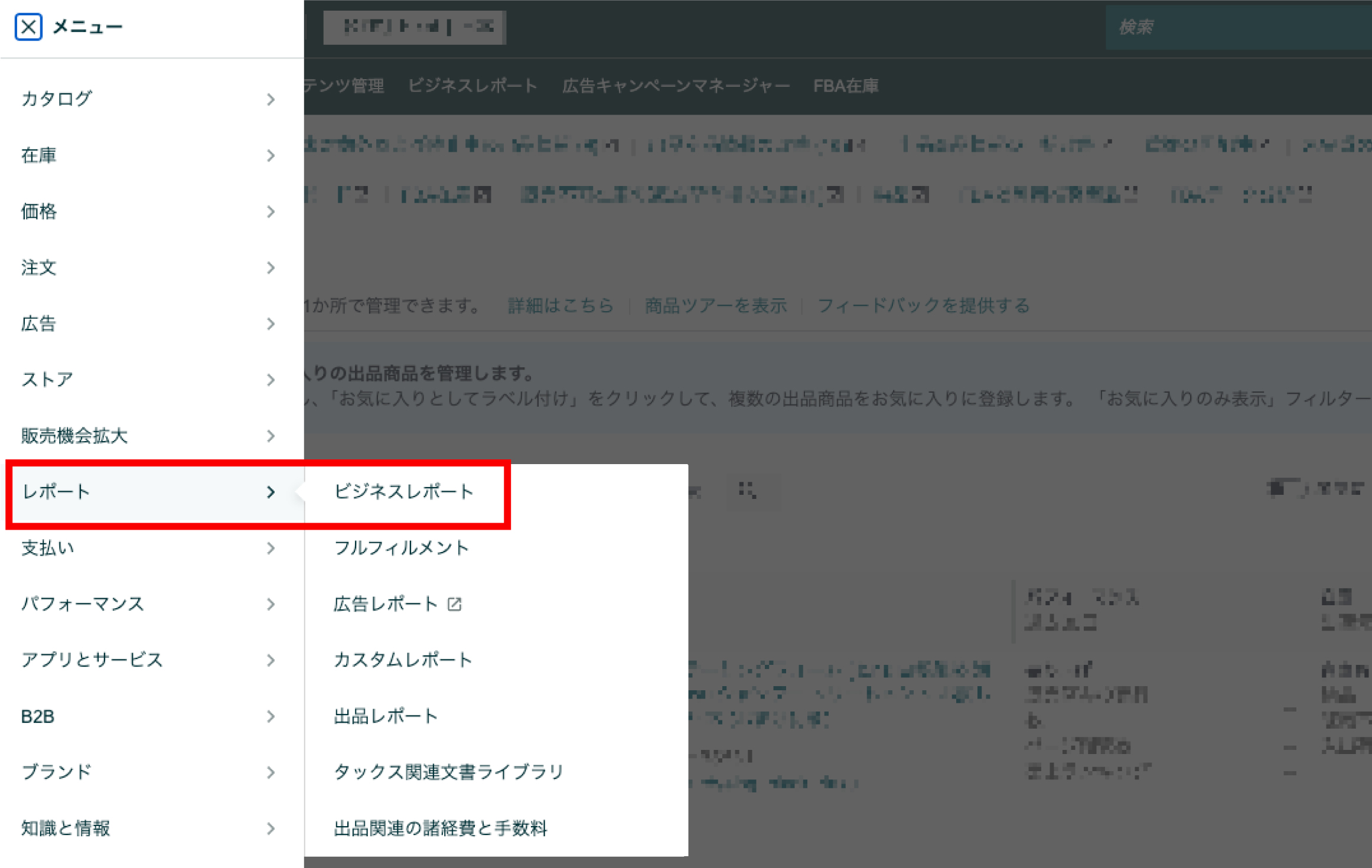
We will provide detailed explanations of the terms you need to understand when analyzing data.
Session
A "session" refers to the number of people who visited a product page,
Even if you visit a product page multiple times within 24 hours, it will still count as one visit.
Users who visit the page via an ad are also counted, but
We cannot tell whether a user came from the search results page or from an ad.
Page Views (PV)
A page view is the number of times a user has viewed a page, and
Each visit counts as one visit.
For that reason, the number should normally be higher than the session count.
The higher the number of page views, the greater the interest in the product page is likely to be.
However, if the number of page views is far too high compared to the number of sessions,
Since it’s likely being compared to other products,
Be sure to take steps such as adding product information and enhancing your product images.
Cart-to-Order Conversion Rate
The shopping cart conversion rate is,
This is the percentage of items added to the cart that resulted in a completed order.
| Cart Conversion Rate = Number of Confirmed Orders ÷ Number of Items Added to Cart × 100 |
Amazon has a rule that each product must have its own page.
The following product is currently listed by six different shops.
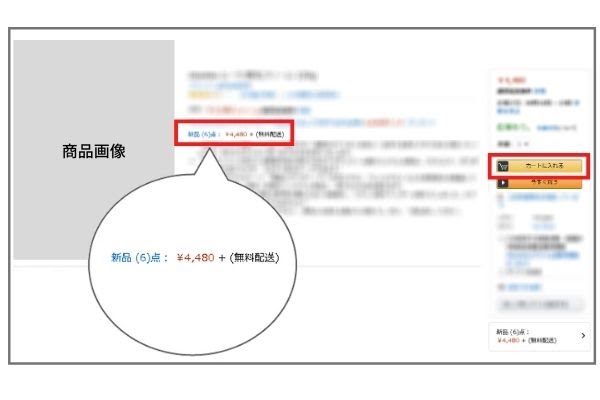
When you click [Add to Cart] on the right,
You will be purchasing from the seller who has the cart.
Since most users make purchases without knowing about this Amazon feature,
Acquiring shopping carts directly leads to increased sales.
When reviewing your business reports, be sure to keep an eye out for low cart conversion rates.
If the cart conversion rate is low, offer incentives such as free shipping or coupons,
Measures such as simplifying the purchase process will be necessary.
In some cases, resellers have snapped up the carts, so,
In that case, we recommend taking steps to prevent resale as soon as possible to avoid lost opportunities.
For more information on reselling, check out the article below!
By the way, there is a rule that only “Large-Volume Sellers” are eligible to receive a cart box.
If you'd like to learn more about large-volume and small-volume listings, check out this article!
Number of Items Ordered / Total Number of Ordered Items
The "number of items ordered" refers, quite simply, to the "number of items" ordered.
The "Total Number of Ordered Items" refers to the number of different items ordered.
For example, if a single user purchases two of the same items,
The number of items ordered is counted as 2, and the number of order lines is counted as 1.
Therefore, “Number of Items Ordered” > “Total Number of Ordered Items,” and
If the difference is too great, it's likely that one person purchased multiple copies.
In such cases, listing multiple items might help you increase your sales!
Unit Session Rate
The unit session rate is defined as,
This refers to the percentage that indicates how many of the visitors to a page made a purchase.
| Unit Session Rate = Sales ÷ Number of Sessions × 100 |
On Amazon, this is referred to as the "unit session rate," but
This is commonly referred to as CVR, CV rate, or conversion rate, and it is a metric that indicates a product page’s sales performance.
Increasing the number of sessions and driving those numbers even higher will lead to higher sales.
Terms You Need to Know When Viewing Ads

Next, I’ll explain the terms you’ll need to know when looking at ads.
Advertising on Amazon is very important for growing sales.
If you'd like to learn more about the types of ads available on Amazon, please check out this article.
ACoS (A-Cos)/ROAS (Roas)
ACoS (A-Cos) refers to the ratio of advertising expenses to sales.
You can measure how much advertising costs were incurred to generate sales.
| ACoS = (Ad Spend ÷ Revenue) × 100 |
For example, if you spend 1,000 yen on advertising and sell a product for 1,000 yen,
ACoS will be 100%.
Therefore, the lower the ACoS, the better.
Sellers can also view a metric called ROAS.
ROAS is a metric that shows how many yen in revenue were generated for every 1 yen spent on advertising.
| ROAS = Advertising Cost ÷ Revenue × 100 |
When managing ads on Amazon,
The two points mentioned above are very important metrics, so be sure to keep them in mind!
Impressions
An impression is the number of times an ad is displayed.
The higher the number of impressions, the more users are exposed to the product.
To raise awareness of our products, we need to increase the number of impressions.
"Sponsored Products," one of the ad formats on Amazon, is
Because CPC ads use an auction-based system,"Bid Amount × Relevance"This determines the number of impressions.
If you're interested in managing "Sponsored Products" ads,
Please take a look at this article.
Click-Through Rate (CTR)
Click-through rate (CTR) is the percentage of displayed ads that were clicked.
With CTR, you can see how many people are interested in your product.
However, a higher CTR isn't necessarily better.
In the case of CPC ads, even if the CTR is high but there are no orders,
Be careful—you’re just wasting your advertising budget.
Terms Related to Shipping and Product Listing

Next, I’ll explain in detail the terms used for shipping and product registration!
FBA and Self-Shipping
There are two ways to ship products.
One of them is FBA.
FBA stands for "Fulfillment by Amazon," and
A service provided by Amazon that handles everything from order management to shipping and customer service.
Although there is a fee, it not only reduces the burden of shipping operations, but also,
Supporting Amazon Prime can help increase customer satisfaction.
It's a very convenient service that lets you leave all shipping-related tasks to FBA.
The article below provides detailed information on the benefits, fees, and more. Be sure to check it out!
In addition to FBA, there is also a "self-fulfillment" shipping method.
"Self-shipping" means,
This is a method where you handle everything yourself, from order management to shipping and customer service.
Unlike FBA, you have to do everything yourself, but,
"I don't want to pay FBA fees"
"The number of items sold is small, so I can handle the shipping myself."
In that case, you might as well ship it yourself.
New Listings / Combined Listings
There are two ways to list an item.
The first one is “New Listing,” which allows you to list products that aren’t yet available on Amazon.
If the product is already being sold on Amazon, you'll need to list it as a "co-listed" item.
That’s because, as I mentioned earlier, on Amazon,
This is because you can only create one page per product.
If you'd like to learn more about how to list items, please read this article.
Other
I'll also go into more detail about other terms you should be familiar with.
Brand Registration
"Brand Registration" is a service that helps protect your brand on Amazon.
By registering a trademark, you can protect your intellectual property rights and
You can create a store page similar to HP's on Amazon.
For information on the benefits of trademark registration and how to register,
This article explains it in detail, so be sure to check it out!
Subscription Savings Plan
On Amazon, there's a service called "Subscribe & Save"
There is a service that allows you to purchase eligible products at discounted prices on a regular basis.
Although the seller bears the cost of the discount, it is one of the strategies used to increase repeat business.
In the article below, I’ve outlined the six features of the Regular Savings Plan.
If you're interested, please take a look at this article.
Points, Coupons, and Promotions
Amazon offers points, coupons, and promotions to boost sales.
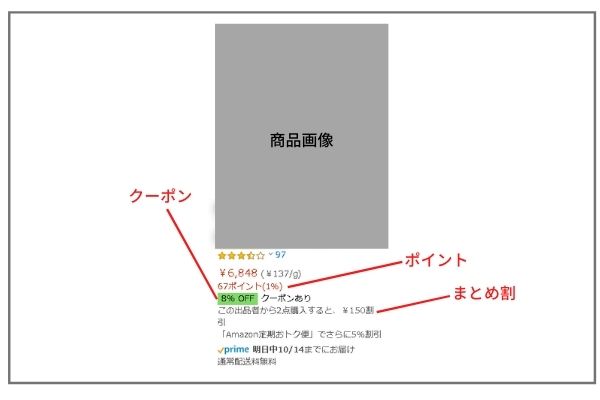
To increase sales on Amazon, it is important to implement these strategies.
Click here for an article that explains in detail how to take advantage of promotional discounts.
Please be sure to check it out.
Amazon SEO
Most people on Amazon use the search function to find products.
It is also said that 70% of searchers do not look beyond the second page.
Therefore, to increase sales on Amazon, you must implement strategies to rank higher in SEO results.
For information on how to rank higher in Amazon SEO and SEO strategies,
This is explained in detail in the article below, so please check it out if you'd like to learn more.
Summary
In this post, I explained the terms you absolutely need to know when using Amazon.
I've also included instructions on how to use it, so please be sure to read through them again!
Hide&Seek, the author of this blog, is,
We are a Fukuoka-based company that provides management services for Amazon, Rakuten, and Yahoo!.
We provide Amazon management services for more than 60 companies.
"I want to open a store on an e-commerce marketplace, but I don't have the resources to spare."
"We want to expand our sales channels while maintaining the competitive edge of our own online mall."
"I opened a store on an e-commerce marketplace, but I'm too busy to manage it properly, so my sales aren't going up."
If you're facing such concerns,
Please feel free to contact us using the contact form below.



アイキャッチnew.jpg)