


Your store is essential for strengthening your branding on Amazon.
For those of you who are wondering, “How do I go about creating a store?”, this article will cover the basics of Amazon stores.
Master the terms of use and how to create listings to boost your sales on Amazon!
What is the Amazon Store?
What Is the “Amazon Store”?A feature that allows you to showcase your company's brand and products through custom pagesThat's what it means.
There are no additional charges; you can use it for free.
As you all know, Amazon product pages are shared with other sellers, so the design offers limited flexibility.
As a result, there are limits to how much branding can be done on product pages.
However, since you can create your own Amazon store, you have the freedom to tell users about your brand.
Let’s make active use of the store to help users become more familiar with our brand and products.
4 Benefits of the Amazon Store
Next, I’ll share four benefits of using the Amazon Store.
① Strengthening Branding
The biggest advantage of the Amazon Store is “You can build your brand through your website"That's it."
While you must comply with Amazon's terms and conditions, you can customize the design to match your company's brand.
② Strengthening External Advertising
An Amazon Store does more than just strengthen your brand presence on Amazon.
Would you believe it?You can set it as the destination for ads outside of AmazonThat's right.
You can use it not only for Google and Yahoo, but also when running ads on Instagram and Facebook.
Sellers who are looking to attract users from outside of Amazon should definitely consider listing their products on external links.
③ Capable of performing various analyses
While the admin panel for product pages only displays metrics such as page views and purchase counts, the Amazon Store allows you to analyze user behavior in great detail.
- ・Number of visitors by day
- ・Daily page views
- ・Sales Revenue via the Store Page
- ・Number of sales generated through the store page
- ・Sales: An estimate of the total sales generated within 14 days of a store visitor’s last visit
- ・Traffic Sources
Let’s analyze the figures above and implement the PDCA cycle to determine whether it’s better to focus on branding or to highlight the product’s strengths.
④ It comes with templates that are easy to edit
Creating an Amazon store does not require any difficult tasks, such as coding.
Since there are customizable templates available, you can create your design by inserting images according to the template layout.
Since there are several types of templates available, you can choose the one that best suits your company's brand and the message you want to convey.
Amazon Store Terms of Use
There are two main requirements for using the Amazon Store.
① It must be a bulk listing
Amazon offers two listing options: “Large-scale selling” and “Small-scale selling.”
The Amazon store featured in this article is available to “Wholesale Listings"Only sellers who are doing this."
There are many benefits to “Large-Scale Listing,” so if you’re currently listing as a “Small-Scale Seller,” we encourage you to consider switching.
▼ Click here for details on “Large-Volume Listings” and “Small-Volume Listings”
② The brand must be registered
"Amazon Brand Registry" is a program designed to "support the protection of your brand on Amazon."
We recommend registering your brand, as doing so will give you access to a variety of services beyond just your store page.
We've put together a summary of the benefits of trademark registration and how to register, so please take a look.
▼Click here for details on brand registration
How to Create an Amazon Store
Did you gain a better understanding of the Amazon Store?
Next, I'll explain how to create a store.
Let's work through the process together while following the steps.
① Click the "Store" tab
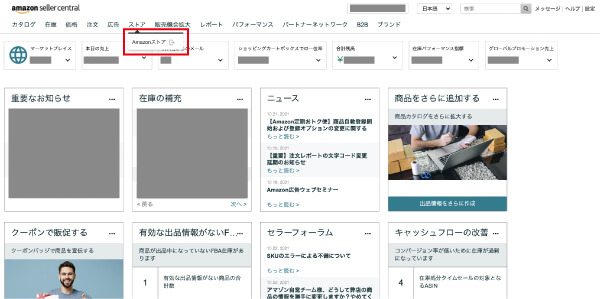
② Click “Create Store” next to the brand name
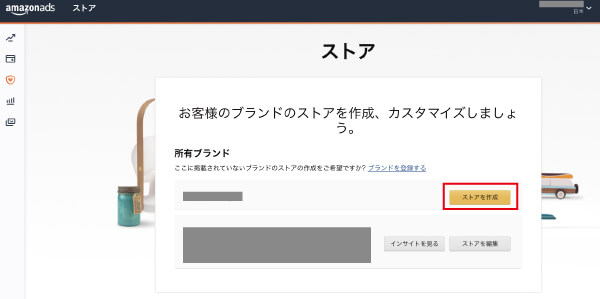
③ Enter the brand name
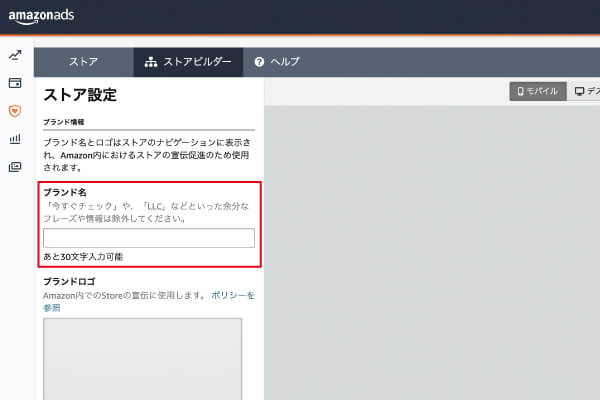
④ Apply the logo and click “Next”
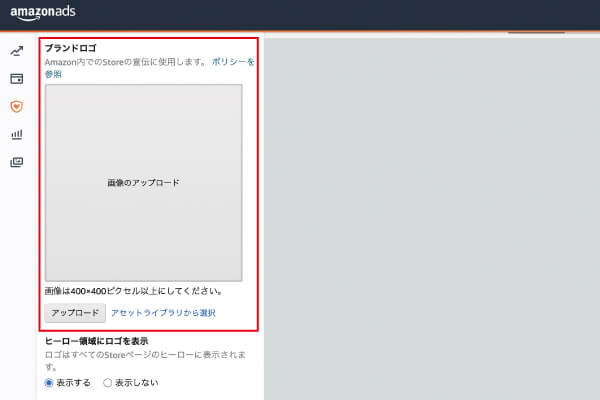
⑤ Enter a brief summary of the page content in the meta description box on the page
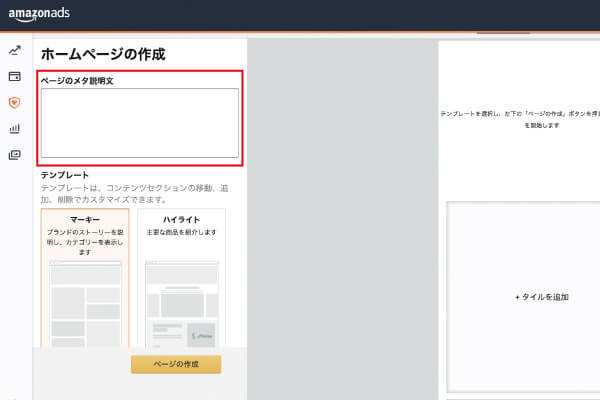
⑥ Select a template and click "Create Page"
There are four types of templates, but you can edit them later.
⑦ Select the "Add Content" template and click "Create Page"
Click "Add New Section" on the right to start adding content.
You can add a variety of content, from images to videos.
▼Sample Content
- ・Image
- ・Products
- ・Images with text
- ・Showcase Images
- ・Text
- ・Video
- ・Product Grid
- ・Gallery
- ・Best-selling products
- ・Recommended Products
- ・Promotion Widget
Let’s create a store that’s ideal for our company’s branding and cross-selling, while regularly updating the content.
⑧ Click “Submit for Review”
Once you've finished creating it, submit it to Amazon and wait for the review results.
How to Check the Amazon Store Page URL
Finally, I’ll explain how to check the Amazon store URL.
Please try using this in settings related to external ads.
① Check your seller ID (seller token)
First, check your seller ID (seller token) in Seller Central.
A seller ID (seller token) is a code assigned to Amazon sellers that begins with the letter "A."
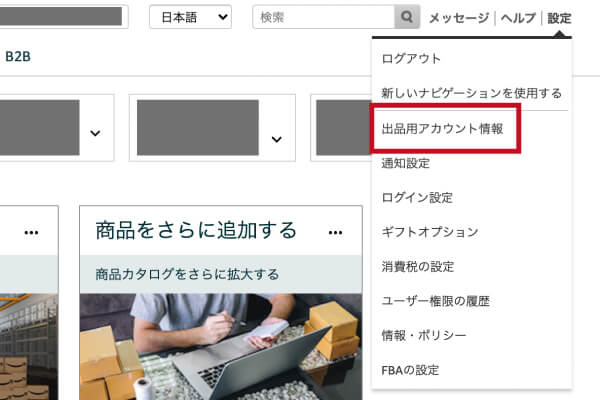
Click "Seller Account Information" under "Settings"
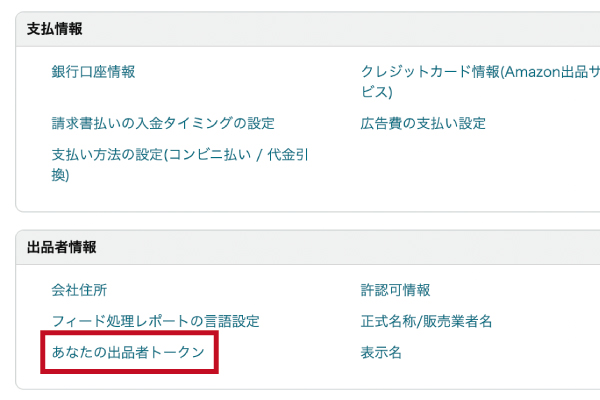
Click “Your Seller Token”
② Substitute into the URL
・https://www.amazon.co.jp/s?me=
・https://www.amazon.co.jp/shops/
All you have to do is enter your seller ID (seller token) after "me=" or "shops/" in the URL above.
Summary
In this article, we explained the importance of your Amazon store for building your brand on Amazon.
Please be sure to give this a try as one way to boost your sales on Amazon.



アイキャッチnew.jpg)