


The Rakuten Super Sale, held once every three months, is the best opportunity to boost sales.
So, in this post, I’ll tell you all about “Search Requests”—a feature you’ll definitely want to take advantage of!
Why should I submit a Search application? What kinds of products should I list? How can I pass the review process…?
Since it covers topics like these, Rakuten users should definitely bookmark this page!
What Is a Search Request?
A search request is a request made during the Super SALE period
This involves submitting a request to Rakuten when selling an item at a price lower than the regular price.
If you pass the screening,A special search bar featuring only sale items (Super SALE Search)の
You can display your store's products in search results.
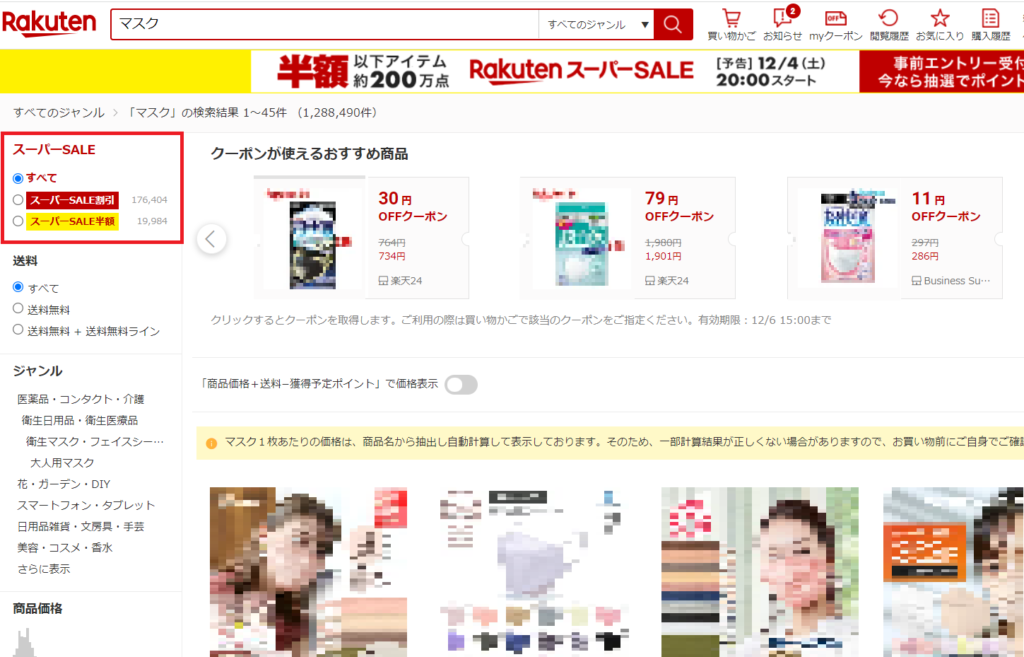
On a smartphone, you can narrow down your search using tabs.
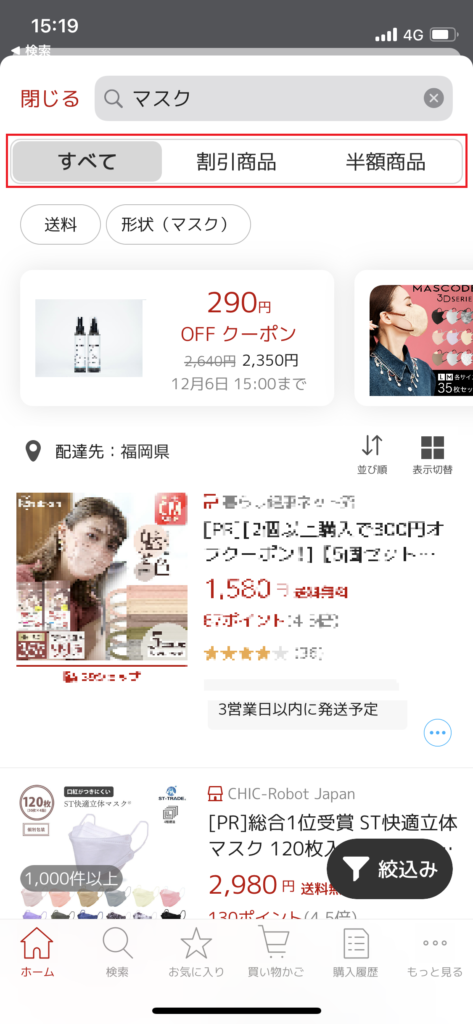
As you can see from the red box in the image,
●Products with 10–491 TP3 TOFF
●Items with 50% or more off
You can choose either option to apply.
Benefits
[1] A significant increase in traffic from Super SALE Search is expected
To efficiently find great deals, many users...
Browse for products on the Super SALE special page.
Installed there is,
A special search bar featuring only sale items (Super SALE Search)That's it.
Therefore, simply by submitting a search request,
Now you can sell your products in a spot that’s more visible to users than usual!
During one of the Super Sales, the number of items found at half price was
There is also data indicating that this represents about 1/150 of Rakuten's total number of products.
In other words,Just by submitting a search request,
Your site is about 150 times more likely to receive traffic if you don't applyThat's the point.
[2] A discount item icon appears
For products that have passed the search application process,
If the discount is 10% or more, it’s a “Super SALE Discount,”
If the discount is 50% or more, an icon labeled "Super SALE 50% Off" will automatically appear.
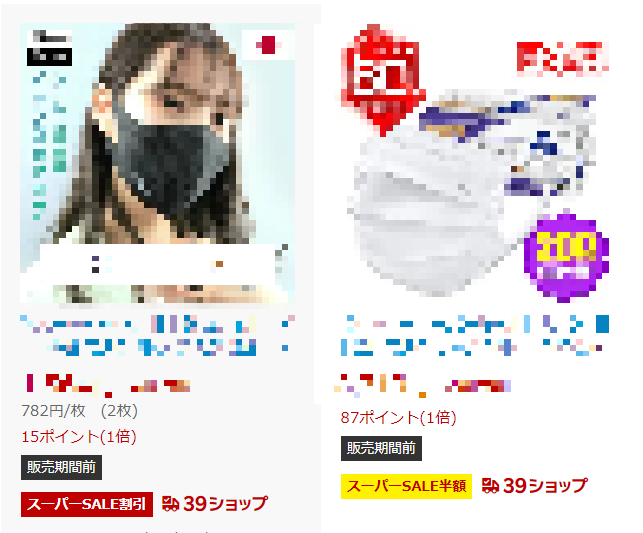
Therefore,Even when a search is performed using the standard search bar,
It's more likely to catch users' attention and is expected to increase trafficThat's right.
Disadvantages
[1] You must apply a direct discount
A condition for submitting a search request is that the selling price itself must be reduced by at least 10%.
If you focus on short-term profits, it might actually result in a loss.
However, the fact that new users who make a purchase during the Super SALE period go on to become repeat customers, and
Considering that reviews accumulate on product pages and increase the conversion rate,
It’s probably worth considering a search application, even if it means setting aside short-term profits.
[2] Search engine optimization is not sufficient if you rely solely on search submissions
Super SALE Search does not have RPP ad slots like a regular search bar.
Therefore, simply submitting a search request is not enough to ensure proper search optimization.
In areas where you can be creative, such as product names, taglines, and product descriptions
We need to make sure our SEO improves.
▼Click here for information on managing RPP ads
Products for Which You Should Submit a Search Request
Do you understand the search request process?
Here, I’ll briefly discuss which products you should submit for search indexing.
There are three main types of products for which we strongly encourage you to submit a search request:
① New Products: A chance to boost traffic, increase sales, and improve your SEO!
② Top-selling items in stores: Offer discounts on award-winning products to create a sense of exclusivity and boost sales
③ Seasonal Products: Encouraging users to buy what they’re looking for right now at a great price
Please try applying this to the products in your own store!
How to Apply
Next, I’ll explain how to submit a search request!
There are two ways to submit a search request.
When applying via the regular page
This applies when you submit an application on the page you normally use for sales.
Search applications will open approximately three weeks before the start of the Super SALE.
In this case, until the Super SALE begins
Since this would result in sales on the regular page coming to a halt,
Until the Super SALE begins, sales will be conducted on the copy pageI recommend doing that.
The application process for RMS is as follows.
[1] Change the product information in the application
RMS Home > Product Management > Product List & Registration > Select Product
(1) Price Changes
"Selling Price": The price at which the item will be sold during the Super SALE period,
Enter the original price in the “List Price” field.
The price shown is our “regular price,”
Only "Manufacturer's Suggested Retail Price" and "Data from Product Price Navigator" are valid.
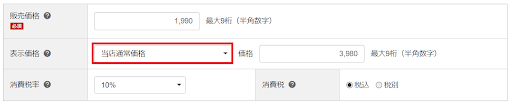
② Change in Sales Period
Set the sales period to fall within the Super SALE period.

If you want to set a sales limit, configure it here.
[2] Submit your application via the form
RMS Home > Product Management > Event Product Application
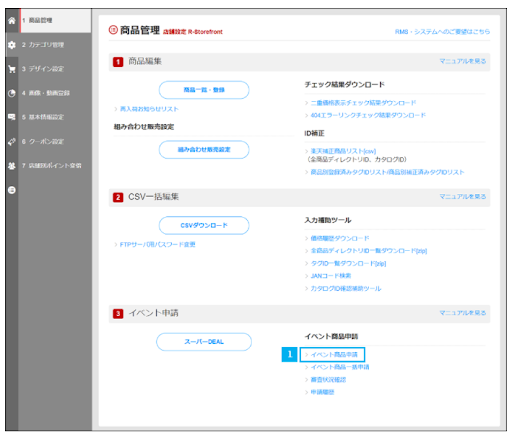
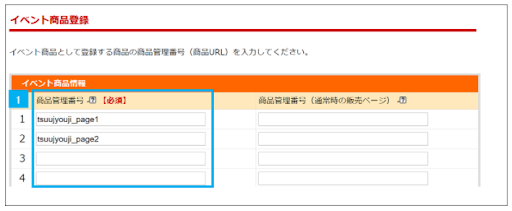
*Source: Rakuten Ichiba
In the left column (blue box) of the event product information, enter the product management number for the product you wish to apply for.
Finally, click the "Apply" button to finish.
Considering that sales records and reviews will accumulate over time, it is preferable to submit the application through the regular page.That's it!
When Applying via the Copy Page
If it is difficult to apply using the standard page, you can also apply using the copy page.
In that case,
・An increase in the number of fields to fill out when submitting an application
・When registering a new product, do so before the deadline set by Rakuten.
You need to keep these two points in mind!
In the column on the left, enter the product management number for the page you wish to copy,
Just enter the product management number from the regular sales page in the column on the right.
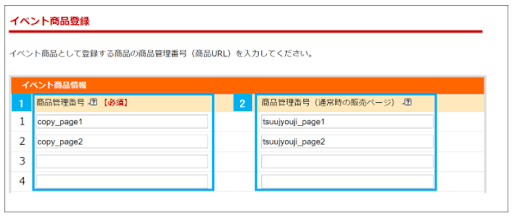
*Source: Rakuten Ichiba
Pitfalls to Watch Out For
Finally, here’s what you need to know to pass the search application process
Here are some pitfalls to watch out for.
Setting the Sales Period
Both the start and end dates and times must be set within the Super SALE period.
If you do not set a sales period, your application will be rejected.
Setting the Original Price for Listed Products
"Listed Price" refers to "Our Regular Price,"
"Manufacturer's Suggested Retail Price" and "Refer to Product Price Navigator data"
Only one of these can be used as the original value.
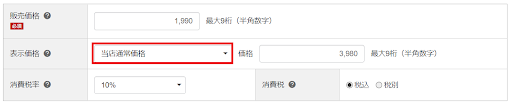
Discount rates are rounded down to the nearest whole number.
Discount rates are calculated in increments of 1%; any decimal places are rounded down.
For example, items with a discount rate of 49.9% are not "Super SALE Half-Price" items, but
It will be classified as a “Super SALE” item.
Measures Before and After Submitting a Search Application
Granting product-specific coupons before or after a search request, or
You need to be careful when awarding pointswill be.
Let's use the examples below as a reference to plan our strategies for before and after the Super SALE.
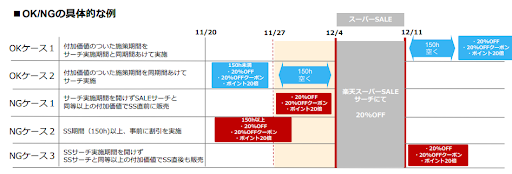
*Source: Rakuten Ichiba
Summary
In this post, we’ve covered how to apply for the Super SALE Search!
Did you understand the key points to keep in mind?
In order to continue growing sales,
It is essential to build a track record during the Rakuten Super Sale, which takes place once every three months.
Be sure to give the search request feature a try during the next Super SALE!
Thank you for reading to the end!



アイキャッチnew.jpg)