


Rakuten has a feature called “Subscription,” and it actually plays a major role in maximizing sales.
For those who haven't implemented this yet, or those who have but aren't seeing much improvement, we'll walk you through everything from setup to best practices.
What exactly is Rakuten's subscription service?
What Is a “Subscription”?
This is a sales method that allows us to continuously deliver the same product to a user according to their specifications once they have made a purchase. On Rakuten Ichiba, signing up for a subscription is referred to as “subscribing” rather than “purchasing.”
While it’s common to buy one item per month, subscription plans have recently become more diverse, with options such as two items every two months or three items every three months.
In addition, Rakuten Ichiba has been placing greater emphasis on subscription services year after year, and the platform continues to be updated annually.
What Kinds of Products Are Suitable?
As expected, items that are purchased repeatedly—such as household goods and food—are the staples of subscription services.
Supplements, cosmetics, and beverages have long been popular categories.
Also, while you often see food items offered as “subscription services” through the Hometown Tax Donation program, this is a different system from Rakuten’s subscription service, so I won’t go into detail about it here.
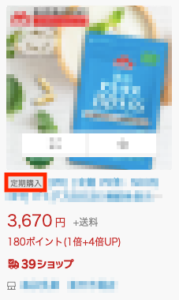
On Rakuten Ichiba, the key indicator that a product is a “subscription item” is the “Subscription” badge displayed before the product name (see the image below).
Pros and Cons of "Subscription Purchases" on Rakuten Ichiba
Subscription services have become one of the mainstream trends in the online retail industry, and public awareness of them is growing; however, some users also seem to have negative perceptions, such as “there are minimum purchase requirements” and “it’s hard to cancel.”
With that in mind, let’s take a look at whether or not you should sign up for a subscription service, and examine the pros and cons of doing so.
Benefits
① It’s easier to generate stable revenue
If it's a standard product, customers might switch to a competitor as soon as one appears.With a subscription service, it becomes harder to switch providers.
It will also allow you to forecast monthly sales figures and other metrics, making it easier to create sales plans.
② When added up, this results in significant sales
As the number of recurring products increases—from one to two, three, four, and so on—stable sales will continue to grow. Even if there isn’t a temporary surge in sales,If you keep piling them up, they'll form a big mountain.
③ Customers will remember your store
One characteristic of Rakuten Ichiba users is that they tend to “buy from stores.”
For example, even when you’re just buying a single mask, you often find yourself looking around the store, thinking, “I wonder if there are any other good deals,” and before you know it, you’ve bought three items at a single store! That happens all the time, doesn’t it?
By introducing other products to users who have signed up for a subscription—whether on product pages, in email newsletters, or via our official LINE account—we can increase the chances that they’ll purchase additional items.
It’s the best feeling when people become “fans” of your shop, isn’t it?
④ Likely to be reordered
One of the key factors in increasing sales is “encouraging repeat business,” and subscription plans are an essential part of that. With subscription plans, as long as users don’t cancel,Because these are recurring orders, they are more likely to result in repeat purchases than one-time purchases.That's right. If we can implement measures to prevent repeat orders through the system, we'd like to do so as soon as possible.
Disadvantages
It's difficult to make adjustments when we run out of stock
As you know, with a subscription, orders continue unless you cancel. Therefore, even if you temporarily close the subscription product page because you suddenly run out of stock, until then...Orders from users with a subscription will automatically continue regardless of inventory status.. In that case, we anticipate that we may need to adjust the delivery date or respond to inquiries, so we’ll need to be very careful about this.
How do I set it up?
Basic setup in just three easy steps!
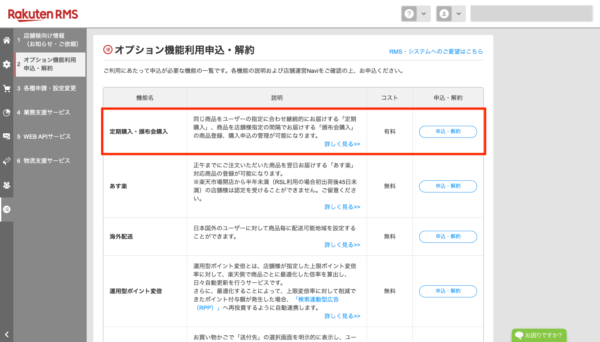
(1) First, submit your application through RMS
Since the subscription service is an optional service, you must apply for it through RMS.
Just click the "Sign Up" button under [RMS Home > Information & Services for Merchants > Sign Up for/Cancel Optional Features > Subscription & Club Purchases]. You'll be able to start using it right away.
(2) Register a recurring product page
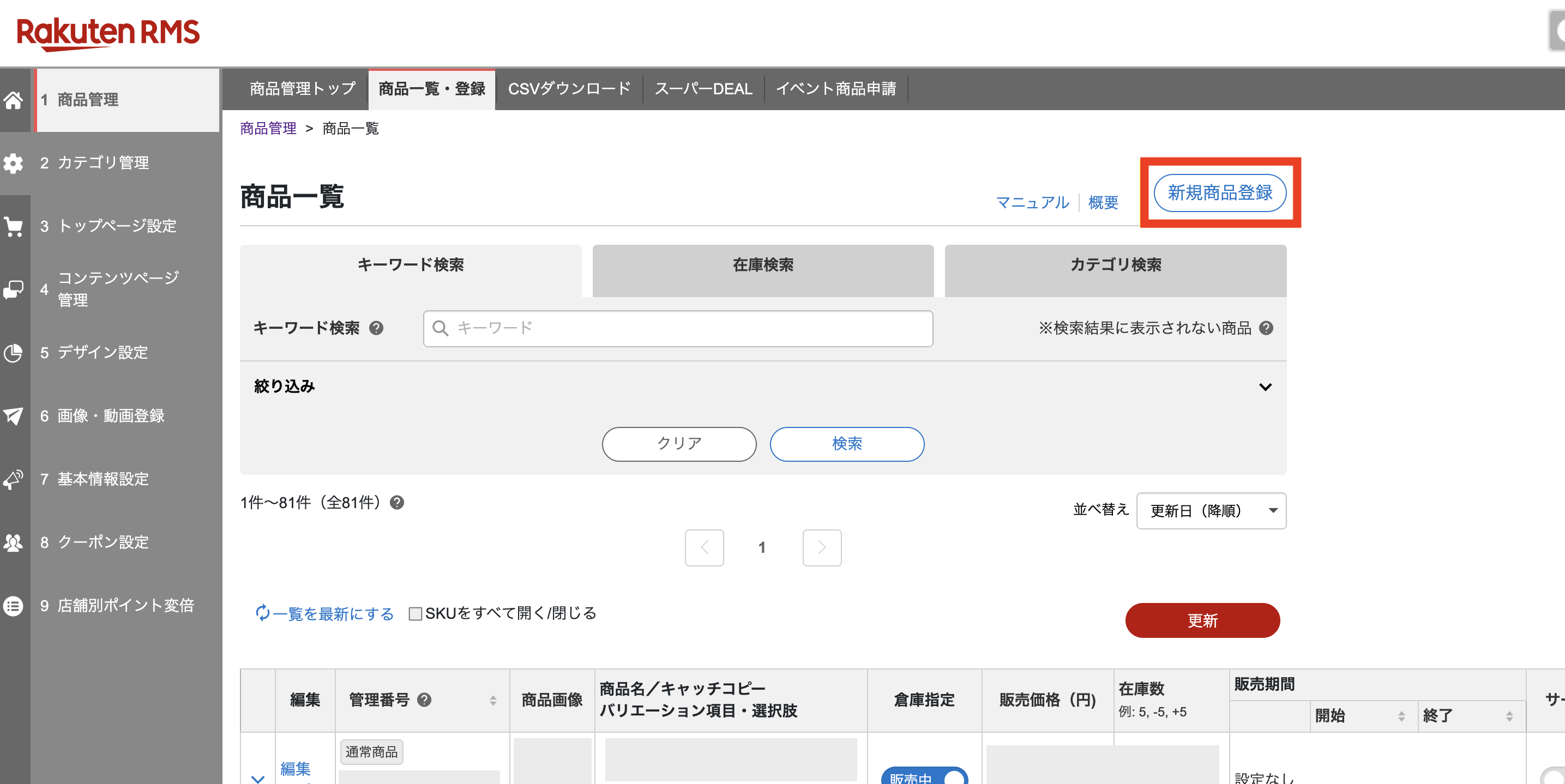
Once your application is approved, a "Register" button will appear at the top of the [RMS Home > Product Management > Product List] page. Click that button to register a subscription product following the same process as for regular products.
The following are settings unique to recurring subscriptions:
・Subscription Button
・Introductory Price
・Subscription Settings (Delivery dates that users can specify; instructions for the checkout process)
・You can upload up to 3 product images.
Please note that if you include an “Order” button, customers will be able to purchase the product as a “regular item” on the subscription product page.
(3) Thinking About Perks
After all, to increase the number of subscription purchases, you need perks that set them apart from regular products. Examples of such perks include:
・Price
・Key Points
・Gift
There are various options, but if you offer perks that make users feel “Subscriptions are a great deal!”, they’ll be more likely to opt for subscription products.
Pitfalls to Watch Out For
Here are some pitfalls to watch out for when setting up a subscription.
・Information provided at the time of application remains valid
Example: If points were set for a 3,000-yen item in October and November
October: 10x Points
November: 15x Points
In this case, orders placed by users in October will continue to be eligible for “10x points” through November and beyond. Even if the points are changed on the product page,The information provided at the time of registration will be retained.Please be aware of this.
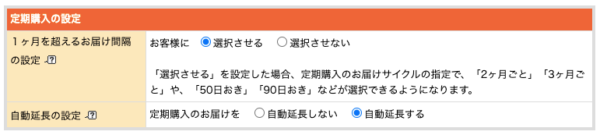
・The automatic renewal setting is required
The automatic renewal setting for subscription purchases is a feature that automatically updates the subscription information for the completed purchase cycle once the final order for the subscription product has been confirmed. If you don’t select “Automatically Renew,” you might find that “even customers who have been with us for a year have canceled their subscription without us realizing it…” Since this can easily lead to customer complaints, be sure to enable this setting.
You can configure these settings from [RMS Home > Store Settings > Basic Information Settings > Settings for Reservations, Subscriptions, and Club Sales].
・Users can cancel their subscription at any time.
You’ve probably heard the term “●-time limit,” which is commonly used in subscription plans, many times before. Don’t get too comfortable thinking, “Since I signed up, I’m guaranteed ● times!”
Since Rakuten Ichiba is designed so that users can cancel their subscriptions at any time, it is necessary to implement strategies to prevent cancellations.
Just Two Tips for Making the Most of Subscription Services

If you’ve signed up for a subscription service but aren’t sure how to make the most of it, this is a must-read. I’ll share two key points that you should keep in mind.
① Creating a Pathway to Raise Awareness
Users who shop on Rakuten Ichiba are particularly eager to "get the best deals," and they’re always looking for the most cost-effective way to purchase the items they want. Therefore, the extent to which they can find the "best deals" on productsRaise awareness among usersThat is important.
Creating a conversion funnel is extremely simple. All you have to do is place banners in various spots where users will see them. We also recommend featuring them in package inserts, newsletters, and on your official LINE account.
Let's create touchpoints with both new and returning users so they can get to know us more effectively.
② Creating a path to encourage sign-ups
Even if you find a product you like, from the user’s perspective, signing up for a subscription service on your first purchase can feel like a big hurdle, right? That’s whyA gateway for first-time buyersThe key is deciding what to do with it.
When it comes to popular subscription products, I feel that the following two strategies are particularly common.
・[Regular Product] Sample ▶︎ Upgrade to [Subscription Product] on your second purchase
・[Regular Product] Get ●% OFF your first purchase with a coupon, etc. ▶︎ Switch to a [Subscription Product] for your second purchase
As you can see, we don't just suddenly push customers toward subscription products.
However, if you'd still like customers to choose a subscription product from the start,
・[Subscription Product] Set the first-time price to ●% off the regular subscription price
・Add a gift to [Subscription Products]
It’s a good idea to lower the barrier to signing up by offering “perks” unique to subscription plans, such as these.
There are many other stores that offer a variety of unique features, so I recommend searching for them on Rakuten Ichiba.
Summary
When people think of Rakuten Ichiba, they often have the strong impression that it only sells “great deals and cheap” products, but,Unlike other shopping malls, it allows for more points of contact with users.. By making small improvements every day, you can greatly expand your possibilities. I hope that the information I’ve shared here will be of some help to you.
Thank you for reading to the end.



アイキャッチnew.jpg)