P-MAX campaigns are one of the campaign types available on Google Ads. Just hearing the name might not give you a clear idea of what they are, but when used effectively, they can actually deliver high advertising performance.
So in this post, we’ll explain what the P-MAX campaign is and how to actually use it.
What is the P-MAX Campaign?
The P-MAX campaign is a feature launched on Google Ads in November 2021 that allows you to serve ads across all ad formats—Search, Display, Video, and Shopping—using a single campaign, and even handles optimization for you.
Can be served on all Google ad slots
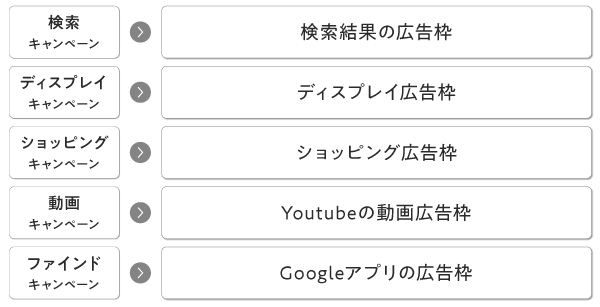
With Google Ads, you can primarily place ads in the following five locations.
① Search Results Page
② AdSense Partner Sites
③YouTube
④ Shopping Ad Slots
⑤ Gmail and Google apps
However, until now, ads could only be served through the respective campaigns.
However, if you use the P-MAX campaign, you can reach all ad slots with just that one campaign.
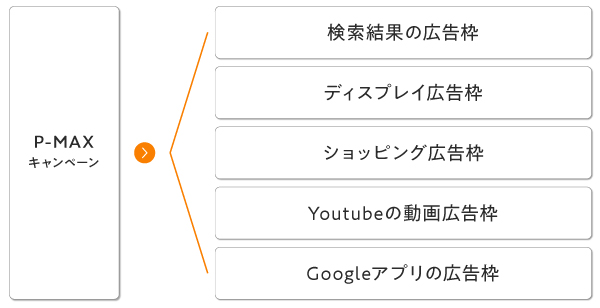
I think this is the most significant feature of the P-MAX campaign.
You can't adjust the settings in detail, but the optimization is amazing.
The P-MAX campaign doesn't just allow you to run ads on all ad placements. It automatically optimizes your campaign to determine which ad placements will deliver the best results based on your budget and goals.
Until now, optimization was limited to the ad slots targeted by each individual campaign, but with this P-MAX campaign, you can optimize across all ad slots.
Benefits of the P-MAX Campaign
There are three main benefits to being able to serve ads across all ad slots in Google Ads.
Less effort required to manage ads
First, it requires minimal effort to manage.
Until now, we had to configure detailed delivery settings for each campaign, prepare creative assets, and carefully analyze which segments and creatives were most effective, but with P-MAX campaigns, the system handles all of that for us.
Since the time spent on operations is reduced, operators can devote their time to more productive tasks.
Allows you to reach audiences you don't usually reach
I suspect there aren't many people who are able to reach a truly comprehensive audience with Google Ads.
However, with a P-MAX campaign—which optimizes across all ad placements—you can reach ad placements you’ve never used before or those that aren’t currently active, providing an opportunity to build brand awareness among user segments that wouldn’t normally be exposed to your products.
It's easy to maximize effectiveness even with limited operational knowledge
When creating and managing campaigns—such as search ads and display ads—you need to make detailed adjustments, ranging from keyword selection to a thorough analysis of CPC and target CPA, as well as bid adjustment ratios.
Therefore, while you generally need some knowledge of advertising to run campaigns, P-MAX campaigns are an exception.
Simply by adding your ad copy and banner, your ads can be delivered to virtually all ad slots, and since the entire process is automated, you can manage your campaigns even without any prior knowledge.
(*If you want to run shopping ads, you’ll need to prepare a landing page where individual items can be purchased, as well as JAN codes, etc.)
Disadvantages of the P-MAX Campaign
While the P-MAX campaign has its advantages, there are also some drawbacks inherent in the system.
I can't make fine-tuned adjustments to my ad campaigns
The advantage of not having to make fine adjustments is, in other words, that “you can’t make fine adjustments.”
Typically, in search and display campaigns, advertisers improve ad performance by making fine-tuned adjustments, such as refining keywords and adjusting bid multipliers for each audience category.
However, the only settings that campaign managers can adjust in the P-MAX campaign dashboard are “ads (text and banners),” “audience signals,” “bidding strategies,” “daily budget,” and “ad scheduling”; they cannot make detailed adjustments such as modifying keywords or setting bid adjustment ratios for specific audience categories.
For operators who want to make fine adjustments, this might be a bit frustrating.
It's hard to tell why the results improved.
In the P-MAX campaign management interface, you cannot see which keywords generated conversions, or the click-through rates and cost per click for each banner and text ad.
(Actually, I’ve heard that if you’re assigned a Google account manager for your advertising account, they’ll tell you which keywords drove the conversions.)
By selecting “View Details” from the “Asset Group,” you can see how well each banner and ad copy is performing based on three categories—“Best,” “Good,” and “Low”—but you cannot view detailed metrics such as click-through rates or conversion rates.
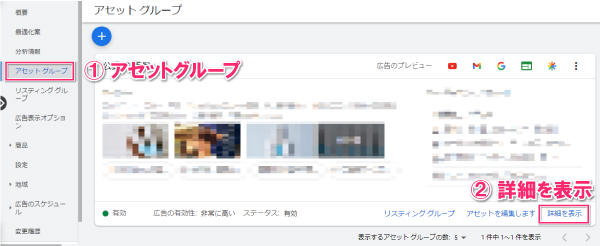
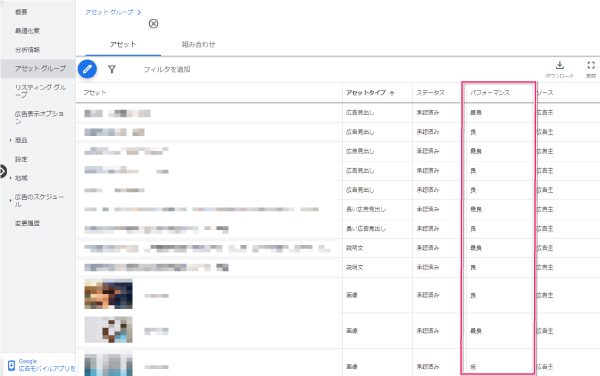
Therefore, the PDCA cycle for creative work will primarily focus on correcting elements that are currently rated “low.”
How to Set Up the P-MAX Campaign
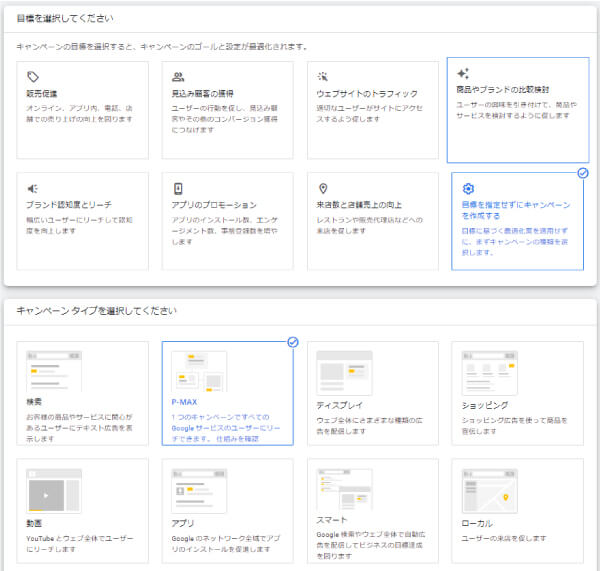
First, on the campaign creation screen, select “Create a campaign without specifying a goal.”
After that, a field labeled "Please select a campaign type" will appear, as shown in the image below, so please select "P-MAX" there.
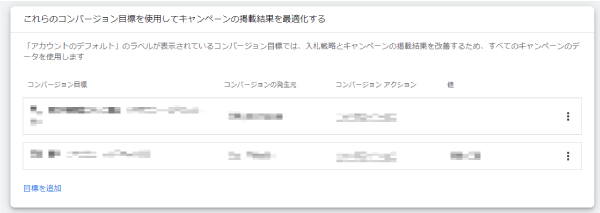
Next, set up your conversion goals.
Generally, if there are already conversions set up in your account, you should configure those conversions.
Next, if you want to run Google Shopping ads using a P-MAX campaign, please set up an account linked to Merchant Center.
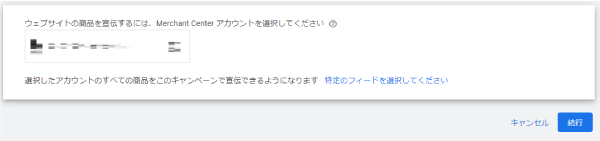
Next, when you click “Continue,” a field for entering the “Campaign Name” will appear. Enter a name there, then click “Continue” again.
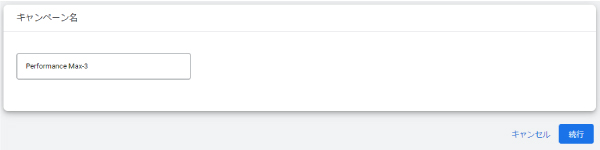
Next, we'll set the budget and bidding strategy.
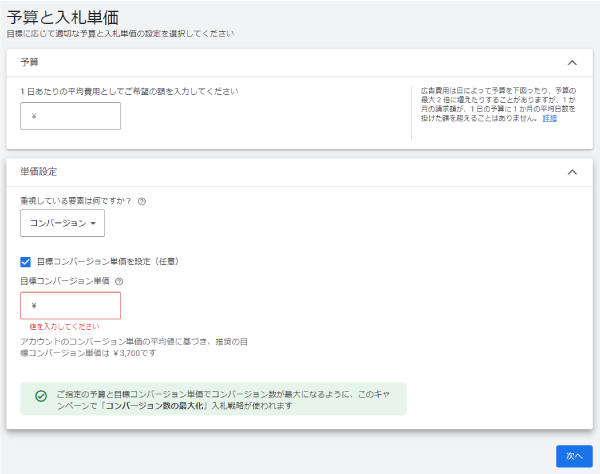
Since this will vary depending on your campaign objectives and advertising budget, you should adjust these settings based on your specific situation.
If you want to run a campaign that carefully optimizes ROAS, we recommend selecting “Maximize Conversions” and setting a target CPA.
Next, configure the distribution region, language, and other campaign settings.
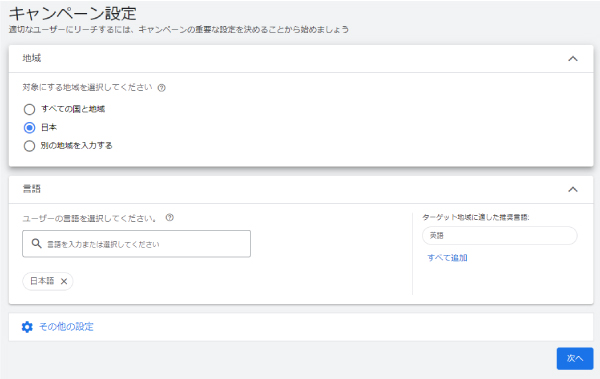
If you want to target only Japan, set the region to "Japan" and the language to "Japanese."
And the “Other Settings” section is very important.
As I’ll explain in more detail in “Points to Note When Running a P-MAX Campaign,” if you don’t want users to be redirected to any destination other than the page you’re promoting, be sure to turn off “Extend Final Page URL” under “Other Settings.”
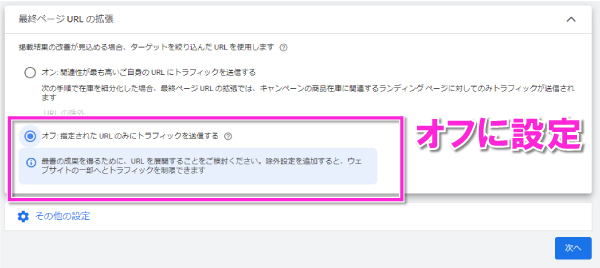
Once you've completed these steps, the next step is to configure the asset group.
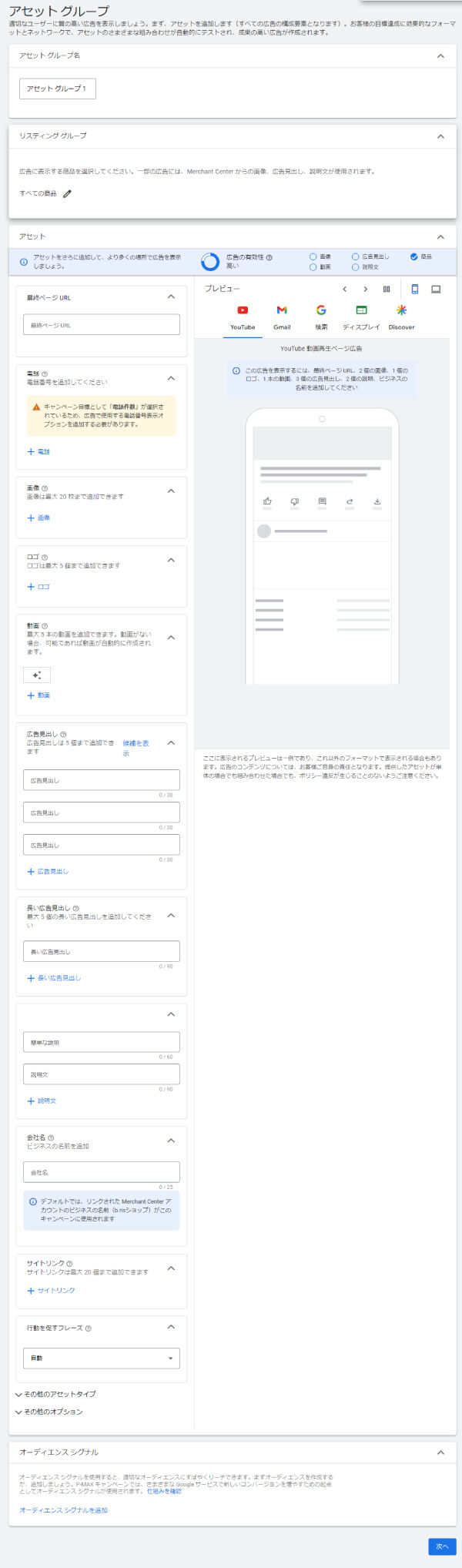
Basically, the campaign structure in Google Ads is
Campaign > Ad Group > Ad
This is a common structure, but in the case of the P-MAX campaign,
Campaigns > Asset Groups
That's how it works.
There are four settings to configure within this asset group:
| Asset Group Name | Determine the name of the asset group to be submitted as part of the P-MAX campaign. |
| Listing Group | If you want to run shopping ads as part of the P-MAX campaign, select the products you want to feature in this asset group from among the products registered in Merchant Center. |
| Asset | Configure the "banner," "ad copy," "landing page URL," and other elements that will actually appear in the ad. |
| Audience Signal | Set the segments you want to target. While this setting is optional, we recommend configuring it as it helps with optimization. *Please note that ads are not delivered exclusively to the specified segments; rather, they are used as a reference for targeting users, so ads may also be delivered to users outside those segments. |
First, name the asset in a way that makes it easy for the campaign manager to understand, and in the “Listing Group,” select the products you want to advertise from among those registered in Merchant Center.
Next, enter the banner, ad copy, and destination URL you want to display in the asset.
The submission guidelines are as follows. Please use them as a reference.
| Image | Maximum Number of Submissions | 2–20 pieces |
| Banner Size | ① Square 1:1 *Recommended size: 1200px × 1200px ② Landscape aspect ratio: 1.91:1 *Recommended size: 1200px × 628px ③ Vertical aspect ratio: 4:5 *Recommended size: 960px × 1200px | |
| File Size | Up to 5 MB | |
| Requirements | You need one square image and one landscape image. | |
| Logo | Maximum Number of Submissions | 1–5 |
| Banner Size | ① Square 1:1 *Recommended size: 1200px × 1200px ② Horizontal aspect ratio of 4:1 *Recommended size: 512px × 128px | |
| File Size | Up to 5 MB | |
| Requirements | I need one square logo | |
| Video | Maximum Number of Submissions | 5 |
| Notes | If no content is submitted, it will be automatically generated based on images and headlines. | |
| Ad Headline | Maximum Number of Submissions | 3–5 |
| Character count | 30 half-width characters (15 full-width characters) | |
| Long Ad Headlines | Maximum Number of Submissions | 0–5 |
| Character count | 90 half-width characters (45 full-width characters) | |
| Description | Maximum Number of Submissions | 2–5 |
| Character count | 90 half-width characters (45 full-width characters) | |
| Company Name | Character count | 25 half-width characters (12 full-width characters) |
In addition, just like with search-based ads, you can configure ad display options.
Also, while configuring audience signals is optional, we recommend that you do so.
The reason is that the P-MAX campaign is essentially Google’s crowning achievement—a campaign specifically designed for optimization—and the more user data there is, the easier it is to optimize.
Although you can’t target specific groups, your ads will be served primarily to the audience you’ve defined. Be sure to set this up so that your ads reach the audience with the highest CVR right from the start.
Points to Note When Running the P-MAX Campaign

Since the P-MAX campaign doesn't allow for detailed settings, you need to be careful.
In this article, we’ll introduce four of the most important ones.
I can't set exclusion keywords
In P-MAX campaigns, text ads are displayed based on users' search keywords, but you cannot exclude keywords at the campaign level.
However, you can exclude keywords on a per-account basis.
Therefore, if you want to exclude trademark keywords, you must register those exclusions at the account level. However, if you are running a search campaign for your own trademarks within the same account and want to separate the ad placements for P-MAX from those for your trademarks, we recommend creating a separate ad account for P-MAX, since registering your own trademark keywords as exclusions within the same account will prevent the trademark search campaign from running.
However, if you’re using Customer Match from your customer list as a signal in the P-MAX campaign, new accounts may not meet the eligibility requirements for Customer Match and therefore be unable to use it. In that case, you’ll have no choice but to accept that there will be trademark conflicts within the same account.
Existing campaigns are being scaled back
As soon as the P-MAX campaign begins, your existing search, display, and shopping ads may see a reduction in volume. Shopping ads, in particular, are likely to experience the most significant fluctuations.
When we launched the P-MAX campaign, nearly all of our existing shopping ads were absorbed into the P-MAX campaign.
However, since the number of conversions from the P-MAX campaign increased and exceeded the reach and conversion volume of our original shopping ads, we ultimately concluded that the P-MAX campaign was more effective.
The destination of the ad may change on its own
As I mentioned briefly above, if you haven’t turned off “Extend Last Page URL” in the settings, there’s a possibility that users are being redirected to unexpected destinations.
For example, “I was running a landing page for a product, but the link took users to the company profile page instead.”
If you want to set only one destination,
Go to "Settings" > "Campaign Settings" > "Automatically Generated Assets" and uncheck "Final Page URL"
Be sure to configure the settings.
If you don't submit a video ad, one will be generated automatically.
If you do not upload a video ad in the asset settings, a video will be automatically generated from the uploaded image and the ad headline and served.
Therefore, if possible, it’s a good idea to prepare video ads as well.
Summary
The P-MAX campaign is Google's flagship campaign, capable of delivering ads across all of Google's channels and optimizing them using machine learning.
From now on, the P-MAX campaign—which optimizes everything—may become the mainstream approach.
Why not give it a try sometime?