
"Extended Conversions," Introduced in Response to the Impact of a Cookie-Less Environment
In this article, I’ll explain these expanded conversions, including the background behind their introduction.
"What exactly are expanded conversions?"
"How is this different from previous conversions?"
If you're struggling with this, you won't want to miss this!
What Are Extended Conversions?
Regarding expanded conversions, Google's official help center states the following:
Extended Conversions is a feature that enables more accurate conversion measurement.
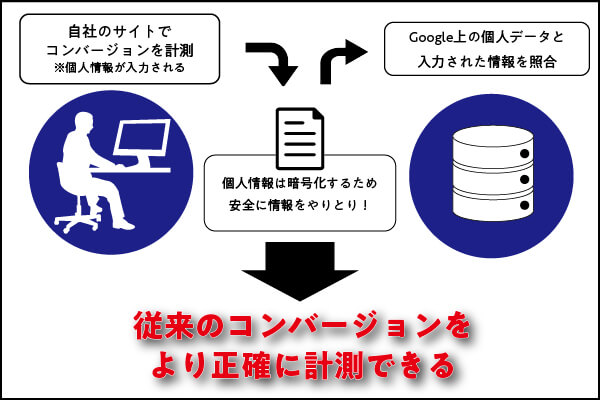
This feature complements existing conversion tags by hashing first-party conversion data collected on your website and sending it to Google in a privacy-conscious manner.
We use a secure one-way hash algorithm called SHA256 to hash first-party customer data (such as email addresses) before sending it to Google.
Next, we match the hash data with the Google Account the user was logged into to associate campaign conversions with ad events such as clicks and views.
Simply put, this is purely a supplementary feature designed to measure more accurate conversion values by complementing existing conversion tags.
Specifically, when a user converts on a company’s website, the personal information they enter (such as email address, name, address, and phone number) is hashed and sent to Google. By cross-referencing this information with Google Account data, it becomes possible to measure conversions more accurately.
However, for extended conversions, one or more of the following customer data points must be available.
| ・Email address (recommended) ・Full name and home address (street number, city/ward/district, prefecture, and ZIP code) ・Phone number (can be used as supplementary information for any of the items listed above) See “About Enhanced Conversions” |
Background on the Introduction of Enhanced Conversions
Next, I will explain the background behind the introduction of expanded conversions.
Traditional conversion tracking was based on a mechanism called "cookies."
These cookies are used to make logging in to and navigating the website more convenient and to ensure a smoother experience when using various web services. In addition to tracking conversions, they allow the website to gather information on purchase history and user interests, which is why they are also used in online advertising campaigns and corporate marketing analytics.
However, while cookies are convenient, user complaints—such as “It’s annoying to always see the same ads” and “It’s unsettling to have my personal information collected without my knowledge”—have gradually grown louder. As a result, there has been a growing movement to restrict tracking via cookies in order to prevent third parties from using personal information and to protect user privacy.
Specifically, Apple’s browser, “Safari,” began blocking all third-party cookies by default in March 2020, and Google’s browser, “Chrome,” has also announced plans to develop a system that does not use third-party cookies, with a target date of late 2023.
Because these cookie restrictions have made it difficult to accurately measure conversions, a service called "Extended Conversions" has been introduced to supplement conversion tracking based on existing cookies.
How to Set Up Enhanced Conversions
In the following section, we'll explain how to set up expanded conversions.
*This guide assumes that you are using Google Tag Manager to track conversions in Google Ads.
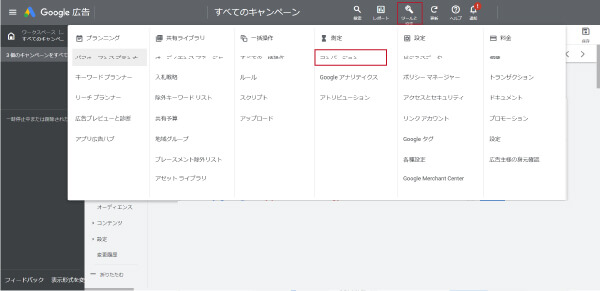
1. Log in to your Google Ads account, click the tools icon in the upper-right corner, and select "Conversions" under "Measurement."
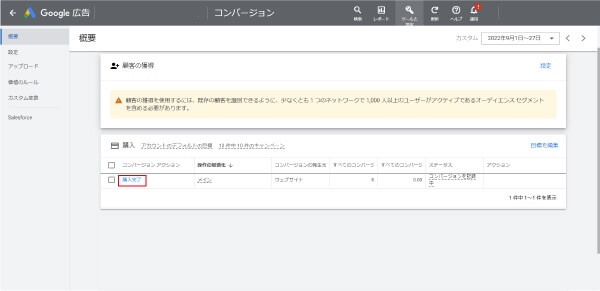
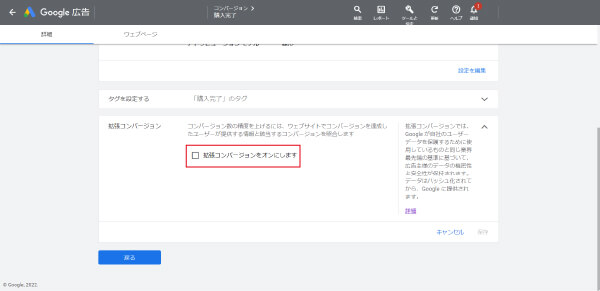
2. Open the conversion action you want to use for expanded conversion settings, and turn on [Expanded Conversions] at the bottom.
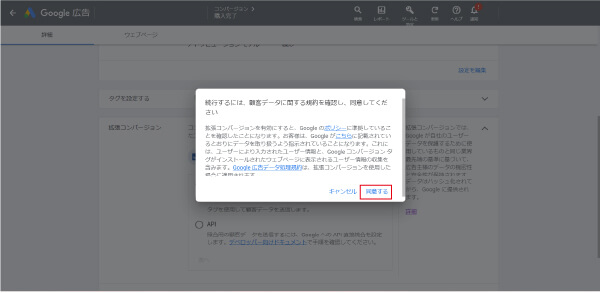
3. Click [Agree] to accept Google's compliance notice.
*By enabling Enhanced Conversions, you confirm that you comply with Google's policies.
4. Click [Verify URL] to verify the Google tag on your website.
5. For the implementation method, select “Global Site Tag or Google Manager.”
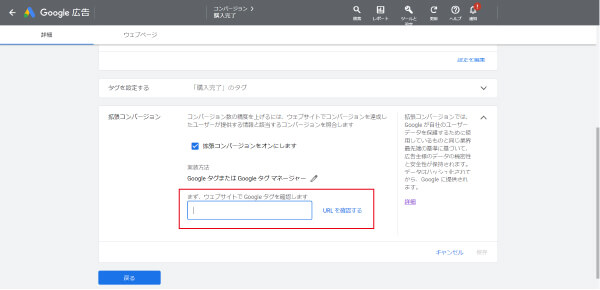
6. To use extended conversions, you must select either [Global Site Tag] or [Google Tag Manager] and then save your settings.
Since [Google Tag Manager] is configured by default, verify that the settings are correct, then click [Save].
That concludes the setup instructions.
For more details, please refer to the following Google Ads Help page.
Manually Set Up Enhanced Conversions (for the Web) Using Google Tags
Pros and Cons of Extended Conversions
As mentioned earlier, the introduction of extended conversions is driven by the fact that “the use of third-party cookies is being restricted” and that this will result in “a decline in the accuracy of conversion tracking and remarketing.”
Therefore, the benefits of implementing this include the following:
Benefits
① Improving the Accuracy of Conversion Tracking
② Remarketing becomes possible.
③ Machine learning accuracy improves as a result of ①
The official Google Ads website reports a case study showing that the introduction of expanded conversions improved ROAS and increased revenue by 8.6% on the Search Network and 31% on YouTube.
Disadvantages
On the other hand, one drawback is that “the setup is quite complicated.”
In reality, this requires fairly advanced technical skills, such as setting up conversion tracking and coding.
Summary
In this post, we explained expanded conversions.
Since conversion tracking is the most important aspect of ad delivery, be sure to set it up as soon as possible.
Thank you for reading to the end!