


In this post, we’ll introduce Amazon’s “Sponsored Brand Video Ads.”
"I want to set it up, but I don't know where to start."
"Creating videos is such a hassle that I just can't seem to get started."
I’m sure there are many sellers who feel this way, aren’t there?
But actually, it might be a hidden gem of an ad with very little competition...!
In this article, we'll cover everything from the features of sponsored video ads to how to set them up and tips for managing them
I'll explain it.
Amazon Ads: “Sponsored Brand Video Ads”
What Are Sponsored Brand Video Ads?
Sponsored Brand Video Ads are a type of Sponsored Brand ad that can be targeted to specific search keywords, categories, and products.
These are video ads that use a cost-per-click (CPC) or viewable cost per thousand (VCPM) pricing model.
By using video and audio, you can convey the appeal of your products to users in a clearer and more understandable way.
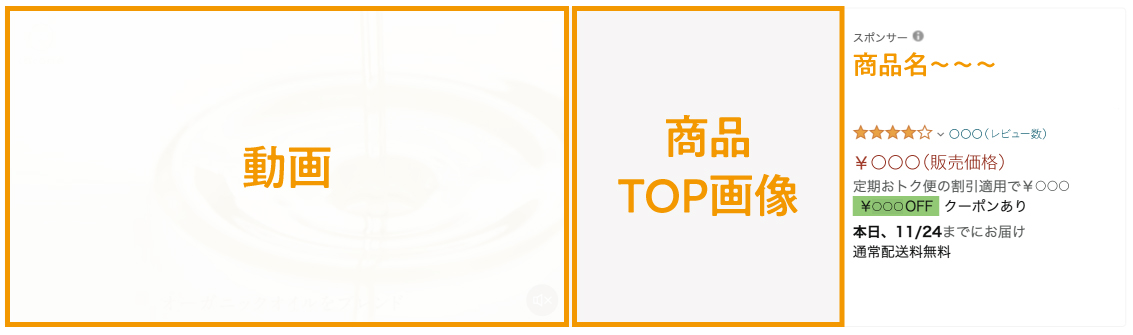
The ad consists of a "6- to 45-second video," a "product featured image," and "product details," and
This feature takes you to the product details page (or store page) when you click on it.
▼ Structure of Sponsored Brand Video Ads
What are the requirements for placing sponsored brand video ads?
There are mainly two conditions:
Wholesale Listings
First, I’m a high-volume seller.
When listing products on Amazon, there are two listing options: “Professional” and “Individual.”
Sponsored Brand ads are available only to large-scale sellers.
For more information on large-volume and small-volume listings, please see this article.
Brand Registration
Second, we have registered our brand.
You can register a brand by obtaining a trademark.
(Registering your brand is very useful for purposes other than sponsored video ads, so I recommend doing so.)
For information on trademark registration, please see this article.
Benefits of Sponsored Brand Video Ads
① It makes it easier to convey the appeal of the product
The biggest advantage is that using video and audio in your creative work makes it easier to convey textures and imagery that are difficult to convey with images and text alone.
Additionally, unlike Sponsored Products and Sponsored Display ads, you can run ads using creatives created by the seller.
As a result, it is possible to convey the appeal of a product in a more concrete way through the messaging, the video’s narrative, and the text and animations within the video.
By continuously implementing the PDCA cycle for your videos, you can create ads that are more likely to capture users' interest and deliver higher results.
② More likely to catch users' attention
Sponsored brand video ads are displayed in the following locations: (1) at the top of the search results page, (2) in the middle of the search results page, and (3) on product detail pages.
In addition to the videos playing automatically, the high screen-to-content ratio makes this design highly effective at catching users' attention.
③ There is little competition
Sponsored brand video ads are ads that can only be set up by sellers who have registered their brands.
In other words, there are only a limited number of sellers available.
Furthermore, even among those who have registered their brands, many say they “don’t know how to set it up, so they aren’t using it” or “find creating videos too much of a hassle, so they haven’t set it up.”
As a result, you may be able to display ads at lower bid amounts compared to Sponsored Products ads and the like.
Disadvantages of Sponsored Brand Video Ads
① You must register your brand to use this service
You cannot set up sponsored brand video ads unless you have registered your brand.
While registering your brand on Amazon itself can be done quickly, it may take some time if you haven't yet obtained a trademark.
② Costs tend to rise
While Sponsored Brand Video Ads may sometimes allow you to display ads at lower bid amounts compared to Sponsored Products ads, if you don’t manage them regularly, their return on investment could decline.
Care must be taken because it is necessary to conduct market research to select the search keywords and products for which to run ads, and to evaluate them while taking competitors’ bid amounts into account.
Basic Information and Setup Instructions for Sponsored Brand Video Ads
Basic Information on Sponsored Brand Video Ads
The following table summarizes the basic information about the videos that can be posted.
If you don't follow these guidelines, an error message will appear, so please make sure to check them as you create your video.
▼ Video and Audio Specifications
| Video Playback Time | 6–45 seconds (We strongly recommend 30 seconds or less) |
| Video Size | ・1920 × 1080 pixels ・1280 × 720 pixels ・3840 × 2160 pixels |
| File Size | 500 MB or less |
| File Format | .MP4 or .MOV |
| Aspect Ratio | 16:9 (square pixels) only |
| Video Codec | H.264 or H.265 |
| Video Profile | Main or Baseline |
| Frame rate | 23.976 fps, 23.98 fps, 24 fps, 25 fps, 29.97 fps, 29.98 fps, or 30 fps |
| Video bitrate | Minimum 1 Mbps (4 Mbps or higher recommended) |
| Audio Codec | PCM, AAC, or MP3 |
| Audio Format | Stereo or Mono |
| Audio bitrate | Minimum 96 kbps |
| Audio Sample Rate | Minimum 44.1 kHz |
| Types of Video Scanning | Progressive |
Source:https://advertising.amazon.com/ja-jp/resources/ad-specs/sponsored-brands-video
Configuring Sponsored Brand Video Ads
Once you've finished creating your video, let's set up your ads in Seller Central.
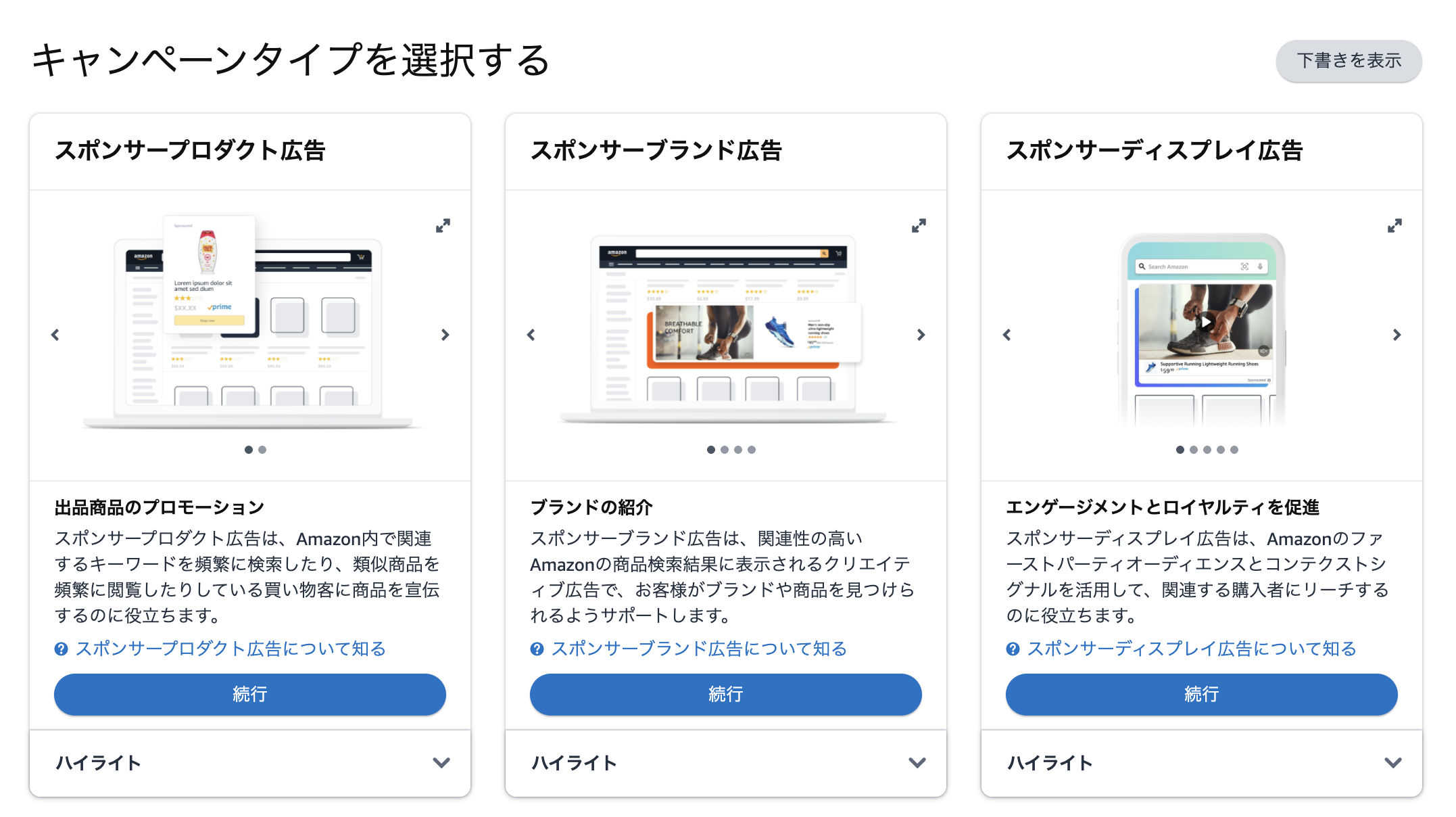
① Click “Create Campaign” and select “Sponsored Brand Ads”
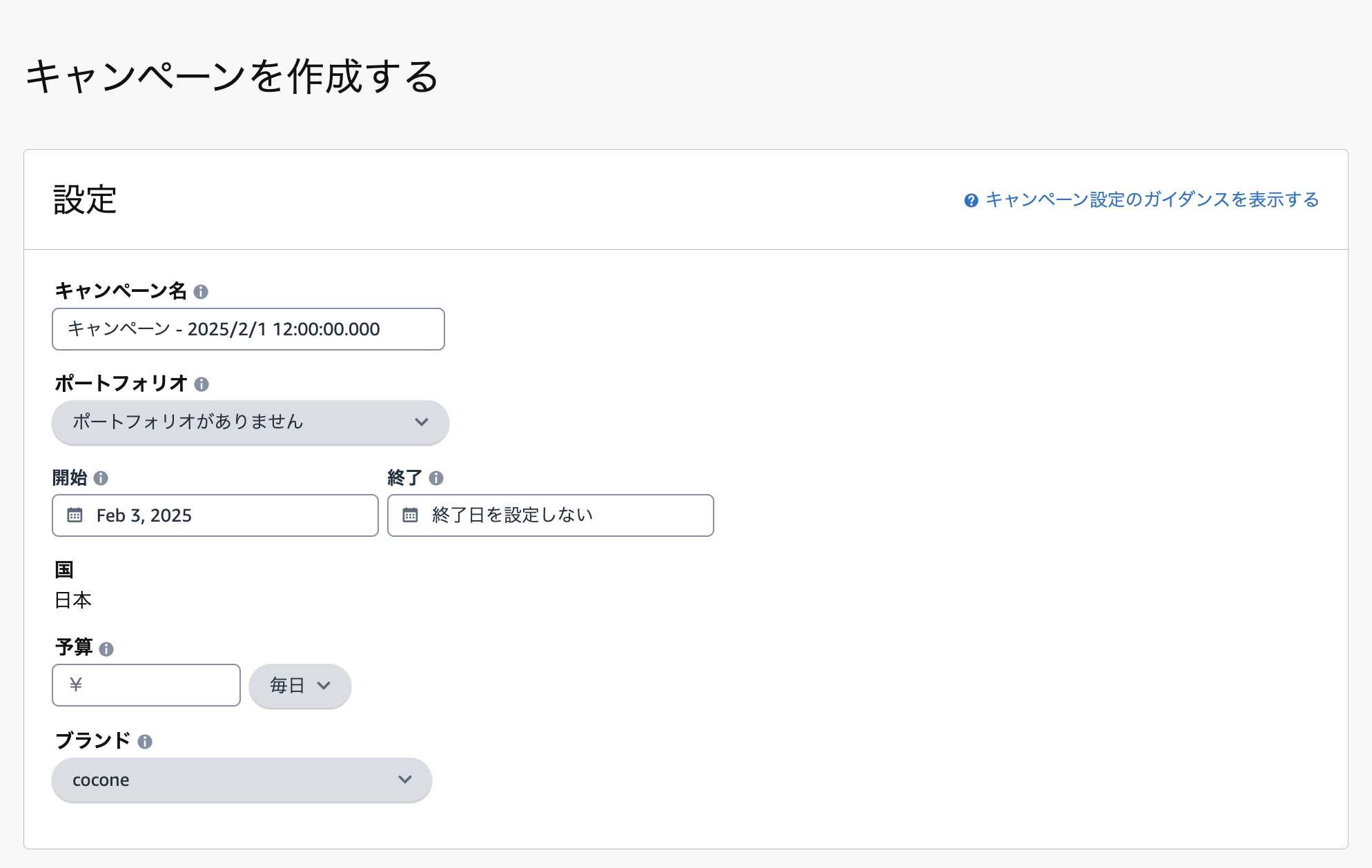
② Creating a Campaign
Please enter the campaign name and daily budget, and select your portfolio and brand.
We recommend choosing a campaign name that will be easy to manage going forward.
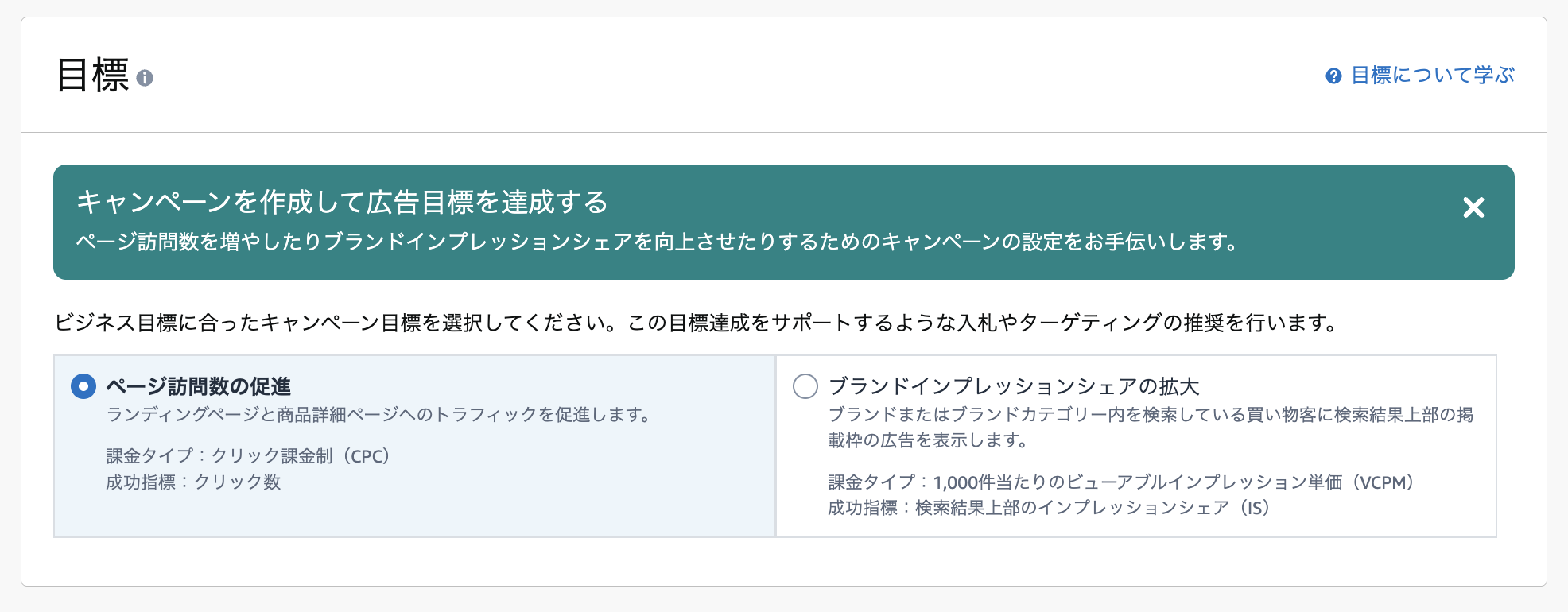
You can choose between two models: pay-per-click and viewable impression-based pricing.
Choose the one that best suits your goals.
③ Creating an Ad Group
First, please enter an ad group name.
Just like with the campaign name, we recommend choosing a name that will be easy to manage going forward.
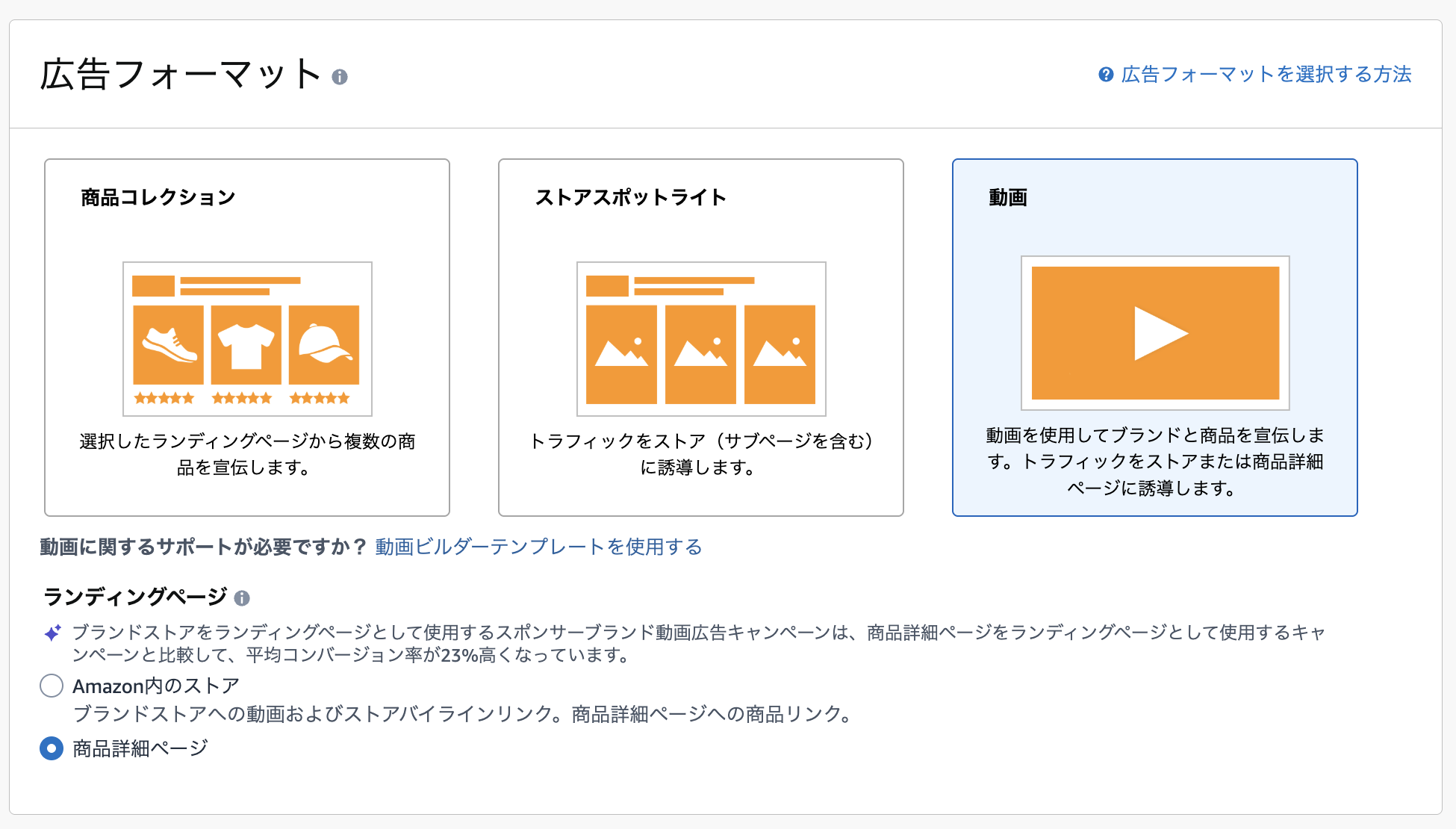
Next, set up the ad format.
Since this is a sponsored brand video ad, let's select "Video."
For landing pages, check the boxes that apply to your specific use case.
・To navigate to a store page: Stores on Amazon (including subpages)
・If you want to navigate directly to the product page: Product Details Page
In this article, I'll explain how to configure the settings for redirecting users directly to a product page.
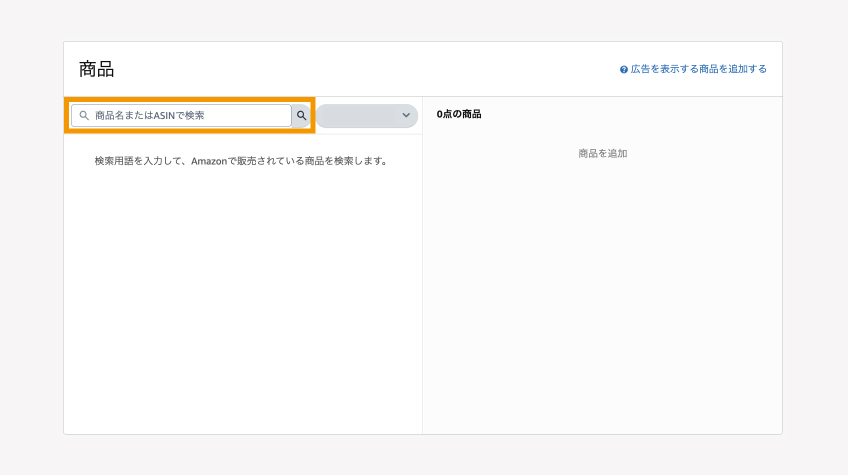
④ Select the product you want to advertise
Please enter the product name (or ASIN) in the search bar and select the product.
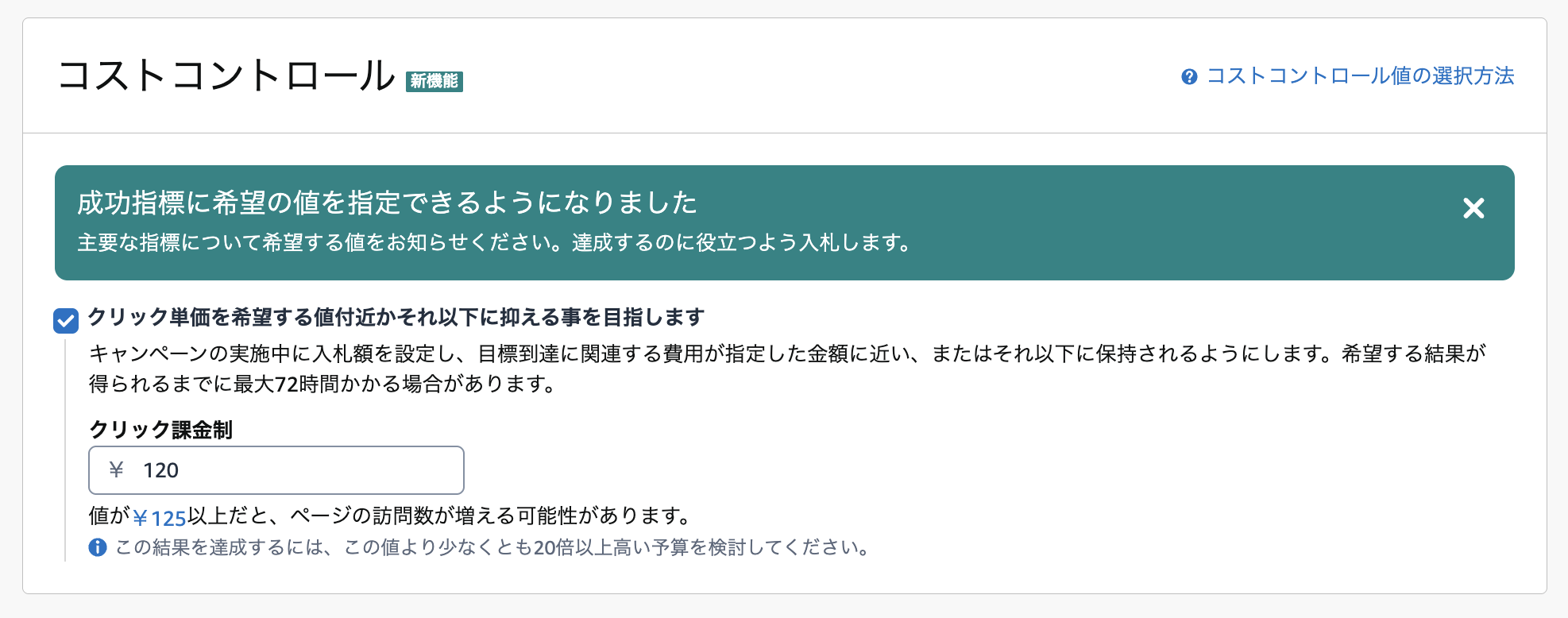
⑤ Cost Control
Amazon can optimize bids on behalf of sellers and optimize campaigns so that they can achieve their specified goals at their desired cost.
If you want to do this manually, don't forget to uncheck the box.
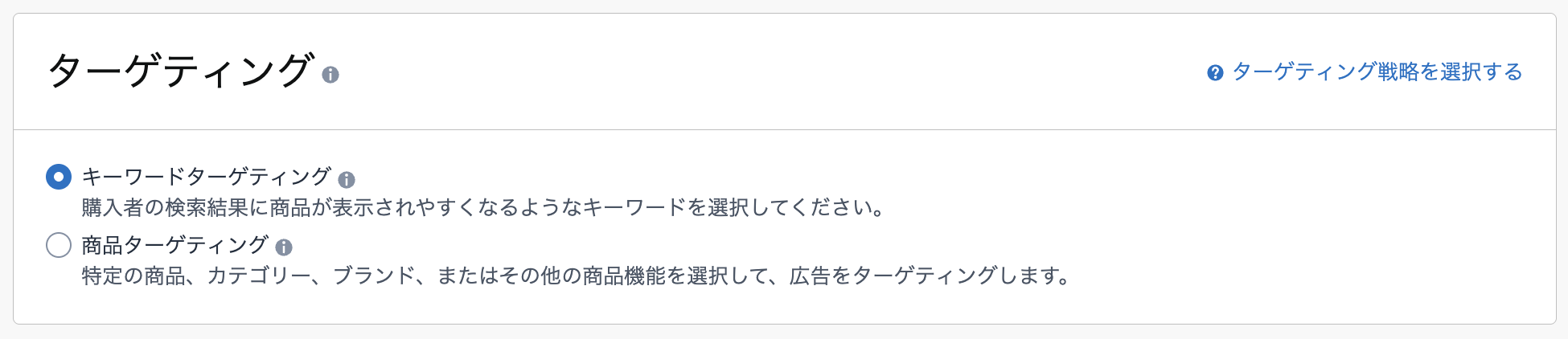
⑥ Targeting Settings
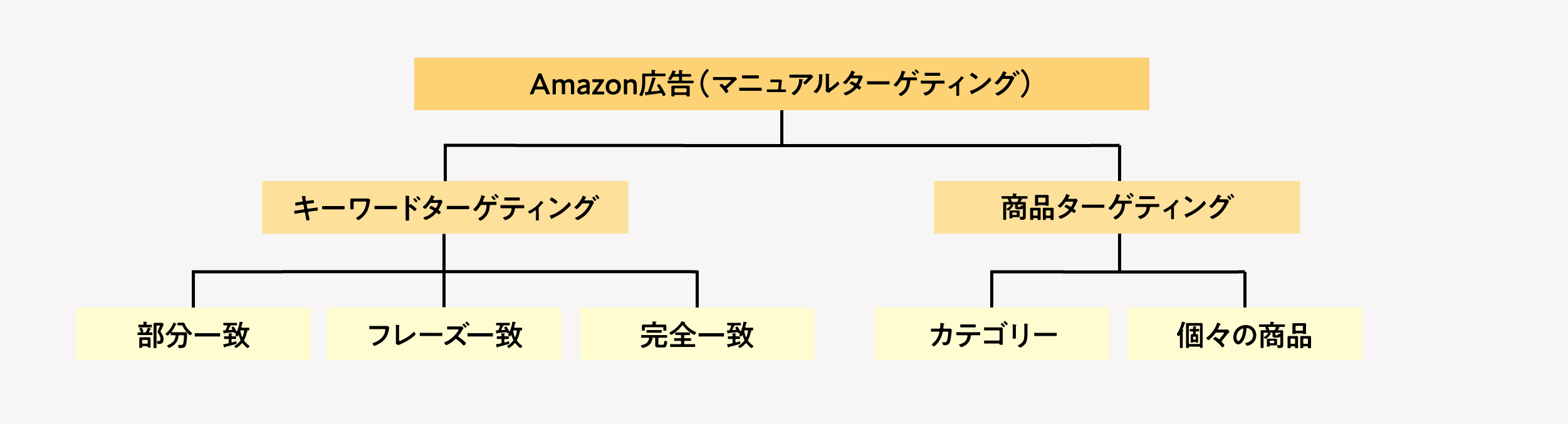
There are two methods of targeting: "keyword targeting" and "product targeting."
Check the appropriate box depending on your needs.
・To target specific search keywords: Keyword targeting
・If you want to target specific products, categories, or brands: Product Targeting
▼ Diagram of Amazon Ads Targeting
⑦ Creating Ads
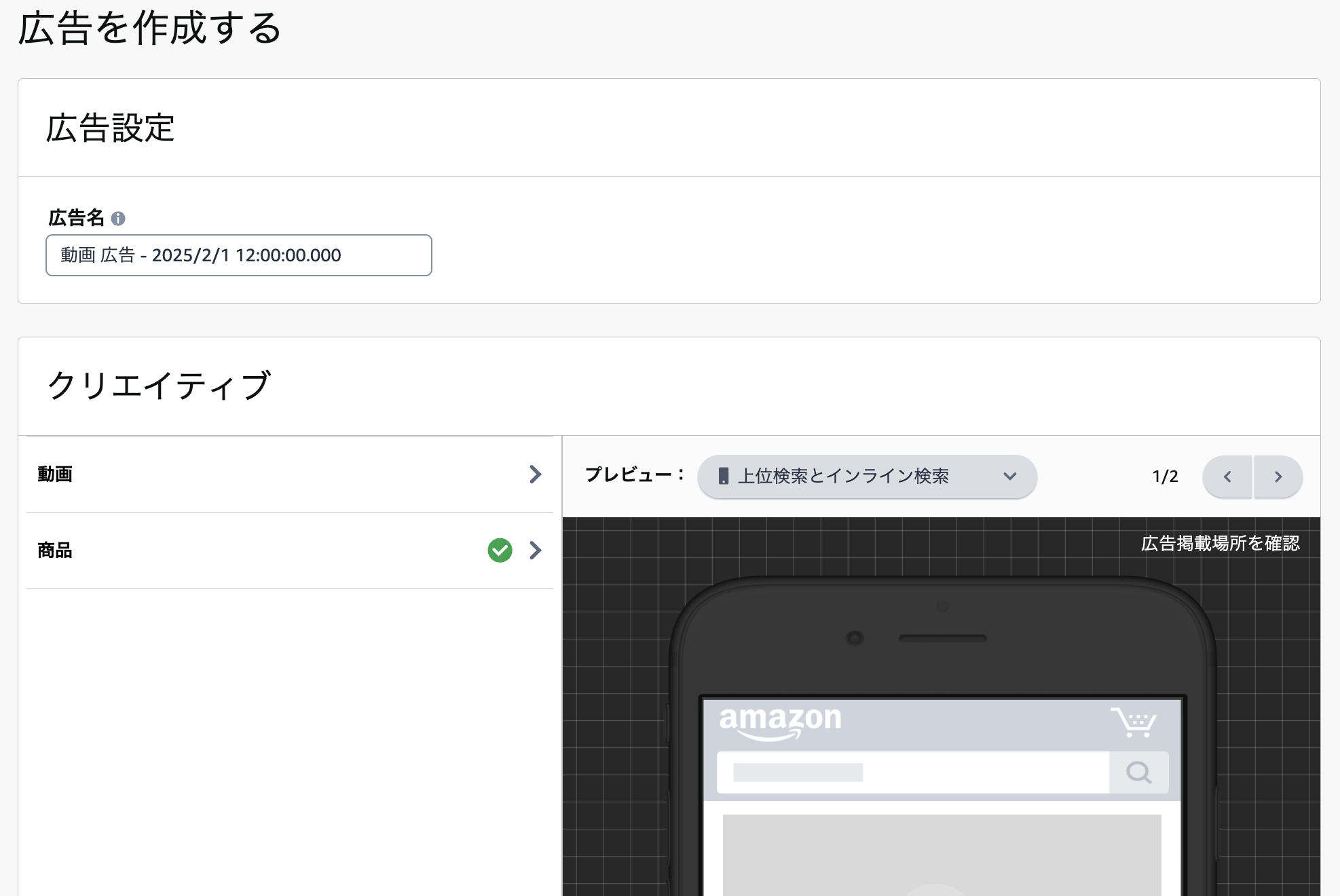
First, please enter the ad name.
We recommend giving this a name that will be easy to manage going forward as well.
Next, we'll set up the creative.
Click "Video" to upload a video.
⑧ Submit an Application for Review
That completes all the settings.
If your application is approved, your ads will automatically begin running.
(If an ad start date has been set, then from that date onward)
Tips for Managing Sponsored Brand Video Ads
Finally, here are some tips for managing sponsored brand video ads.
There are various ways to use it, but in this article, I’ll focus on just two.
Deliver different videos based on targeting
When running sponsored video ads, be sure to create multiple versions of the video.
This is because delivering different videos based on targeting allows us to promote products in a way that’s tailored to each user.
For example, let's consider a search using the terms A and B below.
A: Users who search for “hair oil”
B: Users who search for “organic hair oil”
In this case, rather than a video explaining ”The Appeal of Organic Hair Oil,” B should...
”It is generally considered better to use videos that convey ”added value and appeal.”
This is because, in Case B, many users already find organic hair oil appealing, so there may be no need to convey that message through advertising.
By creating and testing videos tailored to your target audience, you can aim to improve your return on investment.
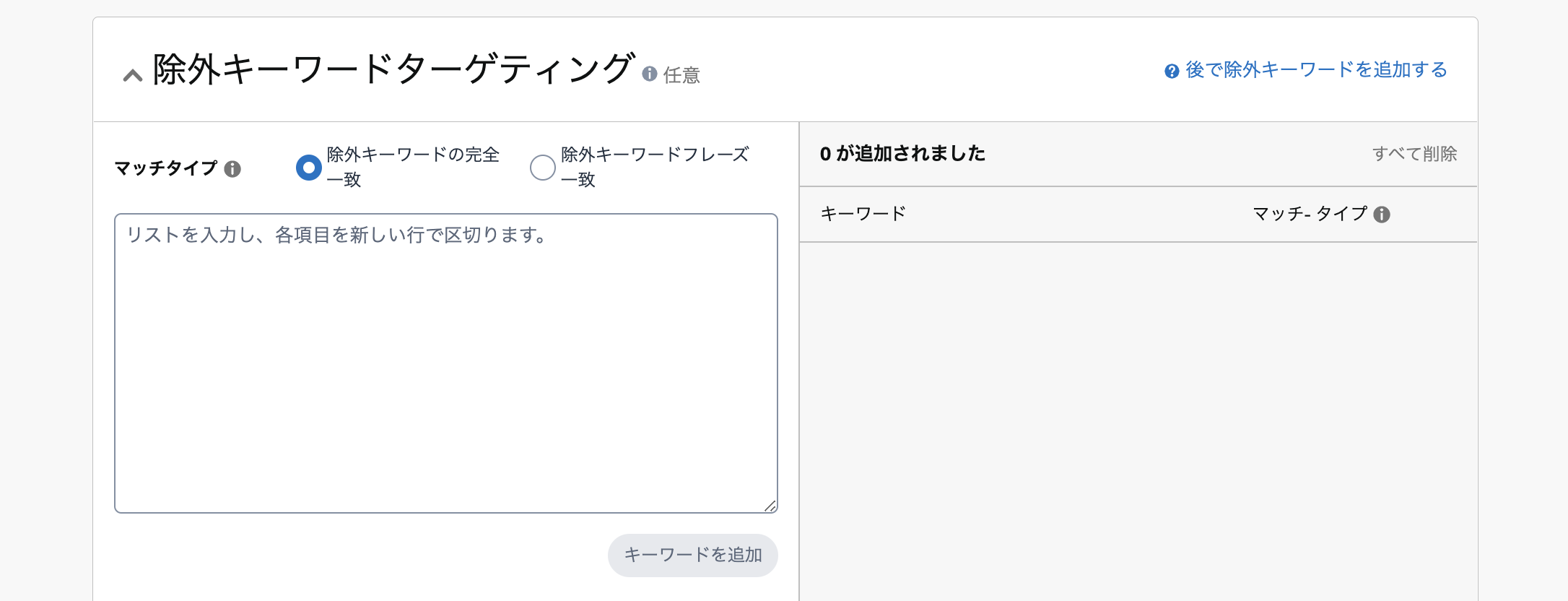
Set Exclusion Settings
You can set exclusions for sponsored brand video ads.
Exclusion settings allow you to specify keywords, products, and other items for which you do not want ads to be served.
If there are any target audiences that are likely to result in a decline in cost-effectiveness,
Be sure to exclude them when setting up your ads.
In addition, since you can set exclusions even after ads have started running, you can use your budget more efficiently by adding targets with poor ROI to the exclusion list as soon as you identify them.
Set up sponsored brand video ads to maximize your sales!
Sponsored brand video ads are an advertising option we highly recommend for sellers looking to grow their sales.
If you're not sure what kind of video to make, why not try creating one based on videos currently available on Amazon?
Right now, there are still target audiences that your competitors haven’t reached yet, so this is your chance to increase your reach and maximize sales!
Thank you for reading to the end.



アイキャッチnew.jpg)