


"The Amazon Vine Early Access Program," one of Amazon's sales promotion programs.
It is commonly referred to as “Amazon Vine.”
What are the actual pros and cons?
I'll explain everything in detail, from how to get started to important points to keep in mind.
What is Amazon Vine?
 Amazon's Proprietary Review Incentive Program
Amazon Vine is an Amazon-exclusive program that invites Vine members—who are Amazon Vine reviewers—to post their opinions on new products.Review Incentive ProgramThat's it.
Sellers participating in this program can ask Vine members to post reviews in exchange for providing them with products.
Who are Vine members? What kind of people are they?
Vine members are high-quality reviewers who have been invited by Amazon based on an analysis of their past reviews.
They post insightful reviews of products from various perspectives.
Check the prerequisites for participation
Not all sellers are eligible to participate in Amazon Vine.
The following are the prerequisites for participation.
A seller who lists large quantities of items
Recognized as the brand owner
You have eligible FBA listings
I am the brand representative approved by Amazon Brand Registry for the products to be registered.
If you have not yet registered your brand, please refer to this page.
In addition, the products must meet the eligibility criteria for participation.
- It is a brand registered through Amazon Brand Registry.
- The product detail page has fewer than 30 reviews
- There are FBA listings available for purchase in "Like New" condition
- Not an adult product, a digital product, or a heavy or bulky item
- I started listing products when I registered for Amazon Vine
- In stock
- Includes product images and descriptions
You should pay particular attention to"Fewer than 30 reviews"This is the part.
On Amazon Vine, you can currently submit up to 30 applications in addition to your reviews.
Costs Associated with Amazon Vine

There is a small fee to join Amazon Vine.
Registration Fee
Changes to Vine's registration fees, which took effect on October 19, 2023, were recently implemented. The new fee structure is as follows:
Registration for 1–2 units: 0 yen
When registering 3–10 units: 10,000 yen
11 to 30 units registered: 22,000 yen
The registration fee will be charged 30 days after the registration date if the product receives its first Vine review.
If we do not receive a review within the first 30 days, you will be billed as soon as the first Vine review is posted, before your registration expires.
Please note that if a listed product does not receive any reviews within 90 days of being listed, no fees will be charged.
Cost of Goods Sold
Since we provide products to Vine members for free, we incur costs equal to the cost of goods based on the number of items provided.
FBA Fees and Sales Commissions
For each product registered with Amazon Vine that is submitted and shipped, sales fees and FBA fees will be charged in the same manner as in the standard sales process.
Benefits of Amazon Vine

There are three main benefits to Amazon Vine.
Reviews come in quickly
Organic reviews may gradually start appearing as sales increase, but
With new products, it takes a while to get a sense of how things will turn out, doesn't it?
With Amazon Vine, it’s not uncommon for more than 80% of reviews to be posted within a week of a product being listed.
Get people to write in-depth reviews
Most reviews by Vine members are of high quality, featuring attached photos or specific comments on the user experience.
It's easy to get good reviews
Since we provide the products for free, people often highlight the product’s strengths and write relatively positive reviews with a rating of 3 to 5 stars.
Disadvantages of Amazon Vine

Of course, there are also some drawbacks.
Sometimes we get negative reviews
Since Vine members' reviews are simply their honest impressions after using the product, if the product quality or packaging is poor, they will describe those issues in detail.
Not all reviews may be included.
According to the Amazon Vine terms and conditions, we cannot take action if not all applicants write reviews. Out of 30 applications, there may be 2 to 5 cases where no reviews are submitted.
How to Get Started with Amazon Vine
It takes less than three minutes to sign up for Amazon Vine.
Register via Seller Central
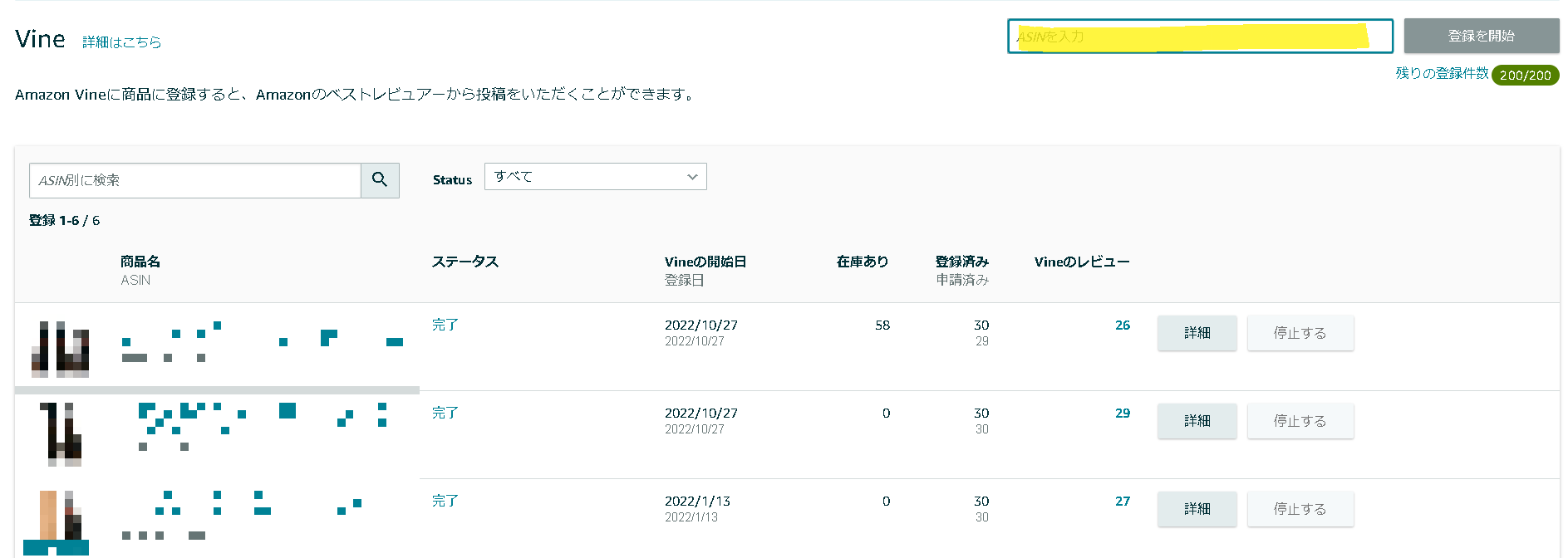
Select Seller Central > Advertising > Amazon Vine to access the Amazon Vine dashboard.
Enter the ASIN in the yellow box to begin registration.
On the registration details page of the next screen, enter the number of requests you want to submit for the unit you wish to register.
Finally, click the "Register" button in the lower-right corner to complete your registration.
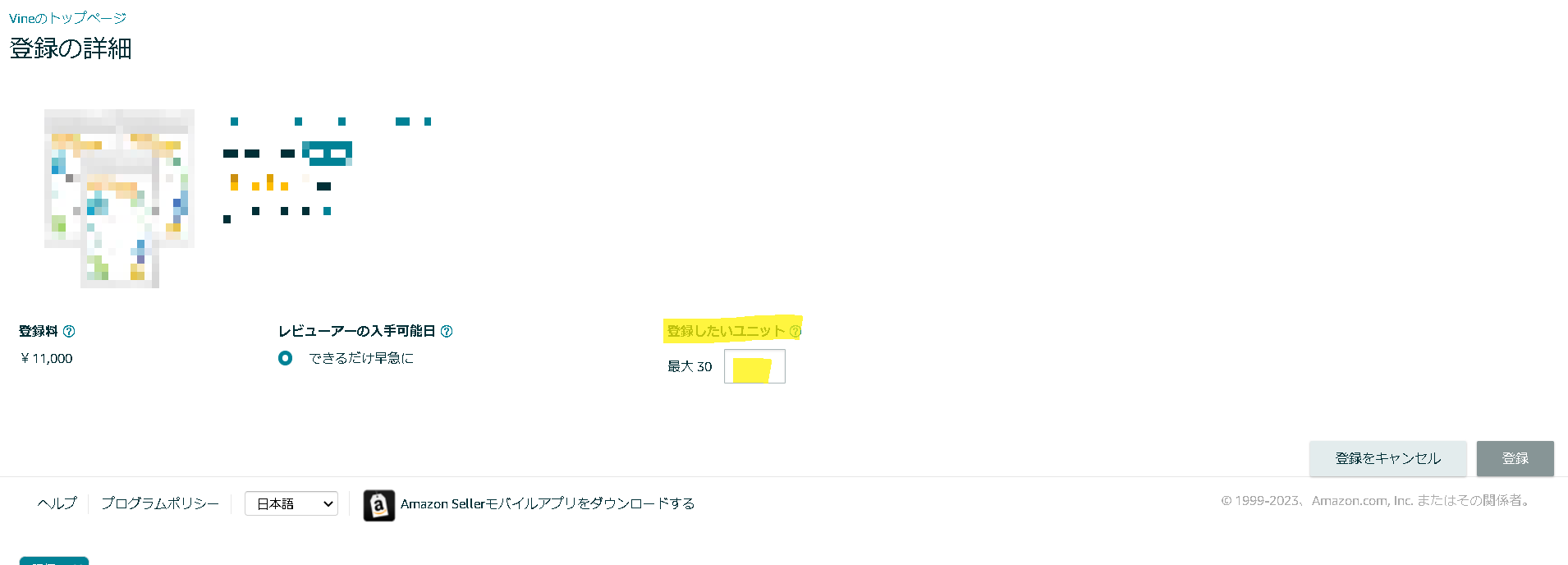
*Since this blog was created during a promotion, the registration fee is shown at half price.
Important Notes on Amazon Vine

There are a few things to keep in mind when registering for Amazon Vine.
If there is one or more units, you cannot re-list variations of the ASIN or other parent ASINs.
Please note that if one or more units were registered during the initial registration, you cannot re-register variations of that ASIN or other parent ASINs.
Don't forget to manage your inventory
When an order is placed, the items will be deducted from inventory just as they were when the order was originally placed.
Before RegisteringSet aside inventory for the Amazon Vine programWe need to verify that it has been done.
You cannot relist under the same ASIN
You may register a product with Amazon Vine only once per parent ASIN.
Therefore, you cannot submit an additional 20 applications after submitting 10.
How to Tell the Difference from "Natural" Reviews
Reviews by Vine members are marked with the phrase “Customer Review by a Vine Early Access Program Member” below the star rating, making them easy to distinguish from organic reviews.
In Closing
While we generally recommend using Amazon Vine, you should consider whether to participate after reviewing its drawbacks and points to keep in mind.
If you have any questions about Amazon Vine or anything else, please feel free to contact us.



アイキャッチnew.jpg)