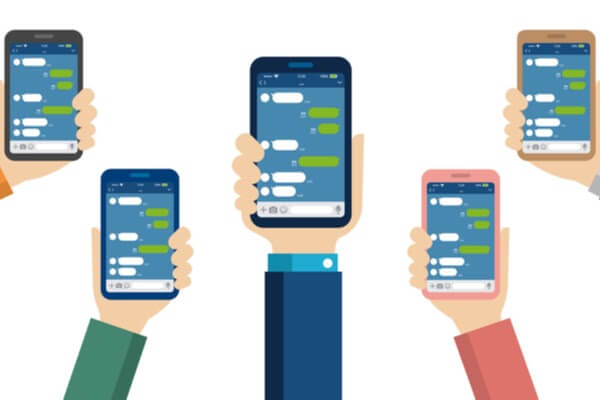
LINE Official Accounts are for businesses that operate stores or websites
This is a tool we really hope you'll try.
In this article, we'll cover everything from how to create an account to how to use a LINE Official Account
I'll explain this in detail.
Please feel free to use this as a reference.
What Is a LINE Official Account?
"LINE Official Account"That is,
On LINE, stores and businesses can send information to users, and
It is a service that enables communication.
By creating touchpoints with users,
This helps attract customers for your business.
What's the difference between a LINE Official Account and LINE@?
Previously,
・LINE@ for individuals and small and medium-sized businesses: No setup fee
・LINE Official Accounts for Large Enterprises: Initial setup fee required & monthly fee of at least 2.5 million yen
There were two types, as mentioned above.
Effective April 18, 2019, “LINE@” was integrated into “LINE Official Accounts,” and
From now on, we will be providing our services through our "LINE Official Account."
After the merger, all initial fees will be waived!
Features that used to be paid are now available for free.
Regarding fees,
We’ll explain this in detail in “3. LINE Official Account Fees.”
Benefits of Using a LINE Official Account
There are three main benefits to using a LINE Official Account:
You can connect with users via LINE

The number of monthly active users of LINE in Japan is a whoppingMore than 84 million people。
The number of users is increasing along with the widespread adoption of smartphones.
By providing information via LINE,
It is possible to reach a large number of users.
LINE Official Accounts work just like LINE itself
Gain friends just by having people scan your QR codeand can,
You can easily connect with users.
Can drive traffic to stores and websites
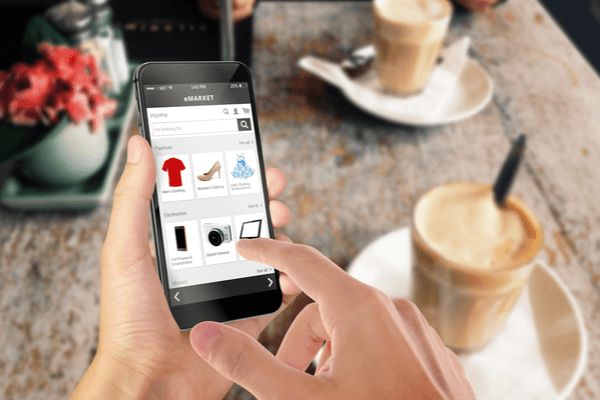
By providing information about products and services via LINE,
Increased traffic to stores and websites...can also be expected.
Some stores have seen their traffic conversion rate to their e-commerce sites increase by 2.8 times compared to email newsletters.
By distributing coupons through our official LINE account,
This will enable us to attract more users.
Can improve the efficiency of ad delivery
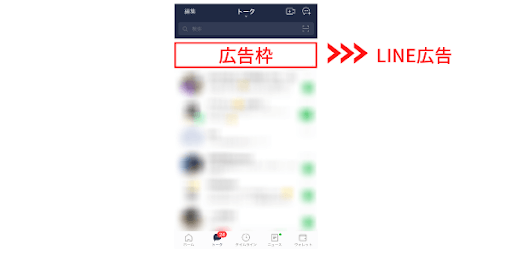
When you link your “LINE Official Account” and “LINE Ads,”
Ad Delivery Using User Data from Official LINE Accountswill be possible.
*What are LINE Ads?*
A service that allows you to deliver ads to LINE users.
The ability to reach customer segments that cannot be reached on other social media platforms,
It also integrates flexibly with official LINE accounts,
One of the strengths of LINE Ads is its ability to run "Add Friends" ads and targeted ads.
(Source:LINE for Business)
LINE Official Account Fees
LINE Official Accounts: 3 Pricing Plans
While LINE Official Accounts can generally be operated for free,
Upgrading to a paid plan will give you access to a wider range of services.
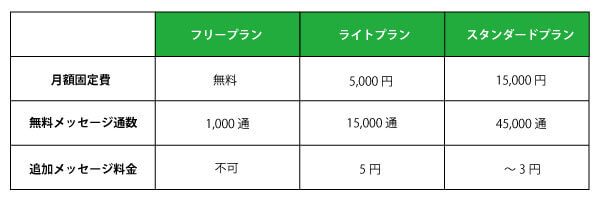
There are three pricing plans for LINE Official Accounts.
For example, if you try to send a message to 500 people using the "Free Plan,"
You can send only two items per person per month.
In this case, if you upgrade to the "Light Plan,"
You will be able to send 30 messages per person per month.
If you're thinking, "I don't know which plan is right for my current situation..."
「Fee Calculator"I recommend this."
「Fee Calculator"In"
Just enter your "number of friends" and "number of monthly posts," and
"Monthly Streams" and "Recommended Plans" will be displayed.
If you're unsure which plan to choose, try running the numbers in the simulator.
"Basic ID" and "Premium ID"
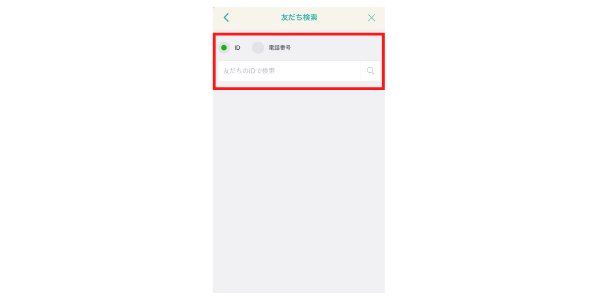
"Basic ID" refers to the ID that is randomly assigned when you open an account.
By upgrading to "Premium ID," you can,
A string representing a user-defined IDyou can obtain, and
It will be easier to search within LINE.
The cost of obtaining a “Premium ID” is100 yen per month。
Payment Methods
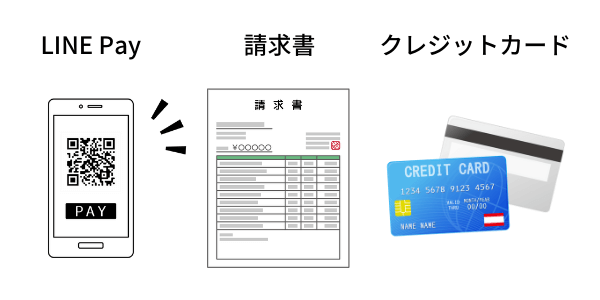
Payment methods are
・LINE Pay
・Invoice
・Credit Card
You can choose from these three options.
For information about payments, see “LINE Official Account Manager"'s
You can check and change this under "Settings" → "Usage and Billing."
Types of Official LINE Accounts
Setting up a LINE Official Account is very easy.
The LINE Official Account features
「Unverified Account" and "Verified Account"..." is available.
I’ll briefly explain each one.
Unverified Account
An "unverified account" is an account that anyone can create without going through a review process.
If you do not want your account name to be searchableは
This is best suited for use with unverified accounts.
Verified Account
"Verified Accounts" require review by LINE.
(The review process takes approximately 10 business days.)
Unlike "unverified accounts,"Account names appear on the search screenTherefore,
For the purpose of sales promotion and attracting customersIf that's the case
We recommend using this account.
With a "Verified Account," you'll have access to the following three features.
①Will be searchable within the LINE app
It will appear in the "Friends" search results within the LINE app.
Once it becomes searchable,Increase opportunities for people to become aware of the accountIn particular
It connects.
②You can download promotional poster files here
You can download official LINE posters for stores.
By putting up posters featuring QR codes,
It is possible to encourage users to add friendsThat's it.
③Invoice payment is available
Operated by Raccoon Co., Ltd.
You can use "Paid," a B2B credit sales and invoice payment service.
(Source:LINE for Business)
How to Create a LINE Official Account
Creating a LINE Official Account is very simple and easy.
①Go to the "Account Setup Page" for the LINE Official Account
[Creating an unverified account isHere[From]
[To create a verified account,Here[From]
②Select "Sign Up with LINE Account" or "Sign Up with Email Address"
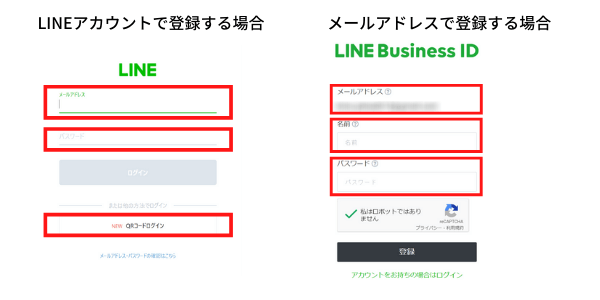
Simply enter the required information, and your account will be created.
How to Log In to a LINE Official Account
①「LINE Official Account Manager"Access"
②Log in with your "LINE Account" or "Business Account"
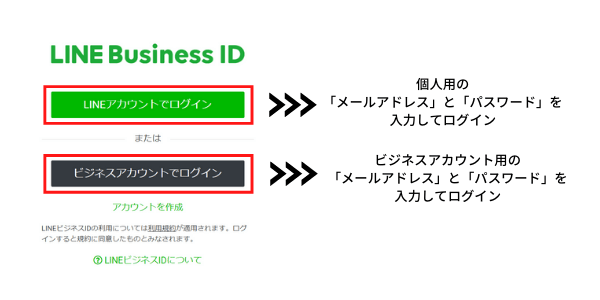
What if I don't know my password?
If you've forgotten your password,
Since verification is not possible, you will need to set it up again.
■For LINE Accounts
① Tap “Home” → “Settings” → “Account” → “Password”
② If you have set a password for your smartphone, enter it.
③ Enter your new password and tap “Confirm”
■For Business Accounts
① Access the admin panel
② Log in with your business account → Click “Reset Password”
If you forget your password, you can follow the steps above to resolve the issue.
How to Use the Official LINE Account
Message Delivery
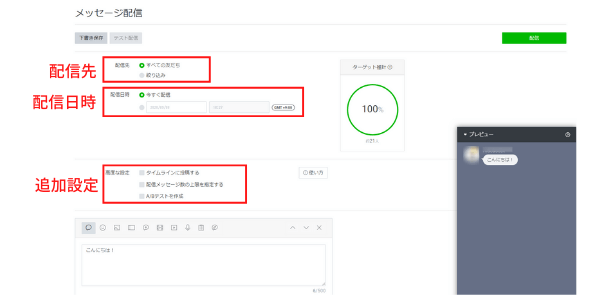
"Message Delivery" is a basic feature of LINE Official Accounts, and
You can share information from the store with your friends who are usersThat's how it is.
Starting with photos and videos,
"A tool that allows you to gather user feedback through polls and surveys"Research" or
"Available for use in stores and on the website"Coupon"etc."
A variety of features are available.
"Tailored to gender, age group, and region,"Segmented Delivery"You can also do that."
You can also configure the following three items.
┏──────────────┓
・TimelinePost to
・Maximum Number of Messages SentSpecify
・A/B TestingCreate
┗──────────────┛
LINE Chat
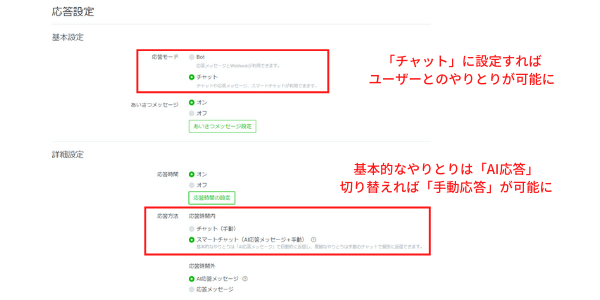
On the official LINE account,
Replying to Messages from UsersYou can do that.
It's convenient that you can use it anytime, anywhere.
Response methods include “AI Response" and "Manual Response"There are two types: ."
Let's go through them one by one.
AI Response
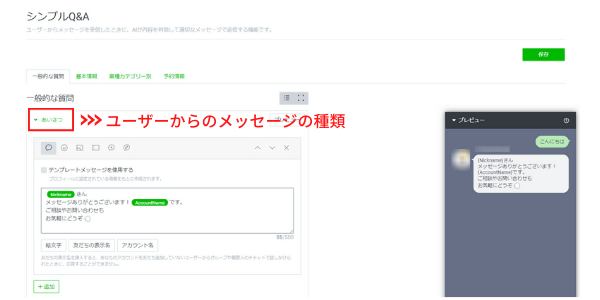
For specific phrasesIt sends replies generated by AIThat's how it is.
Starting with "greetings" such as "Hello"
"Thank you" and other expressions of gratitude, etc.
We can tailor our responses to the situation.
While there is the advantage of being able to reply right away,
There is also the drawback that we cannot always provide replies that fully meet users' expectations.
Manual Response
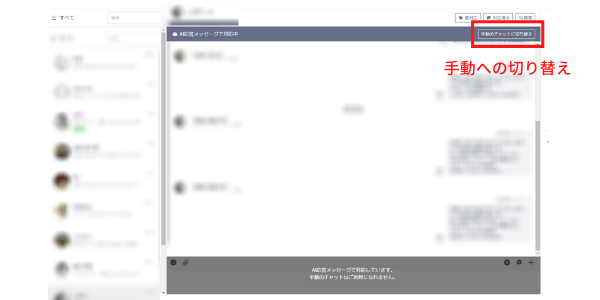
When you click “Switch to Manual Chat” in the chat,
Switch from AI Responses to Manual ResponsesYou can.
When you want to send a personalized reply,
We recommend switching to "Manual Response."
Timeline Post
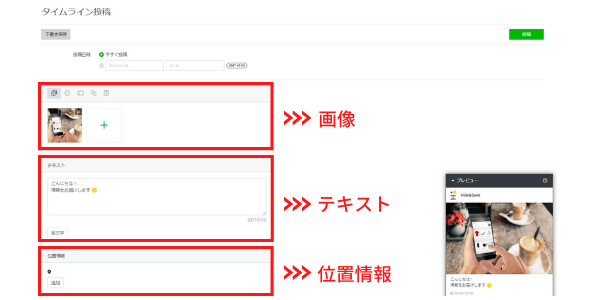
"Timeline Posts" are
Post information to the timelines of users you've added as friends...that can be done.
Since hashtag searches are visible to users other than your friends,
Reaching a Wider Audience Than Just Message Delivery...can be expected.
Rich Menu
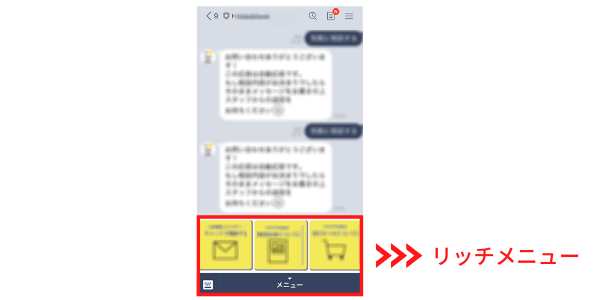
The "Rich Menu" appears when a user visits the chat screen
The menu displayed at the bottom of the screenThat's what it means.
Takes up a large portion of the screenTherefore,
Whether or not we can drive traffic to stores or websites is
Even if you say it all comes down to the rich menu...That's no exaggeration.
What You Can Do with the Rich Menu and How to Set It Up
Please click here for more details.
Store Card
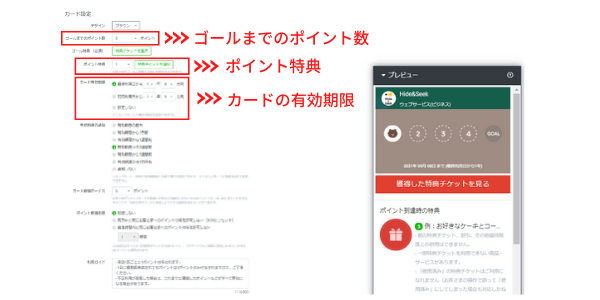
In "Shop Card,"
Loyalty cards on LINEPrepared and PublishedYes, you can.
Since it is managed online,
Loss of repeat business due to users losing their loyalty cards
It can be prevented.
The number of points needed to reach the goal, point rewards, and expiration dates
You can configure a variety of settings.
Coupons, Raffle Features
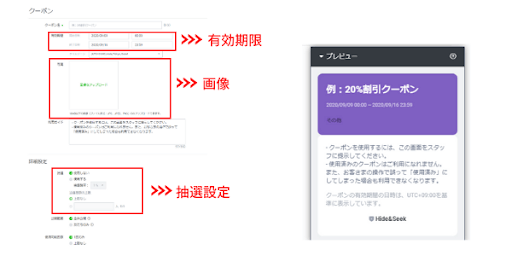
With this feature,Create coupons and sweepstakes that can be used in-storeYou can do that.
You can check the number of coupons used in the admin panel.
By distributing coupons and holding raffles,To encourage store visitsIt connects.
What are the first settings I should configure?
Set a Profile Picture
Your profile picture is an important part of your account.
By adding a name or a logo,
Let's make it something that can be decided instantly.
Set a Greeting Message
This is the message sent to users when they register an account.
Your greeting message sets the first impression of your account.
Express your gratitude for their registration and provide users with their account details.
Post to the Timeline
When users register for an account,
To see what kind of content they're sharing
Let's look at the timeline.
When I checked my timeline,
If nothing has been posted,
It may also be determined that the account isn't posting enough content.
Before asking someone to add you as a friend
I recommend posting something on your timeline.
Register a Rich Menu
By registering a rich menu,
It is possible to increase the amount of information provided to users.
If you issue coupons and loyalty cards together,
It also helps prevent user churn.
Summary
In this post, we focused on explaining how to create a LINE Official Account.
Setting it up is very easy, so please follow along with this article!
There are five main features available on LINE Official Accounts:
————————————–
・Message Delivery
・Timeline posts
・Rich Menu
・Store Card
・Coupons, raffle features
————————————–
By utilizing the official LINE account,
Attract customers to stores and websites, and
Let's get more people to learn about our products and services!
"I'd like to learn more about LINE Official Accounts"
If this sounds like something you're interested in, please feel free to contact us using the contact form below.