If you've come to this page,
"What is Pinterest?"
"I want to know how to use Pinterest..."
I bet a lot of people are thinking that, aren't they?
In this post, we'll cover the basics of Pinterest, as well as
We'll explain how to use it in detail!
What is Pinterest?
Overview of Pinterest
Pinterest is,
In a nutshell, it's a tool for "bookmarking images."
You can post on your own, but
Basically, saving images is the main way to use it.
By saving the images,
So that you can discover a variety of ideas.
Since the images displayed vary depending on the person and the time of day,
Another feature of Pinterest is that it helps you broaden your range of ideas.
Since the posted images contain links,
You can use it not only to save images but also to save the entire website.
As I'll explain later, for each genre you want to collect...
Since you can save "boards" separately,
You can collect only the things you like.
In today's world, where social media fatigue is becoming a serious issue,
You can collect only the things you like
Pinterest is likely to attract even more attention.
Use Pinterest for the Future
People often think of Pinterest as just another social media platform,
Contrary to what some people think, Pinterest is not a social media platform.
Instagram, one of the social media platforms, is,
It's a way to share posts with your friends and followers.
However, I use Pinterest for my future self.
The image below shows the timing of social media use over time.
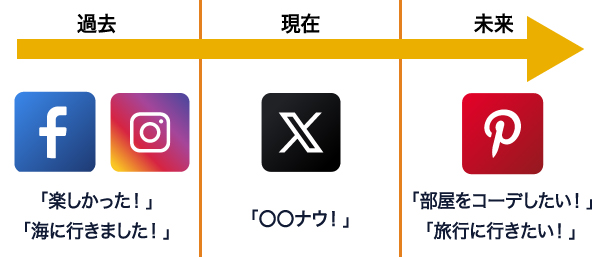
Mainly on Facebook and Instagram,
I post about past events, saying things like, “That was fun!” and “That was delicious!”
What's happening or what you're thinking about "right now"
Twitter is all about posting in real time.
Pinterest is great when you feel like cooking—
When you're thinking about renovating a room, for example,
This is used when collecting stock images.
I also often use it when I want to come up with new ideas.
Bookmark this for future use
Saving it will make it easier to refer back to later.
>> How to Manage an Instagram Business Account
We explain this in detail here.
If you're interested, please click here to learn more.
When is it most effective to use this?
As I mentioned earlier, Pinterest is
"When you want to come up with ideas" or
"When you want to imagine your future"
You might want to use it.
Also, on Pinterest, the images you've saved and
Related images will now be displayed based on your search history.
Looking at the images we've collected
”Things I just sort of liked” were
Sometimes it becomes clear why you liked it.
I want to know what I like! I want to get to know myself better!
If you're thinking that, you can use Pinterest to
You might discover a new side of yourself.
Also, since you can add links to images,
To help bloggers increase traffic to their blogs
I also often see examples of people using Pinterest.
By posting an image with a blog link on Pinterest,
Since it also serves as one of the "backlinks" necessary for achieving a high ranking in SEO,
I recommend that bloggers make use of Pinterest.
>> If you'd like to learn more about backlinks,
Please take a look at this article.
Pinterest(Pinterest)Basic Usage
Here are some things you should know about using Pinterest
I'll explain the basics.
Pin
A "pin" is an image from a website outside of Pinterest that
It means bookmarking it on your board.
Pin the image and save it to the board, and
I'll keep adding bookmarks.
If you install a dedicated plugin on your website,
From the website to Pinterest, as shown in the image below
You can also easily save images.
In addition, visitors can use the extension themselves to,
A button to save images to Pinterest
You can also display it.
Since images you create yourself will also be saved to the board,
It will be a pin.
Since you can post the same URL multiple times as long as you change the image,
When posting on my own, what kind of images result in a high click-through rate?
It's also important to test things.
Also, by repeating the pin, your own pin will
It may increase the likelihood of appearing in other users' feeds, or
This increases the likelihood of being pinned (or repinned) by other users.
Lipin
A "pin" is something found on Pinterest
Images (those pinned by other users)
Save it to your board.
Since pinned items are saved to the board,
The way you handle the pin remains the same.
When you repin a post, the original poster receives a notification, and
There's a chance that people will visit your page.
So, after performing the pin and re-pin operations,
Accumulating images on the board is
The Basics of Pinterest.
Board
Items you've pinned or repinned
A "board" is a place where you can organize and store items by type.
Give it a name and save the pin.
Let's make sure to give the board a name that's easy to understand.
In addition to regular boards, the selection includes
There are three types of boards.
- "Group Board": A board you can share with other Pinners (users)
- "Secret Board": A board that is not made public and can only be viewed by specific people, such as invitees.
- "Subboard": A board used to organize the contents of a board into even smaller sections
Use them appropriately depending on the situation.
How to Find Ideas on Pinterest
Next, let's look at how to find posts on Pinterest.
I'll explain this in more detail.
Home Feed
The Home Feed appears when you open the app
This is the first screen that appears.
Based on users' interests and preferences
Something that displays images
Basically, from the “Recommended for You” section
You can see it.
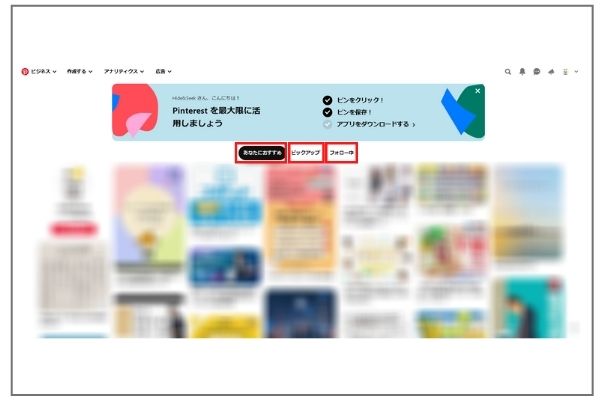
From items saved to your board or search terms
Because it learns from users' interests
The more you use Pinterest, the more your home feed will,
It will gradually fill up with things that interest you more.
To the right of "Recommended for You"
"Pickup" is updated daily, and
This is where you'll find the latest, most relevant ideas.
Also, in the "Following" column to the right,
Users I follow
Images you've saved to your favorite board, or
Only the most recent saved pins will be displayed.
By using these appropriately,
Let's go find some new pins.
Search Screen
On Pinterest, using text search...
You can also find images.
Even with the same search terms,
Depending on who performed the search and when
The image that appears changes
That's what makes Pinterest so interesting.
Also, Pinterest,
Only the characters contained in search keywords or posts
It does not mean that they are associated.
The person who pinned it asked, "What's the name of this board?"
It also depends on whether you saved it.
Therefore, even if a post doesn't contain any search terms,
One of its characteristics is that it may sometimes be displayed.
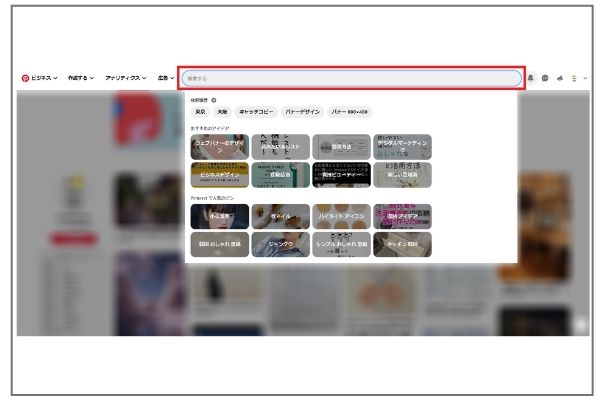
Also, as shown in the image above, below the search bar
It recommends things that users might be interested in, or
It might show popular pins on Pinterest, or
It's designed to help you come up with a wider range of ideas.
Related Pins
When you click on a pin that catches your eye,
Similar or related pins will appear below that.
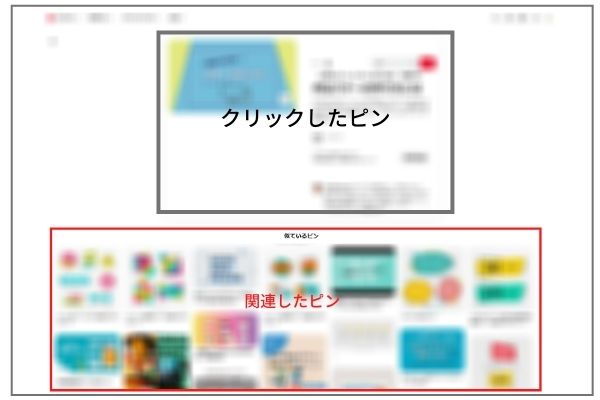
Here, we not only broaden the scope of our ideas, but also,
You can explore topics that interest you more deeply by looking at similar ones.
Follow
Pinterest also has a "Follow" feature
Accounts whose hobbies and interests are similar to your own
You can also follow us.
Also, on a per-account basis
Not only can you follow them, but
You can also follow just the board.
For example, if you only want to follow that board, etc.
Available.
Focusing only on the things that interest you
Here's how to collect images.
Summary
This time, we'll be talking about Pinterest
I explained it in detail.
People who use Pinterest
Although it's still small, we're working to raise awareness of the site,
Some people use it to drive traffic to their blogs
It will likely increase.
Hide&Seek, the author of this blog, is,
We provide social media management, e-commerce platform management, and advertising management services.
For inquiries, please contact us at
Please contact us using the contact form below.