
GA4 (Google Analytics 4) was launched in October 2020. For those who were using the previous version, UA (Universal Analytics), the UI of the admin interface has changed so much that many of you were probably confused.
So in this post, I’ll explain why GA4 and UA ended up with such different specifications, as well as the specific differences in what you can and cannot do now.
Are GA4 and UA (the old version) completely different tools?
The sidebars in GA4 and UA are different, aren't they? The biggest change is in the reports section.
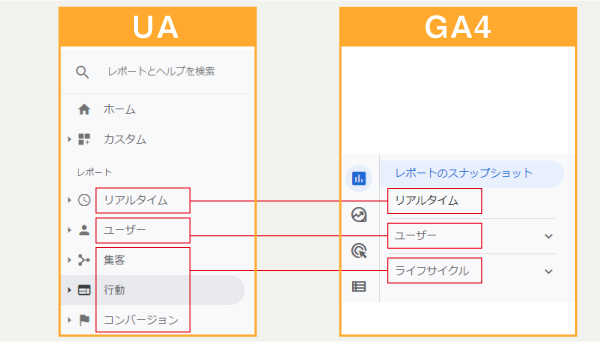
While the UA report consisted of only five sections—Real-Time, Users, Acquisition, Behavior, and Conversions—in GA4, an icon has been added to the far left, and the sections have changed to Report Snapshot, Real-Time, Users, and Lifecycle.
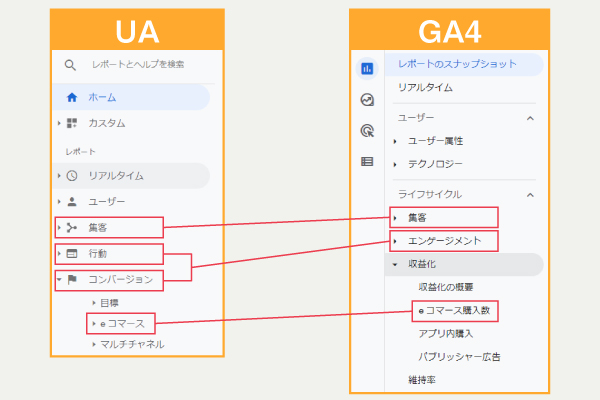
Furthermore, when viewed in the context of the customer lifecycle, “Acquisition” refers to customer acquisition, “Action and Conversion” refers to engagement, and new categories—“Monetization” and “Retention”—have been added. (Some conversion metrics are included under “Monetization.”)
That said, the way the reports are displayed has changed, so I imagine many of you are wondering where to look and how to interpret them.
The reason we've completely revamped the UI to this extent is that...GA4 and UA have become completely separate tools with different purposes.That's why.
I’ll explain why things have changed so much, along with the background behind the development of UA and GA4.
UA is a tool for optimizing search-based ads
To begin with, it's Analytics prior to GA4UA Optimizes Google's Search AdsDid you know that it was a tool designed for that purpose?
Search-based advertising (often referred to as “listing ads”) was once the mainstream approach in the online advertising industry, as it made it easy to target potential customers and offered a high return on investment.
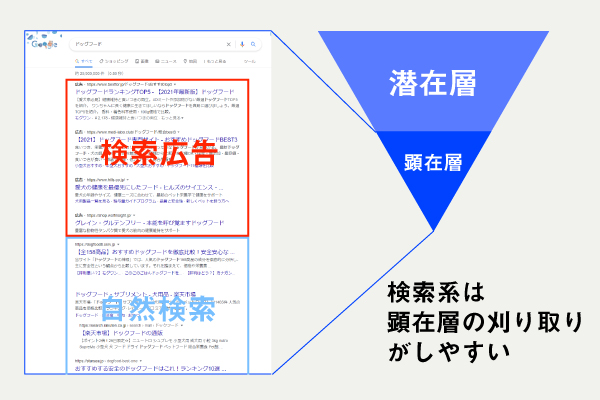
(Since SEO is also aimed at the conscious market segment, it’s fair to say that UA optimizes all search-related aspects.)
To help users make more effective use of search-based advertising—which is Google’s core business and accounts for the majority of its revenue—Google released UA, a “tool designed to analyze the visible user base,” and has been refining it ever since.
Of course, search-based advertising remains a mainstream medium today. However, its effectiveness has plateaued recently due to an increase in advertisers, the limited number of ad placements, and the fact that search volume has an upper limit.
GA4 is a tool for optimizing awareness and branding campaigns
So, to boost sales, Google...Display Ads That Excel at Awareness and Branding InitiativesWe will begin focusing on [...].

Since display ads expand their reach every time new content—such as YouTube videos or SEO articles—is added, they are the perfect medium for increasing your advertising budget.
However, awareness and branding initiatives—such as display ads—make it difficult to gauge their cost-effectiveness, making them less accessible to small and medium-sized businesses compared to advertising focused on acquiring new customers, where the return on investment is clearer.
That’s because, these days, there are more opportunities to learn about products through various channels—such as YouTube, Instagram, and display ads—and users’ paths to purchase have become much more diverse, as they research products across various apps and websites before making a purchase.
<ユーザーの経路例>
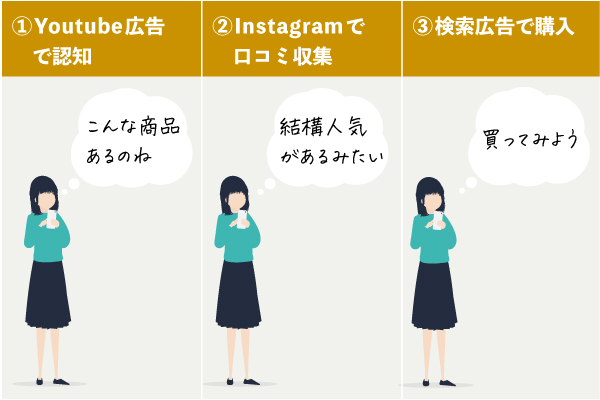
In addition, since awareness and branding ads are not designed to acquire new customers, most users end up leaving to visit other apps or websites.
However,At UA,If you switch between different devices, apps, or websites, the system will recognize it as a separate user session.As a result, we are unable to collect detailed user information.
That’s why, even when we run awareness and branding ads, we can’t tell if they’re actually bringing in new customers, which makes it hard to take the plunge.
Furthermore, due to the iTP issue, the retention period for cookies has been reduced, making it impossible to collect even more accurate data—a problem that has rendered the system unsuitable for today’s environment.
Therefore, Google needed to improve Google Analytics to keep up with the times and encourage greater use of display ads.
For those of us who use Analytics, it would be really helpful to be able to see the entire flow of how users behave when they visit our app or website, wouldn't it?
Given these circumstances,Google has revamped its tools with GA4 to enable users to analyze how customers make purchases and return for repeat purchases across various devices, websites, and apps—in other words, the “lifecycle of a single user.”
Key Analytical Concepts in GA4 and UA
Since GA4 allows you to analyze a single user's lifecycle, you can determine which user acquisition channels result in higher LTV.
There are no concepts such as the "latent layer" or the "manifest layer" here.GA4 can identify users with high LTV among the entire user base.
In contrast, at UA, we conduct analyses—primarily aimed at capturing the ready-to-buy audience—to determine which keywords can drive higher conversion rates.
The figure below illustrates this.
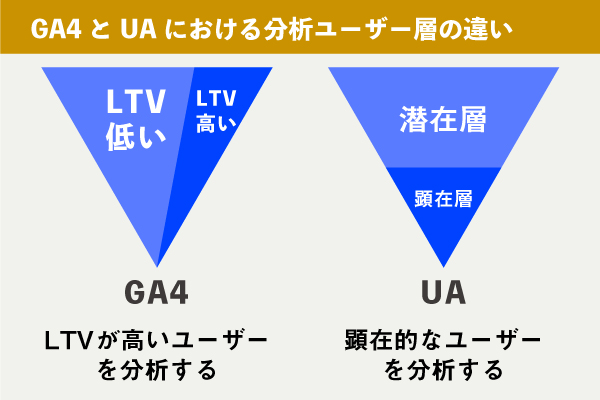
So, in other words, GA4 provides a vertical analysis of user segments, while UA provides a horizontal analysis of user segments.
GA4 and UA use different methods for measuring data
Furthermore, in order to conduct a life cycle analysis that is in line with today’s standards, it was necessary to make significant changes to the way data is measured.
Originally, the old version of UA showed “how many sessions, bounce rates, and purchases there were per page,”Page-Based MeasurementThat's it.
In contrast, GA4 tracks “which events (such as page views, scrolling, and purchases) users triggered on which devices, websites, or apps,”User-Based MeasurementIt has become.
Since the measurement method is no longer page-based, metrics like bounce rate and exit rate—which were important indicators in UA—are no longer available by default in GA4.
It's just that it's no longer the default setting, but you can still view it if you configure it manually.
How should I decide when to use GA4 and UA?
Actually,You can use both GA4 and UA at the same time.. So, how should we distinguish between the two?
UA has its own strengths, and GA4 has its own. It’s probably best to use them appropriately, taking their respective strengths into account.
GA4 is used to increase LTV
GA4’s strength lies in its ability to identify users who are a good fit for your company—regardless of whether they are active or latent—analyze everything from brand awareness to repeat purchases, and even apply machine learning.
Since users can be tracked as the same individual across different devices, websites, and apps, it’s possible to conclude, for example, “While the CPA for this media channel is higher when viewed in isolation, most of the people who saw this ad were converted through search ads and retargeting, so the overall CPA works out—we should keep running this ad,” and so on.It will make it easier to select advertising media。
Furthermore, once you set up e-commerce tracking, machine learning can predict which users will make a purchase or abandon their cart within seven days, allowing you to create audience lists and use them to optimize your ad campaigns.
UA is used to harvest the surface layer.
UA's strength lies in its ability to capture users in the visible layer.
Since it integrates with Search Console, you can quickly identify keywords with high conversion rates and see which landing pages generate the most purchases.
Since many people are already familiar with UA when analyzing surface layers and landing pages like these, it’s best to just use UA as is.
So far, we’ve explained how to use GA4 and UA together, but there may still be some companies that haven’t quite decided to switch to GA4 yet.
However, considering that improvements to GA4 to support iTP are underway,From now on, GA4 will likely provide increasingly accurate data.
Also, since UA support may be discontinued in the future, rendering it unusable, we recommend implementing it now and starting to collect data.
Other things you “can no longer do” in GA4
Due to significant changes in GA4’s specifications, there are several things that were possible in UA but are no longer possible in GA4. Here, we’ll highlight three of the most impactful changes that are no longer available.
Aggregation by View
In UA, the account structure was Account > Property > View, but in GA4, it is now Account > Property, andThe concept of a "view" no longer exists.。
In other words, while filtering by view is no longer possible, a data stream has been added instead, and you can configure various settings using the data stream.
As a note, a feature has been added that allows you to configure internal access and crawler exclusions by default, so please use that setting.
Integration with Google Search Console
We were able to integrate with Google Search Console in UA, but for nowIntegration is not available in GA4。
Therefore, when selecting keywords for SEO, be sure to use UA.
AMP (Accelerated Mobile Pages) Measurement
AMP enables mobile pages to load quickly, butGA4 does not yet support AMP.. In other words, we can't track AMP pages.
While it may be supported in the future, if you want to track sites with AMP pages right now, you should use UA.
How to Learn GA4
It’s been a year since GA4 was released, and there are now quite a few articles on the topic. However, many beginners to Analytics probably aren’t sure what they need to know to be able to analyze data effectively, are they?
So, I’d like to introduce a product released by Impress Corporation in September 2021:"A Book That Teaches the Basics of Google Analytics 4 in One Week"That's it.

*Clicking on the image will take you to the product page on Amazon.
This course covers a wide range of topics—from the basics of GA4 to setup procedures, from generating simple reports to configuring custom events—all in just seven days.
If you'd like to learn more about GA4, please be sure to read this.